|

-
Dec 17th, 2009, 01:49 PM
#1
Thread Starter
Fanatic Member

PivotChart Axis fail
Hey there everyone,
I'm trying to make a pivotchart to display a summary of data from some of our plants. The problem I have is when I filter a field, one gridline goes way up to the top (beyond the top of the chart area). It's weird, and I can't figure out why it happens. It always seems to be with the same axis as well. Any ideas?
the only thing I can think of is that there's some data somewhere that's not in the filtered range that causes it to display like that, but it only does it on with some locations, not all.
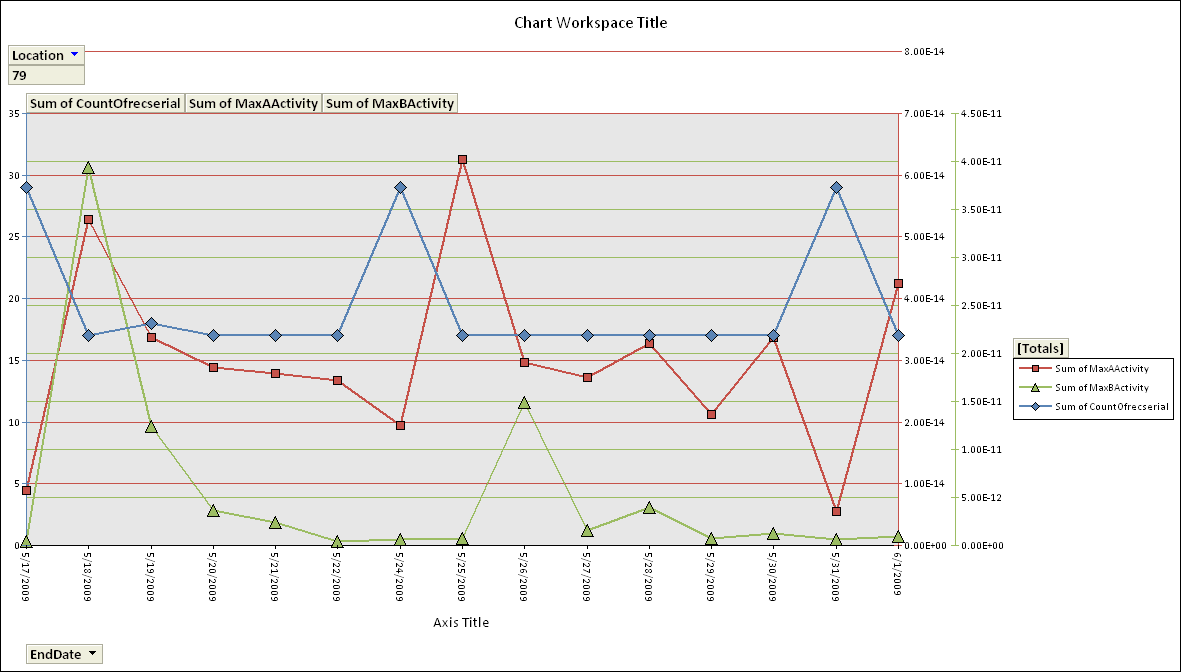
EDIT: Not sure what significance this has yet, but the only values that appear over the top like that are 2E-13 and 8E-14. Various totals don't do this.
Last edited by drag0n_45; Dec 17th, 2009 at 01:53 PM.
-
Dec 21st, 2009, 08:49 PM
#2
Fanatic Member

Re: PivotChart Axis fail
Can you make the numbers more reasonable? You know how much you look at census data they don't show 42,000,000 they will show it as 42 stating that the number represents millions. That would be a step in making this easier to read. But lets move on to the issue. 
It sounds like the Pivotchart cannot scale to where it needs too, do you have max values set for the axis?
-
Dec 28th, 2009, 10:50 AM
#3
Thread Starter
Fanatic Member
Re: PivotChart Axis fail
I could make the numbers more reasonable, but that would make them inaccurate. The numbers can vary by multiple decades, and are variable based on which plant I select (the filter field). That's why I used scientific notation.
Both the max and min values are set to automatic.
-
Jan 15th, 2010, 09:52 AM
#4
Thread Starter
Fanatic Member
Re: PivotChart Axis fail
I hate to be a bumper, but this is kind of an important issue - does anyone have any ideas? :/
-
Jan 15th, 2010, 10:29 AM
#5
Re: PivotChart Axis fail
Upload your workbook... Will check it out this weekend.
A good exercise for the Heart is to bend down and help another up...
Please Mark your Thread " Resolved", if the query is solved
MyGear: Resolved", if the query is solved
MyGear:
★ CPU ★ Ryzen 5 5800X
★ GPU ★ NVIDIA GeForce RTX 3080 TI Founder Edition
★ RAM ★ G. Skill Trident Z RGB 32GB 3600MHz
★ MB ★ ASUS TUF GAMING X570 (WI-FI) ATX Gaming
★ Storage ★ SSD SB-ROCKET-1TB + SEAGATE 2TB Barracuda IHD
★ Cooling ★ NOCTUA NH-D15 CHROMAX BLACK 140mm + 10 of Noctua NF-F12 PWM
★ PSU ★ ANTEC HCG-1000-EXTREME 1000 Watt 80 Plus Gold Fully Modular PSU
★ Case ★ LIAN LI PC-O11 DYNAMIC XL ROG (BLACK) (G99.O11DXL-X)
★ Monitor ★ LG Ultragear 27" 240Hz Gaming Monitor
★ Keyboard ★ TVS Electronics Gold Keyboard
★ Mouse ★ Logitech G502 Hero
-
Jan 15th, 2010, 10:38 AM
#6
Thread Starter
Fanatic Member
Re: PivotChart Axis fail
It's got linked tables. Your queries won't work. The workbook is about 26M in size also, and is being used as a temporary solution until I can hit up SQL. I'm not sure show to freeze a workbook (if it's even possible), so that the data there is whats used and the source isn't accessed in the linked tables.
 Posting Permissions
- You may not post new threads
- You may not post replies
- You may not post attachments
- You may not edit your posts
-
Forum Rules
|
Click Here to Expand Forum to Full Width
|



 Reply With Quote
