|

-
Feb 17th, 2009, 03:08 PM
#1
Thread Starter
New Member

 [RESOLVED] How to ignore WebBrowser script errors ? [RESOLVED] How to ignore WebBrowser script errors ?
Hi,
I'm try Webbrowser1.silent = True but not working 
How do i ignore errors ?
Thanks, Hasan
-
Feb 17th, 2009, 03:29 PM
#2
Re: How to ignore WebBrowser script errors ?
Fixing the errors are even better than fighting against those popup messageboxes.
-
Feb 17th, 2009, 04:32 PM
#3
Re: How to ignore WebBrowser script errors ?
Have a look at this and this if it helps.
-
Feb 18th, 2009, 08:15 PM
#4
Thread Starter
New Member
Re: How to ignore WebBrowser script errors ?
Hi again, it didn't fix the problem, how to ignore this errors with VB ?
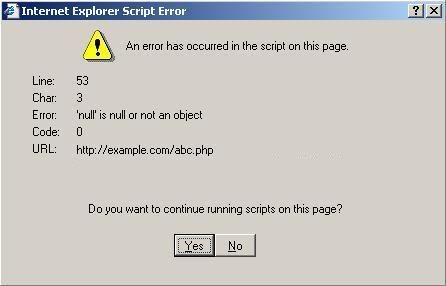
I need help, thanks.
Hasan
-
Feb 18th, 2009, 08:53 PM
#5
Re: How to ignore WebBrowser script errors ?
Remove or fix the errorenous javascript content on your page, that is causing the javascript error window to be shown.
Alternatively, you can try to set the following property, before loading a webpage.
Code:
WebBrowser1.Silent = True
-
Feb 18th, 2009, 09:36 PM
#6
Thread Starter
New Member
Re: How to ignore WebBrowser script errors ?
 Originally Posted by getElementByID
Hi,
I'm try Webbrowser1.silent = True but not working
How do i ignore errors ?
Thanks, Hasan
Thanks.
-
Feb 18th, 2009, 10:19 PM
#7
Fanatic Member

Re: How to ignore WebBrowser script errors ?
that weird WebBrowser1.Silent = True should work
Live life to the fullest!!
-
Feb 18th, 2009, 10:29 PM
#8
Re: How to ignore WebBrowser script errors ?
Originally Posted by Karl J. Sak at planetsourcecode.com
You see every time a webbrowser control is run, it automatically sets webbrowser.silent=false. Setting it to true during development doesn't work. What you need to do is run a seperate control. I used a timer control in the form load event, to set the .silent property to true. I then set the timer.enabled=false. The silent property is now set and you won't have to worry about script messages again. So far every web site with popups has been blocked and no script errors. In the source example I also included a way to control popups using the ctrl key.
http://www.planet-source-code.com/vb...43907&lngWId=1
-
Feb 19th, 2009, 12:25 AM
#9
Thread Starter
New Member
Re: How to ignore WebBrowser script errors ?
I moved Webbrowser1.Silent = True code in Timer source and set interval to 5. Worked fine really 
Thanks all for help!
Hasan
-
Aug 31st, 2015, 02:09 PM
#10
New Member
Re: [RESOLVED] How to ignore WebBrowser script errors ?
I may be a bit late for this (I know I am.) But for future people;
Visual Basic 2010 needs the command:
Code:
WebBrowser1.ScriptErrorsSuppressed() = True
To be set in place for error messages to stop. I put it in at Form1_Load
-
Aug 31st, 2015, 02:10 PM
#11
New Member
Re: [RESOLVED] How to ignore WebBrowser script errors ?
I may be a bit late for this (I know I am.) But for future people;
Visual Basic 2010 needs the command:
Code:
WebBrowser1.ScriptErrorsSuppressed() = True
To be set in place for error messages to stop. I put it in at Form1_Load
-
Dec 21st, 2016, 07:04 PM
#12
Junior Member

 Re: [RESOLVED] How to ignore WebBrowser script errors ? ก้้้้้้้้้้้้้้้้้้้้ Re: [RESOLVED] How to ignore WebBrowser script errors ? ก้้้้้้้้้้้้้้้้้้้้
Originally Posted by getElementByID

Hi,
I'm try Webbrowser1.silent = True but not working
How do i ignore errors ?
Thanks, Hasan
Very Easy Fix - ก้้้้้้้้้้้้้้้้้้้้
Code:
Private Sub mWB_BeforeNavigate2(ByVal pDisp As Object, URL As Variant, Flags As Variant, TargetFrameName As Variant, PostData As Variant, Headers As Variant, Cancel As Boolean)
mWB.Silent = True
End Sub
 Posting Permissions
- You may not post new threads
- You may not post replies
- You may not post attachments
- You may not edit your posts
-
Forum Rules
|
Click Here to Expand Forum to Full Width
|



 Reply With Quote


 ™
™