|

-
Jan 8th, 2009, 04:19 AM
#1
Thread Starter
Addicted Member

 SQL Query (Amendments Logic) SQL Query (Amendments Logic)
Hi Guys,
Anyone here knows how to create a query that will produce something like the tables below.
I have an Item A that costs 10 but in a few days the Item A was changed to 15. I need to know how much I need to add as an additional fee or if there's a need for reimbursement.
Code:
[U]Date[U]    TypeOfWork    UnitPrice  AccountsPayable
1/10/2009     Item A                     10                     10
1/11/2009     Item A                     15                     5
But what if the same Item was changed again for the third time.
Code:
[U]Date[U]    TypeOfWork    UnitPrice  AccountsPayable
1/10/2008     Item A                     10                    10
1/11/2008     Item A                     15                    5
1/20/2008     Item A                     13                    -2
I need to show everything in the query to determine how many times Item A changed in price. Negative values under AccountsPayable are the amounts subjected for reimbursement and the positive values are those I need to pay as an additional fee.
If I am going to code it in excel the formula is something like this;
Code:
[Col4, Row1] =[Col3,Row1]
[Col4, Row2] =[Col3,Row2]-[Col3,Row1]
[Col4, Row3] =[Col3,Row3]-[Col3,Row2]
-
Jan 8th, 2009, 06:28 AM
#2
Re: SQL Query (Amendments Logic)
Based on SQL Server 2005.
I have created a table using your example above. I have also created a PK (counter) field to help with working out the previous entry.
SQL for table below
Code:
CREATE TABLE [dbo].[tblCosts](
	[pk] [int] IDENTITY(1,1) NOT NULL,
	[Date] [datetime] NULL,
	[TypeOfWork] [varchar](50) COLLATE SQL_Latin1_General_CP1_CI_AS NULL,
	[UnitPrice] [money] NULL,
	[AccountPayable] [int] NULL,
	[Difference] [int] NULL,
 CONSTRAINT [PK_tblCosts] PRIMARY KEY CLUSTERED
(
	[pk] ASC
) ON [PRIMARY]
) ON [PRIMARY]
Data stored within the created table
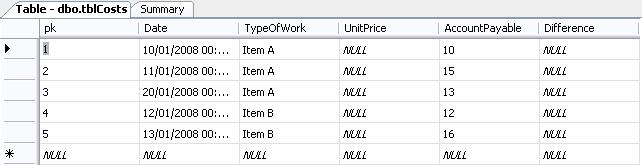
SQL to select what your after
Code:
SELECT t.[Date],
	t.TypeOfWork,
	t.UnitPrice,
	t.AccountPayable,
	ISNULL(t.AccountPayable - (SELECT t2.AccountPayable
					FROM dbo.tblCosts t2
					WHERE t2.pk = (t.pk - 1)
					AND t2.TypeOfWork = t.TypeOfWork), t.AccountPayable) AS 'Diff'
FROM dbo.tblCosts t
Results of that SELECT Statement
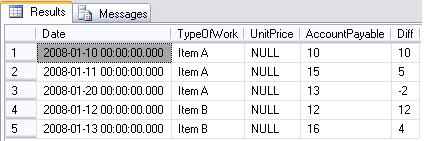
Last edited by kevchadders; Jan 8th, 2009 at 06:56 AM.
-
Jan 8th, 2009, 07:52 AM
#3
Re: SQL Query (Amendments Logic)
Cool... just as a side note however, the Difference column isn't necessary.... unless you want to store the result. The only problem I can see with storing it though, is knowing if it needs to be updated. But it'll work just fine w/o the field in the table in the first place.
-tg
-
Jan 8th, 2009, 08:27 AM
#4
Re: SQL Query (Amendments Logic)
Yeah i put that in the table but realised i didnt need it when it came to the select. Like you mentioned it might be useful it you want to store it. 
 Posting Permissions
- You may not post new threads
- You may not post replies
- You may not post attachments
- You may not edit your posts
-
Forum Rules
|
Click Here to Expand Forum to Full Width
|



 Reply With Quote
