|

-
Dec 27th, 2008, 03:01 PM
#1
Thread Starter
Junior Member

Need help pls 'fraction division in VB 2005
Hello,,,,,,,,,,,,,,,
Would some1 please help me to let the below code work for proper fractions( positive numbers less than 1)
Private Sub Button1_Click(ByVal sender As System.Object, ByVal e As System.EventArgs) Handles Button1.Click
Dim D1, D2 As Integer
D1 = CInt(TextBox1.Text)
D2 = CInt(TextBox2.Text)
TextBox3.Text = D2 / D1
End Sub
End Class
If I put 0.1 in textbox2 and 0.3 in textbox1 the results in textbox3 is NaN ??!!!
Cheers
-
Dec 27th, 2008, 03:15 PM
#2
Re: Need help pls 'fraction division in VB 2005
That's because you are converting to Integer before division. You should use SINGLE, DOUBLE or DECIMAL datatype to handle decimal points.
vb.net Code:
Private Sub Button1_Click(ByVal sender As System.Object, ByVal e As System.EventArgs) Handles Button1.Click Dim D1, D2 As Double D1 = CDbl(TextBox1.Text) D2 = CDbl(TextBox2.Text) TextBox3.Text = D2 / D1 End Sub End Class
-
Dec 27th, 2008, 04:40 PM
#3
Thread Starter
Junior Member
 Re: Need help pls 'fraction division in VB 2005 Re: Need help pls 'fraction division in VB 2005
Loads of cheers Pradeep1210. It's really working now. I just unable to find the way to rate the answer u posted, otherwise it is 10/10.
many thanks.
-
Dec 27th, 2008, 07:35 PM
#4
Frenzied Member
Re: Need help pls 'fraction division in VB 2005
Click this button:

-
Dec 27th, 2008, 07:45 PM
#5
Thread Starter
Junior Member
Re: Need help pls 'fraction division in VB 2005
Gents,
Since I'm working with the same problems above, would someone please guide me through my code below, since I got an error to process it!!
Private Sub Button1_Click(ByVal sender As System.Object, ByVal e As System.EventArgs) Handles Button1.Click
Dim v As Double ' fluid velocity
Dim Qv as integer = textbox1.text ' volumertric flow rate
Dim D2 as integer = textbox2.text
v = (4 * Qv) / (Math.PI * D2 ^ 2)
v = CDbl(TextBox9.Text)
End sub
-
Dec 27th, 2008, 07:46 PM
#6
Thread Starter
Junior Member
Re: Need help pls 'fraction division in VB 2005
 Originally Posted by Zach_VB6
Click this button:
thanks Zach
-
Dec 28th, 2008, 05:17 AM
#7
Re: Need help pls 'fraction division in VB 2005
I think you at least want "v = CDbl(TextBox9.Text)" to be "TextBox9.Text = Val(v)". Otherwise the line above it does nothing.
The time you enjoy wasting is not wasted time.
Bertrand Russell
<- Remember to rate posts you find helpful.
-
Dec 28th, 2008, 08:06 AM
#8
Re: Need help pls 'fraction division in VB 2005
Originally Posted by ChemEng
Gents,
Since I'm working with the same problems above, would someone please guide me through my code below, since I got an error to process it!!
Private Sub Button1_Click(ByVal sender As System.Object, ByVal e As System.EventArgs) Handles Button1.Click
Dim v As Double ' fluid velocity
Dim Qv as integer = textbox1.text ' volumertric flow rate
Dim D2 as integer = textbox2.text
v = (4 * Qv) / (Math.PI * D2 ^ 2)
v = CDbl(TextBox9.Text)
End sub
I think you better get familiar with different datatypes before you continue further with number manipulation. So in the above code you would be able to find the problem yourself.
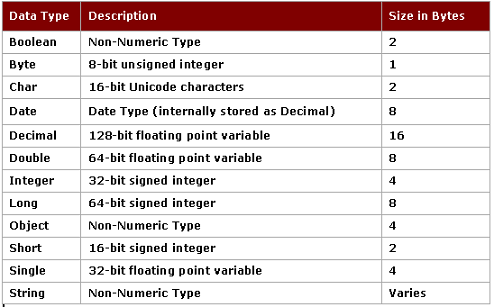
Integers are numbers without any floating points. If you assign a decimal value to any datatype which can handle only integers (e.g. byte,short,integer,long) the decimal point will be stripped off; or worse cause an error. So if you want decimals to be considered, you must use one of those datatypes that can handle floating points. (e.g. single, double, decimal, currency etc.)
-
Dec 29th, 2008, 06:25 PM
#9
Thread Starter
Junior Member
Re: Need help pls 'fraction division in VB 2005
Originally Posted by jemidiah
I think you at least want "v = CDbl(TextBox9.Text)" to be "TextBox9.Text = Val(v)". Otherwise the line above it does nothing.
Many thanks Jemidiah and your code worked well.
-
Dec 29th, 2008, 06:29 PM
#10
Thread Starter
Junior Member
Re: Need help pls 'fraction division in VB 2005
Originally Posted by Pradeep1210
I think you better get familiar with different datatypes before you continue further with number manipulation. So in the above code you would be able to find the problem yourself.
Integers are numbers without any floating points. If you assign a decimal value to any datatype which can handle only integers (e.g. byte,short,integer,long) the decimal point will be stripped off; or worse cause an error. So if you want decimals to be considered, you must use one of those datatypes that can handle floating points. (e.g. single, double, decimal, currency etc.)
I appreciate your answer and I'm trying to understand the table by putting more examples and excersies to figure out the difference between each data type.
Load of cheers 
-
Dec 30th, 2008, 12:51 PM
#11
Thread Starter
Junior Member
Re: Need help pls 'fraction division in VB 2005
Good evening..
As I went through the difference between each data type, I got a short code but I got it wrong somewhere in the declarations.
The code is below and please please I need your support here to run it :
Private Sub Button1_Click(ByVal sender As System.Object, ByVal e As System.EventArgs) Handles Button1.Click
Dim Qv As Double
Dim Ao, A1 As Double
Dim D1 As Integer = TextBox1.Text
Dim D2 As Integer = TextBox2.Text
Ao = (Math.PI * D2 ^ 2) / 4
TextBox3.Text = Val(Ao) ' area of the orifice
A1 = (Math.PI * D1 ^ 2) / 4
TextBox4.Text = Val(A1) ' area of the pipe
Dim P1 As Integer = TextBox5.Text
Dim P2 As Integer = TextBox6.Text
Dim CD As Double = TextBox7.Text
Dim rho As Integer = TextBox8.Text
Qv = ((CD * Ao) / (Math.Sqrt(1 - (Ao / A1) ^ 2))) * Math.Sqrt((2 * (P1 - P2)) / (rho))
TextBox9.Text = Val(Qv)
End Sub
loads of cheers
-
Dec 30th, 2008, 03:39 PM
#12
Re: Need help pls 'fraction division in VB 2005
Originally Posted by ChemEng
Good evening..
As I went through the difference between each data type, I got a short code but I got it wrong somewhere in the declarations.
The code is below and please please I need your support here to run it :
Private Sub Button1_Click(ByVal sender As System.Object, ByVal e As System.EventArgs) Handles Button1.Click
Dim Qv As Double
Dim Ao, A1 As Double
Dim D1 As Integer = TextBox1.Text
Dim D2 As Integer = TextBox2.Text
Ao = (Math.PI * D2 ^ 2) / 4
TextBox3.Text = Val(Ao) ' area of the orifice
A1 = (Math.PI * D1 ^ 2) / 4
TextBox4.Text = Val(A1) ' area of the pipe
Dim P1 As Integer = TextBox5.Text
Dim P2 As Integer = TextBox6.Text
Dim CD As Double = TextBox7.Text
Dim rho As Integer = TextBox8.Text
Qv = ((CD * Ao) / (Math.Sqrt(1 - (Ao / A1) ^ 2))) * Math.Sqrt((2 * (P1 - P2)) / (rho))
TextBox9.Text = Val(Qv)
End Sub
loads of cheers
Have a look at one of those variables that you declared INTEGER that might be causing the problem. To be on the safe side, you could declare all of them as DOUBLE.
-
Dec 30th, 2008, 04:14 PM
#13
Thread Starter
Junior Member
Re: Need help pls 'fraction division in VB 2005
Originally Posted by Pradeep1210
Have a look at one of those variables that you declared INTEGER that might be causing the problem. To be on the safe side, you could declare all of them as DOUBLE.
That is true Pradeep, I found the problem and it looks working now,
many thanks again and again
-
Dec 30th, 2008, 04:33 PM
#14
Thread Starter
Junior Member
Re: Need help pls 'fraction division in VB 2005
Pradeep, Jemidiah and other experts;
I can say I'm almost in the finishings to end up my VB work, but I've the following code to be viewed and corrected please.
The code shall converts the textbox value according to the unit selected from the combobox. Example, if I enter 0.2 in the text box and put m as meter the value shall stay the same since m is the SI unit for length. Whereas if I change the unit to cm or mm from the combobox the value of 0.2 shall be converted into cm or mm according to the combobox unit selected, and visa versa if I put the value in cm or mm and want to change it to m then I just need to select the unit from the combobox.
I put the code but when I've tried to return it to m I failed as it keep converting, which gives wrong figures.
The code is
Public Class Form1
Dim unit_d1 As Single = 1 'multiple input in D1 by this value to get into SI units
Dim unit_d2 As Single = 1
Dim DI As Double 'pipe internal dia
Private Sub ComboBox1_SelectedIndexChanged(ByVal sender As System.Object, ByVal e As System.EventArgs) Handles ComboBox1.SelectedIndexChanged
Dim unit As String
unit = ComboBox1.Text ' get current value from combo box
If unit = "m" Then
DI = DI * 1.0
ElseIf unit = "cm" Then
DI = DI * 0.01
ElseIf unit = "mm" Then
DI = DI * 0.001
Else
If TextBox1.Text = " " Then
MsgBox(" please enter a valid ID value")
End If
End If
TextBox1.Text = DI
End Sub
Private Sub Form1_Load(ByVal sender As System.Object, ByVal e As System.EventArgs) Handles MyBase.Load
ComboBox1.Items.Add("m")
ComboBox1.Items.Add("cm")
ComboBox1.Items.Add("mm")
ComboBox1.SelectedIndex = 0
TextBox1.Text = "0.2"
DI = CSng(TextBox1.Text)
End Sub
Private Sub TextBox1_Leave(ByVal sender As System.Object, ByVal e As System.EventArgs) Handles TextBox1.Leave
'Dim DI As Double 'Commented by Mr.Z !!
If (TextBox1.Text.Length > 0) Then ' dont check empty textbox
DI = CSng(TextBox1.Text) ' only apply the unit multiplier when the calc button is pressed.
If (DI > 0.4) Or (DI <= 0.1) Then
MsgBox(" Pipe ID to be from >0.1m to 0.4m ")
End If
End If
End Sub
End Class
Loads of cheers
-
Dec 31st, 2008, 12:25 AM
#15
Re: Need help pls 'fraction division in VB 2005
You are not storing the value of textbox anywhere before changing it. So whenever combobox value changes, only the latest value is assumed to be in metres. You should store the actual metre value somewhere before applying the change.
Also, the Units and the Multiplier go side by side. So instead of calculating the multiplier in the combobox change event, you could keep it with the item itself. Since the combobox Items is a collection of objects, you can store both the things (maybe more properties if you want) in the Items collection as a Class or Structure.
PS: Please put your code in [CODE] or [HIGHLIGHT] tags to make it more readable.
[EDIT] Code removed and posted modified code in next post [/EDIT]
Pradeep 
Last edited by Pradeep1210; Dec 31st, 2008 at 01:55 AM.
-
Dec 31st, 2008, 01:50 AM
#16
Re: Need help pls 'fraction division in VB 2005
I think this is what you need:
vb.net Code:
Public Class Form1 Dim DI As Double 'pipe internal dia Private Sub ComboBox1_SelectedIndexChanged(ByVal sender As System.Object, ByVal e As System.EventArgs) Handles ComboBox1.SelectedIndexChanged TextBox1.Text = DI * ComboBox1.SelectedItem.Multiplier End Sub Private Sub Form1_Load(ByVal sender As System.Object, ByVal e As System.EventArgs) Handles MyBase.Load ComboBox1.Items.Add(New SIUnit("m", 1)) ComboBox1.Items.Add(New SIUnit("cm", 100)) ComboBox1.Items.Add(New SIUnit("mm", 1000)) ComboBox1.DropDownStyle = ComboBoxStyle.DropDownList ComboBox1.SelectedIndex = 0 TextBox1.Text = "0.2" DI = CDbl(TextBox1.Text) End Sub Private Sub TextBox1_Leave(ByVal sender As System.Object, ByVal e As System.EventArgs) Handles TextBox1.Leave If (TextBox1.Text.Length > 0) Then ' dont check empty textbox If (DI > 0.4) Or (DI <= 0.1) Then MsgBox(" Pipe DI to be from >0.1m to 0.4m ") End If End If End Sub Private Sub TextBox1_KeyUp(ByVal sender As Object, ByVal e As System.Windows.Forms.KeyEventArgs) Handles TextBox1.KeyUp DI = Val(TextBox1.Text) / ComboBox1.SelectedItem.Multiplier End Sub End Class Public Structure SIUnit Public Unit As String Public Multiplier As Single Public Sub New(ByVal unit As String, ByVal multiplier As Single) Me.Unit = unit Me.Multiplier = multiplier End Sub Public Overrides Function ToString() As String Return Me.Unit End Function End Structure
-
Dec 31st, 2008, 06:45 PM
#17
Thread Starter
Junior Member
Re: Need help pls 'fraction division in VB 2005
Happy New Year every1 and wish all our dreams turn true. Wish the peace to spread over the world. Wish all the people live in an equity and prosperity .
Thanks very much Pradeep for your time and valuable comments and I highly appreciate your support and concern. Thanks for Jemidiah as well. Many thanks for everyone tried to put some effort in this issue.
-
Jan 1st, 2009, 04:49 PM
#18
Thread Starter
Junior Member
Re: Need help pls 'fraction division in VB 2005
Hi again 
I have a combobox with drop down list say water, Oil, air and Gas.
I have a volumetric flow rate formula is used to calculate the flow when the combobox selection is water, oil and air. Whereas for Gas I have different formula. Now, I need to switch the volumetric flow rate calculation according to the combobox selection.
Here is the code (refering to above help from Pradeep and Jemidiah)
Qv = ((CD * A2) / (Math.Sqrt(1 - (A2 / A1) ^ 2))) * Math.Sqrt((2 * (P1 - P2)) / (rho)) ' formula cited from Perry chapter 8-48 Process Control
TextBox12.Text = Val(Qv) 'Calculated volumetric flow rate based on selected orifice size
If ComboBox6.SelectedIndex = 3 Then ' selection 3 refers to Hydrocarbon Gas
Dim expcoeff, Qv As Double ' expcoeff is e or expansion coefficient for gas
Qv = ((CD * expcoeff * (Math.Sqrt(1 / (1 - (D2 / D1) ^ 4))) * ((Math.PI * D2 ^ 2) / 4) * (Math.Sqrt(2 * (P1 - P2)) / (rho))))
TextBox12.Text = Val(Qv)
expcoeff = 1 - (0.41 + 0.35 * (D2 / D1) ^ 4) * ((P1 - P2) / (1.4 * P1)) ' 1.4 refers to k which is a isentropic coefficient for gas
TextBox16.Text = Val(expcoeff)
End If
When I put this code and choise gas from the dropdown list of the combobox the Qv value in the textbox will turn to 0 !!!1
-
Jan 1st, 2009, 06:24 PM
#19
Thread Starter
Junior Member
Re: Need help pls 'fraction division in VB 2005
After many attempts, I've solved the above problem...
Cheers.
 Posting Permissions
- You may not post new threads
- You may not post replies
- You may not post attachments
- You may not edit your posts
-
Forum Rules
|
Click Here to Expand Forum to Full Width
|



 Reply With Quote

 icon on the left of the post.
