|

-
Oct 19th, 2008, 01:26 PM
#1
Thread Starter
Frenzied Member


 [RESOLVED] VB6/Access MoveNext error. [RESOLVED] VB6/Access MoveNext error.
I'm still working on code to import updates from a specially designed/Exported mdb to the users main mdb.
There are Do While loops that call subs to filter then display one record at a time.
The loop then waits for the user to decide what they want to do with the record.
rsIm is holds the imported records and stays open.
The NextTable sub uses rsOrg to open records from the main mdb for testing against rsIm.
The first record through the loop works fine.
The user is able to Save it and the next record auto loads.
But saving the 2nd record causes this error on the 'rsIm.MoveNext' line of the NextTable sub
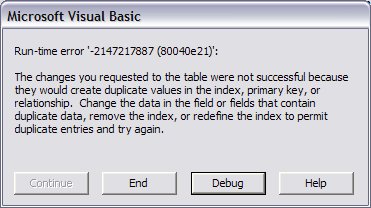
By the time it gets to MoveNext, any changes to the records have already been made.
At the point of the error, m_lItenCnt = 2 and rsIm.RecordCount = 11
Any ideas of what I should look for?
Code:
'here's one of the loops from the Import Sub
            If OpenTbl(Tables) Then
                m_eImporting = Tables
                m_lItenCnt = 0
                Do While m_lItenCnt < rsIm.RecordCount
                    NextTable
                    If m_lItenCnt < rsIm.RecordCount Then 'this is needed here as NextTable is recursive
                        WaitForAction
                    End If
                    If m_bExit Then Exit Sub
                Loop
            End If

'and here's the sub where I'm getting the error
Private Sub NextTable()
    Dim rsOrg As ADODB.Recordset
    Dim sSQL As String
    Dim lTID() As Long
    Dim bFound As Boolean
    Dim lCnt As Long
    Dim lMCnt As Long
    Dim lX As Long
    Dim sTest As String
    Dim lCaIDnew As Long

    If m_lItenCnt Then
' I get the error here
        rsIm.MoveNext
    End If
    m_lItenCnt = m_lItenCnt + 1

'filtering and list loading happens below here
Last edited by longwolf; Oct 19th, 2008 at 01:31 PM.
-
Oct 19th, 2008, 03:41 PM
#2
Thread Starter
Frenzied Member
Re: VB6/Access MoveNext error.
I think this app is starting to get too damn big, about 2 mb of code.
A can't remember all it's doing any more 
There's a sub about 5 steps out that can change a primary key of the exported DB.
I just changed the exporting code so that that Columns is no longer a primary key.
 Posting Permissions
- You may not post new threads
- You may not post replies
- You may not post attachments
- You may not edit your posts
-
Forum Rules
|
Click Here to Expand Forum to Full Width
|



 Reply With Quote