|

-
Jan 13th, 2007, 05:42 PM
#1
Thread Starter
Frenzied Member


 How to use .NET to make an Add-In for an Office Application.. That isn't in the list? How to use .NET to make an Add-In for an Office Application.. That isn't in the list?
Hello, everyone... 
I was going through RobDog's FAQ entry about creating an add-in for an office application using .NET, now what if the Office Application didn't appear in "Select Application Host" list?
I kept going making it for Outlook just for the sake of it, but there are some new Office Applications that don't appear in that list, what would you recommend in that case?
Also, consider that as Office grows and evolves, new applications will be added to it, how would you create the add-in for those?
Last edited by Tec-Nico; Jan 13th, 2007 at 11:50 PM.
Reason: Resolved
We miss you, friend...  Rest in Peace, we will take care of the rest of it.
[vbcode]
On Error Me.Fault = False
[/vbcode]
- Silence is the human way to share ignorance
Tec-Nico
-
Jan 13th, 2007, 11:53 PM
#2
Thread Starter
Frenzied Member
Re: How to use .NET to make an Add-In for an Office Application.. That isn't in the l
Never mind, I performed some research and found how to do this.
If anyone is interested, it is related to registry configuration:
Just ask here for more details.
Added: I have a C# version of Rob's FAQ code if anyone wants me to publish it, let me know.
Last edited by Tec-Nico; Jan 13th, 2007 at 11:58 PM.
Reason: Added comment
We miss you, friend... Rest in Peace, we will take care of the rest of it.
[vbcode]
On Error Me.Fault = False
[/vbcode]
- Silence is the human way to share ignorance
Tec-Nico
-
Jan 14th, 2007, 02:42 AM
#3
Re: How to use .NET to make an Add-In for an Office Application.. That isn't in the list?
What Office app were you needing that wasnt in the list?
Can you post the link to the registry hack? Maybe we can find a place for it in the FAQ?
VB/Office Guru™ (AKA: Gangsta Yoda™  ®) ®)
I dont answer coding questions via PM. Please post a thread in the appropriate forum. 
Microsoft MVP 2006-2011
Office Development FAQ (C#, VB.NET, VB 6, VBA)
Senior Jedi Software Engineer MCP (VB 6 & .NET), BSEE, CET
If a post has helped you then Please Rate it! 
• Reps & Rating Posts • VS.NET on Vista • Multiple .NET Framework Versions • Office Primary Interop Assemblies • VB/Office Guru™ Word SpellChecker™.NET • VB/Office Guru™ Word SpellChecker™ VB6 • VB.NET Attributes Ex. • Outlook Global Address List • API Viewer utility • .NET API Viewer Utility •
System: Intel i7 6850K, Geforce GTX1060, Samsung M.2 1 TB & SATA 500 GB, 32 GBs DDR4 3300 Quad Channel RAM, 2 Viewsonic 24" LCDs, Windows 10, Office 2016, VS 2019, VB6 SP6
-
Jan 14th, 2007, 02:56 AM
#4
Thread Starter
Frenzied Member
Re: How to use .NET to make an Add-In for an Office Application.. That isn't in the l
Hello, Rob. InfoPath and SharePoint Designer are not included in the host list.
Regarding including the link that describes the registry hack, what I found was just that: "It is possible to do if modifying the registry".
Now, I spent some time playing with the registry and found the way to do it, I will gladly write down the instructions if you want.
We miss you, friend... Rest in Peace, we will take care of the rest of it.
[vbcode]
On Error Me.Fault = False
[/vbcode]
- Silence is the human way to share ignorance
Tec-Nico
-
Jan 14th, 2007, 03:03 AM
#5
Re: How to use .NET to make an Add-In for an Office Application.. That isn't in the list?
Sure 
I have InfoPath 2003on one system and havent installed InfoPath 2007 yet but do have it. You know there is new support in VSTO for InfoPath 2003 and a SDK for InfoPath. Maybe the SDK would be a better way to go?
VB/Office Guru™ (AKA: Gangsta Yoda™ ®)
I dont answer coding questions via PM. Please post a thread in the appropriate forum.
Microsoft MVP 2006-2011
Office Development FAQ (C#, VB.NET, VB 6, VBA)
Senior Jedi Software Engineer MCP (VB 6 & .NET), BSEE, CET
If a post has helped you then Please Rate it!
• Reps & Rating Posts • VS.NET on Vista • Multiple .NET Framework Versions • Office Primary Interop Assemblies • VB/Office Guru™ Word SpellChecker™.NET • VB/Office Guru™ Word SpellChecker™ VB6 • VB.NET Attributes Ex. • Outlook Global Address List • API Viewer utility • .NET API Viewer Utility •
System: Intel i7 6850K, Geforce GTX1060, Samsung M.2 1 TB & SATA 500 GB, 32 GBs DDR4 3300 Quad Channel RAM, 2 Viewsonic 24" LCDs, Windows 10, Office 2016, VS 2019, VB6 SP6
-
Jan 14th, 2007, 03:14 AM
#6
Thread Starter
Frenzied Member
Re: How to use .NET to make an Add-In for an Office Application.. That isn't in the l
I had heard about it but didn't take the time to check it... I thought you needed to have VS .NET 2007 for using the VSTO and since I forgot to bring the MS VS .NET 2007 from the Office I am stuck with VS .NET 2003 until Tuesday.
I will post the instructions in a minute... I would like to know if the installation of the add-in works fine without having to resort to this hack (I suspect it doesn't and needs an extra step for it to actually work)
Oh, I also took some time and translated the code you posted in the FAQ so that it uses C# and reflection. I left your comments just the way they are and added a few of my own in the code that had to be added for C# support.
Added:
Rob, what about SharePoint Designer? I am more interested in SharePoint Designer for the moment than InfoPath. Does it support VSTO too? Does it include a SDK as well?
I have been playing with the macros in SharePoint Designer and that's when I discovered the need of an add-in which has been the reason of all this research and development from my part.
Last edited by Tec-Nico; Jan 14th, 2007 at 03:19 AM.
Reason: Added question
We miss you, friend... Rest in Peace, we will take care of the rest of it.
[vbcode]
On Error Me.Fault = False
[/vbcode]
- Silence is the human way to share ignorance
Tec-Nico
-
Jan 14th, 2007, 03:40 AM
#7
Thread Starter
Frenzied Member
Re: How to use .NET to make an Add-In for an Office Application.. That isn't in the l
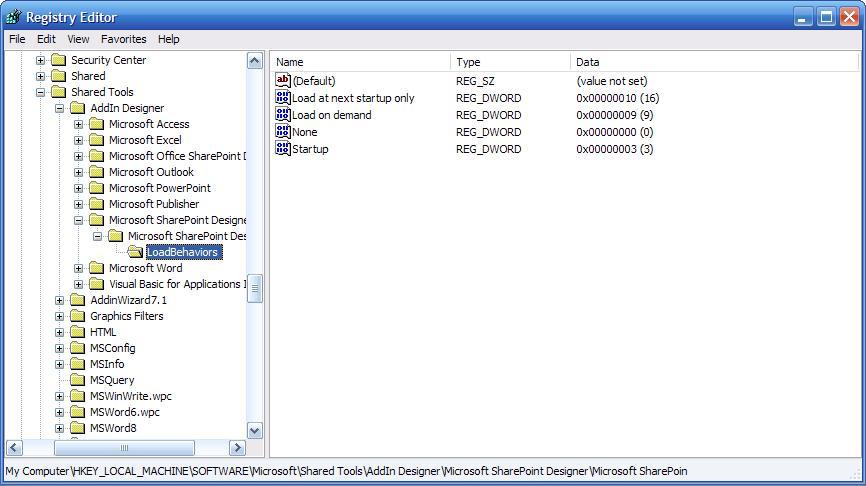
Ok, here are the instructions for any Office Application that doesn't appear in the host list such as InfoPath or SharePoint Designer:
- Open regedit and backup your current configuration (This might appear obvious but it is better to state it for the new comers)
- Expand the explorer up to "HKEY_LOCAL_MACHINE\SOFTWARE\Microsoft\Shared Tools"
- Go to the "AddIn Designer" Key
- Add the following Keys in the following hierarchy:
|-- Microsoft XXXX
| |--> Microsoft XXXX 12.0
| | |--> LoadBehaviors - Inside the "LoadBehaviors" Key add the following DWORDs:
- Name = Load at next startup only, Value = 10
- Name = Load on demand, Value = 9
- Name = None, Value = 0
- Name = Startup, Value = 3
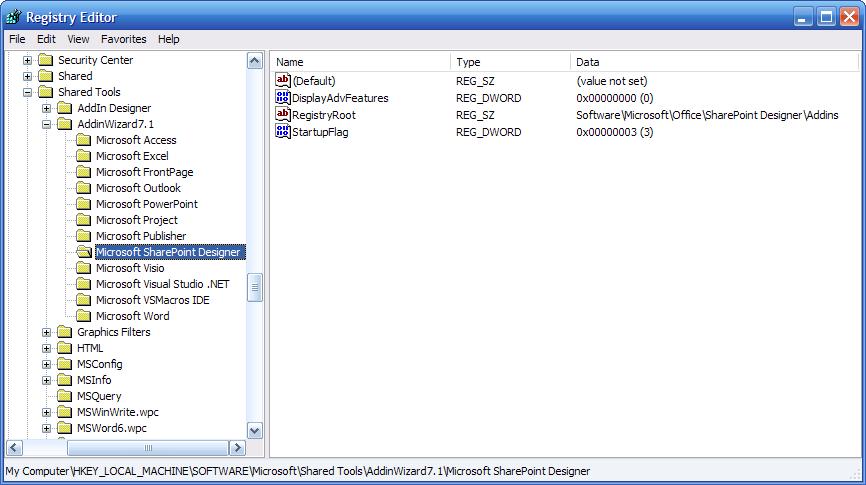
- Go Back to "HKEY_LOCAL_MACHINE\SOFTWARE\Microsoft\Shared Tools"
- Go to the "AddinWizard7.1" Key
- Add the following Key:
- XXXX - Inside the "XXXX" Key add the following DWORDs:
- Name = DisplayAdvFeatures, Value = 0
- Name = StartupFlag, Value = 3
- Inside the "XXXX" Key add the following String:
- Name = RegistryRoot, Value = Software\Microsoft\Office\XXXX\Addins
That's all you have to do. Next time you open the Wizard Rob shows in the FAQ, the application XXXX will be there for you to select from the host list.
Remember XXXX is the name of the application, don't use "Microsoft InfoPath", that won't work, use "InfoPath" instead. Also, "12.0" is the current version, that's why you have to use it but this might vary in the future with new versions.
Figures:
Last edited by Tec-Nico; Jan 14th, 2007 at 04:15 AM.
Reason: Added visual aid
We miss you, friend... Rest in Peace, we will take care of the rest of it.
[vbcode]
On Error Me.Fault = False
[/vbcode]
- Silence is the human way to share ignorance
Tec-Nico
-
Jan 14th, 2007, 04:30 AM
#8
Re: How to use .NET to make an Add-In for an Office Application.. That isn't in the list?
I think I will find a place for this in the OD FAQ and either copy the post (it will actually be a post of yours) or move it to the FAQ.
I havent really been looking for SharePoint but will keep an eye out. Tomorrow I will do the FAQ stuff maybe as a new thread or should we add it to the .NET AddIn thread?
VB/Office Guru™ (AKA: Gangsta Yoda™ ®)
I dont answer coding questions via PM. Please post a thread in the appropriate forum.
Microsoft MVP 2006-2011
Office Development FAQ (C#, VB.NET, VB 6, VBA)
Senior Jedi Software Engineer MCP (VB 6 & .NET), BSEE, CET
If a post has helped you then Please Rate it!
• Reps & Rating Posts • VS.NET on Vista • Multiple .NET Framework Versions • Office Primary Interop Assemblies • VB/Office Guru™ Word SpellChecker™.NET • VB/Office Guru™ Word SpellChecker™ VB6 • VB.NET Attributes Ex. • Outlook Global Address List • API Viewer utility • .NET API Viewer Utility •
System: Intel i7 6850K, Geforce GTX1060, Samsung M.2 1 TB & SATA 500 GB, 32 GBs DDR4 3300 Quad Channel RAM, 2 Viewsonic 24" LCDs, Windows 10, Office 2016, VS 2019, VB6 SP6
-
Jan 14th, 2007, 01:49 PM
#9
Thread Starter
Frenzied Member
Re: How to use .NET to make an Add-In for an Office Application.. That isn't in the l
I don't know, what do you consider would be the best?
One option could be to make it a new thread and add a link to it from the .NET AddIn one.
Also, would you like me to give you the C# version of the code you have in the .NET AddIn thread?
We miss you, friend... Rest in Peace, we will take care of the rest of it.
[vbcode]
On Error Me.Fault = False
[/vbcode]
- Silence is the human way to share ignorance
Tec-Nico
 Posting Permissions
- You may not post new threads
- You may not post replies
- You may not post attachments
- You may not edit your posts
-
Forum Rules
|
Click Here to Expand Forum to Full Width
|



 Reply With Quote
