Results 1 to 3 of 3

Thread: Why the standard VB FRAME, doesn't show as XP-Style when using appName.exe.manifest?

  1. #1

    Thread Starter
    Member
    Join Date
    Apr 2002
    Location
    in
    Posts
    40

    Why the standard VB FRAME, doesn't show as XP-Style when using appName.exe.manifest?

    Hi all,

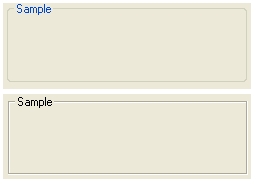
    When I using AppName.EXE.Manifest file, to use XP-Theme, all the standard VB controls style, changes to XP-Theme, except the FRAME. Why?! How can I use the XP-Style frame?!

    In the picture below, I show the both XP-Style and none XP-Style FRAME (in other windows app, not in my app) How can I use this XP-Style FRAME in my app?!


    I notice that the XP-Style FRAME object class is 'BUTTON'. all the commandButtons, OptionBoxes and CheckBoxes in windows applications is also BUTTON! what is this object?! and how can I use it?! Is it an OCX?! Can I use it in my VB projects?!

    Thanks a lot
    A.B.Fatehi
    Attached Images Attached Images  

  2. #2
    PowerPoster Static's Avatar
    Join Date
    Oct 2000
    Location
    Rochester, NY
    Posts
    9,390

    Re: Why the standard VB FRAME, doesn't show as XP-Style when using appName.exe.manifest?

    i think i read that there is some issue with this.. try to put the frame inside a picturebox.
    JPnyc rocks!! (Just ask him!)
    If u have your answer please go to the thread tools and click "Mark Thread Resolved"

  3. #3
    Addicted Member sigid's Avatar
    Join Date
    May 2006
    Location
    Massachusetts, USA
    Posts
    182

    Re: Why the standard VB FRAME, doesn't show as XP-Style when using appName.exe.manife

    As usual, Static is spot on...the same issue applies to CommandButtons if you happen to place them inside a frame. If they have to be inside a frame, place a picture box in the frame first,and then add the command buttons...

Posting Permissions

  • You may not post new threads
  • You may not post replies
  • You may not post attachments
  • You may not edit your posts
  •  


Click Here to Expand Forum to Full Width