|

-
Sep 25th, 2005, 01:52 PM
#1
 [RESOLVED] Pointer math / images [RESOLVED] Pointer math / images
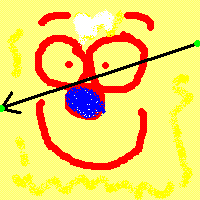
I need to find a pointer increment that when used repeatedly, describes a line of pixels running through an image at any angle.
To start with all I have is the starting and ending points of the line as (u,v) texture coordinates...
Look at the image and you see that the start and end points are (1, 0.21) and (0, 0.55) respectively.
I need a floating point increment value in order for the pointer to move along this line.
The pointer will be used on the raw data of the image that is held in an int array, the pixel data is stored as 32bit ARGB in that array.
This is really hard to explain. Sorry. 
How do I calculate the increment for my pointer?
I don't live here any more.
-
Sep 25th, 2005, 02:16 PM
#2
Not NoteMe


Re: Pointer math / images
Treat the line/arrow as a vector. Divide it by how many steps you want it to trace through in (i think that'd be how many pixels are you drawing on the screen). Then you've got the 2 vector components that are the width step (i) and the height step (j).
So the increment would be something like ((j*ImageWidth)+i)*(BytesPerPixel), i think. Casting to an int of course!
Last edited by SLH; Sep 25th, 2005 at 02:33 PM.
Quotes:
"I am getting better then you guys.." NoteMe, on his leet english skills.
"And I am going to meat her again later on tonight." NoteMe
"I think you should change your name to QuoteMe" Shaggy Hiker, regarding NoteMe
"my sweet lord jesus. I've decided never to have breast implants" Tom Gibbons
Have I helped you? Please Rate my posts. 
-
Sep 26th, 2005, 08:52 AM
#3
Re: Pointer math / images
I think you need to have a look at Bresenham's algorithm. It is a (the) algorithm for drawing lines, instead of drawing you could of course use it to do something else with the pixels on the line.
First google gets you this, which seems like a good explanation.
-
Sep 26th, 2005, 04:15 PM
#4
Re: Pointer math / images
So you mean use the Bresenham algorithm to retrieve pixels from my source texture?
I thought it would be much easier to just use a pointer increment. Calculating the pointer increment is practically impossible for me at the moment. If I do the math without a pointer increment and just fetch pixels using (x, y) coordinates then the algorithm works perfectly. There must be a glitch in my code that deals with a long line of contiguous pixel data rather than the conventional 2D grid of pixels like you find on screen.
This is so aggravating, I've struggled with this quad renderer for nearly 3 weeks now and to get this far only to stumble at a single equation is driving me mental.
I should sleep on it.
I don't live here any more.
-
Sep 26th, 2005, 08:31 PM
#5
Not NoteMe
Re: Pointer math / images
How are you getting the pixel colour using the x,y coordinates now then?
Quotes:
"I am getting better then you guys.." NoteMe, on his leet english skills.
"And I am going to meat her again later on tonight." NoteMe
"I think you should change your name to QuoteMe" Shaggy Hiker, regarding NoteMe
"my sweet lord jesus. I've decided never to have breast implants" Tom Gibbons
Have I helped you? Please Rate my posts.
-
Sep 27th, 2005, 04:43 AM
#6
Re: Pointer math / images
I havent got the code with me now but its something like:
(x and y are both floats in the range 0...1)
PHP Code:
return pixels[ ((int)(textureHeight * y) * textureWidth) + (x * textureWidth) ];
That's more or less pseudocode really. It works perfectly if I do this calculation for EVERY pixel. Its damn slow though, about 5 times slower than my faulty pointer version.
Last edited by wossname; Sep 27th, 2005 at 04:49 AM.
I don't live here any more.
-
Sep 27th, 2005, 08:12 AM
#7
Not NoteMe
Re: Pointer math / images
When you read in an image have you taken into account that the scanline length (of that image) may not be the same as the width * depth??
Windows pads BMPs so that each scanline is a multiple of 4 bytes.
Quotes:
"I am getting better then you guys.." NoteMe, on his leet english skills.
"And I am going to meat her again later on tonight." NoteMe
"I think you should change your name to QuoteMe" Shaggy Hiker, regarding NoteMe
"my sweet lord jesus. I've decided never to have breast implants" Tom Gibbons
Have I helped you? Please Rate my posts.
-
Sep 27th, 2005, 01:27 PM
#8
Re: Pointer math / images
Thats already dealt with, before I commit the data to the array I'm copying the image to a 32bpp bitmap and then using lockbits on it, then the copy to the array is done. Using an int* to iterate through it ensures that the addresses are not mangled.
I don't live here any more.
-
Sep 29th, 2005, 07:36 AM
#9
Not NoteMe
Re: Pointer math / images
I guess you've probably sorted it by now, but here's something anyway:
Yesterday i got up to the stage you're at, getting each pixel individually using coordinates.
I had a TextureInc variable, which was a 2D vector which i used to step through the texture sample line.
This worked fine.
I then triend to make a pointer increment using this 2D vector. The trouble i'm having, and i think you're having too is with floats and ints. i.e. it doesn't make sence to have the pointer incrememnt through half a scanline in the texture, but often you need to incrememnt 0.5. When i was using the texturecoordinate incrementor i was using floats, so this was fine, since i just rounded when calling my texture colour lookup routine.
To get round the probelm i'm going to convert my 2 floats (the x incrememnt and the y incrememnt (or more accuratly the u and v incrememnts)) into ratios to the first sig fig. e.g. 0.7 would be 7 / 10, 0.04 would be 4 / 100.
Using these two numbers i'll work out when to incrememtn the pointer and by how much.
Something else i realised is that you HAVE to have 2 seperate pointer incrememtors, one for the x (u) and one for the y (v) incrememnts, because with the above system you may want to incrememnt the x, but not y and visa-versa.
Sorry if this is rushed, i'm off to work right now!
Quotes:
"I am getting better then you guys.." NoteMe, on his leet english skills.
"And I am going to meat her again later on tonight." NoteMe
"I think you should change your name to QuoteMe" Shaggy Hiker, regarding NoteMe
"my sweet lord jesus. I've decided never to have breast implants" Tom Gibbons
Have I helped you? Please Rate my posts.
-
Sep 30th, 2005, 03:37 AM
#10
Re: Pointer math / images
Sounds about where I'm at. If I calculate the uv the long way around for each pixel then it works fine but its butt-slow.
So you think that converting the u and v values to integers is better?
Sounds like it would introduce quite a bit of overhead. 
I don't live here any more.
-
Sep 30th, 2005, 04:14 AM
#11
Not NoteMe
Re: Pointer math / images
 Originally Posted by wossname
Sounds about where I'm at. If I calculate the uv the long way around for each pixel then it works fine but its butt-slow.
So you think that converting the u and v values to integers is better?
Sounds like it would introduce quite a bit of overhead.
I assumed that's what you ment all along, since a pointer increment must be an int.
I've done it for the X dimension, gonna do it for 2 then do speed tests, but yes i think it's gonna be slower than using a floating point increment (which i've got working already) and rounding at the last possible time (when incrementing the pointer).
Quotes:
"I am getting better then you guys.." NoteMe, on his leet english skills.
"And I am going to meat her again later on tonight." NoteMe
"I think you should change your name to QuoteMe" Shaggy Hiker, regarding NoteMe
"my sweet lord jesus. I've decided never to have breast implants" Tom Gibbons
Have I helped you? Please Rate my posts.
-
Sep 30th, 2005, 05:03 AM
#12
Re: Pointer math / images
Yeah I'm only casting to an integer at the last minute. I don't like all the floating point additions and multiplications though. If I ever get this alg working I'll recode it in ASM and compile into a C++ DLL then I can call it from my C# program. That should improve things a little.
The raw maths is killing me though, last night I was resorting to trial and error with plugging number in here and there. 
I don't live here any more.
-
Sep 30th, 2005, 05:52 AM
#13
Re: Pointer math / images
The pointer increment is not a good idea. If the line gets very flat, you'll get very few pixels. Let's deal in integers for a moment and I'll show you what I mean:
Suppose the image is 50x50. The pointer increment method takes one pixel per line. If you draw a line from 0,0 to 50,50, all's fine. The increment is 51, and you have the pixels (0,0) (1,1) (2,2) ...
If you draw a line form 0,0 to 5,50, it's fine, too. It's not possible to use an integer increment here (Either you increment by 50, which is vertical, or by 51, which is 45°), but let's use an increment of 50.1. You get pixels (0,0), (1,0.1), (2,0.2), ... Round to nearest and you get a proper line.
However, try to draw a line from 0,0 to 50,5. The increment is now 60, and you get the pixels (0,0), (10,1), (20,2), ... Suddenly, what previously was a continuous line, is now 6 pixels along an invisible line.
That's why you need Bresenham's algorithm.
All the buzzt
 CornedBee
"Writing specifications is like writing a novel. Writing code is like writing poetry."
- Anonymous, published by Raymond Chen
Don't PM me with your problems, I scan most of the forums daily. If you do PM me, I will not answer your question.
-
Sep 30th, 2005, 09:23 AM
#14
Re: Pointer math / images
yeah i realised last night that I'd need at least 2 increments, one for u and one for v. There seems to be about 20 different variants of this bresenhan algorithm, is there a particular one that would be suitable for my needs?
I don't live here any more.
-
Sep 30th, 2005, 01:12 PM
#15
Re: Pointer math / images
hi!!
can i ask you a simple question????
thnx you very much..............are you trying to draw a line in C/C++ (not using lib) starting from a fixed co-ordinate n finishing at another fixed co-ordinate???
i think i learnt such technique in my graduation..........if thats wot you want then i will dust off those old registers!!!
-
Sep 30th, 2005, 01:29 PM
#16
Re: Pointer math / images
Bresenham for a straight line can be implemented as:
Code:
// (x1,y1) = start, (x2,y2) = end
dx = x2-x1
dy = y2-y1
if abs(dx) > abs(dy) // angle less then 45 degrees
    x = x1, y = y1
    p = 2*abs(dy) - abs(dx)
    setpixel(x, y)
    while x != x2
        x += sign(dx)
        if p >= 0
            y += sign(dy)
            p -= 2*abs(dx)
        p += 2*abs(dy)
        setpixel(x, y)
else
    // do the same, but swap all uses of x and y (including dx/dy)
    x = x1, y = y1
    p = 2*abs(dx) - abs(dy)
    setpixel(x, y)
    while y != y2
        y += sign(dy)
        if p >= 0
            x += sign(dx)
            p -= 2*abs(dy)
        p += 2*abs(dx)
        setpixel(x, y)
-
Oct 1st, 2005, 07:52 AM
#17
Re: Pointer math / images
This isn't going to work I don't think. Unless I build an array of all the colors that the Bresenham lands on (by replacing setpixel in the above code with an array allocation). Then interpolate through the array instead.
The color list would have to be no longer than the screenwidth I think.
I can't imagine this being any faster than a couple of floating point multiplications though 
Good job I'm learning ASM too.
Last edited by wossname; Oct 1st, 2005 at 08:01 AM.
I don't live here any more.
-
Oct 1st, 2005, 08:46 AM
#18
Re: Pointer math / images
ASM won't help you if you don't have the right algorithm. What exactly do you want to accomplish?
All the buzzt
CornedBee
"Writing specifications is like writing a novel. Writing code is like writing poetry."
- Anonymous, published by Raymond Chen
Don't PM me with your problems, I scan most of the forums daily. If you do PM me, I will not answer your question.
-
Oct 1st, 2005, 09:08 AM
#19
Not NoteMe
Re: Pointer math / images
He's writing a texture mapping routine.
It works by dividing up a quad (4 sided polygon) into a number of scanlines. These are horazontal lines of pixels, together making up the quad.
Each scanline needs a pixel colour lookup from the source texture, in order for the pixels to be rendered the correct colour.
A source scanline, which wouldn't be horizontal (most likely) needs to be itterated along, as we go along the scanline to be rendered.
So we need to iterate along 2 lines symaltainously, one is the destination scanline, that makes up the quad to be rendered, the other is the source scanline which is where we get the pixel colours to texture map the quad.
The Bresenham algorithm itterates along a line, but the dificulty lies in syncronising it with the itteration of the other line at the same time since both lines will very rarely (if ever) be the same length. To make things more annoying the source scanline should really be defined with floating point accuracy, in order to get a good final image (and must have sub-pixel accuracy if we want to add any kind of decent filtering method later down the line).
Currently i've got somethig working that uses floating point operations, so any alternative algorithm would need to be faster than that (which is a couple of flops in the (destination) scanline loop total).
Quotes:
"I am getting better then you guys.." NoteMe, on his leet english skills.
"And I am going to meat her again later on tonight." NoteMe
"I think you should change your name to QuoteMe" Shaggy Hiker, regarding NoteMe
"my sweet lord jesus. I've decided never to have breast implants" Tom Gibbons
Have I helped you? Please Rate my posts.
-
Oct 3rd, 2005, 04:46 AM
#20
Re: Pointer math / images
Problem solved.
I'm using Bresenham to fill a pixel buffer with the bare minimum source pixels. Then I'm applying the darkening value to each pixel (a simple boolean operation) and then I'm interpolating through this 1D array to give me the source pixel. Its far from perfect but it is pretty fast.
I only have to fetch a maximum of 128 pixels from a 128X128 texture for each destination scanline. Currently I can't think of a more efficient method (which is not to say that there isn't one, but I want to do as much of this my own way as possible).
Thanks to Captain Obvious for the jibe about ASM though.
I don't live here any more.
 Posting Permissions
- You may not post new threads
- You may not post replies
- You may not post attachments
- You may not edit your posts
-
Forum Rules
|
Click Here to Expand Forum to Full Width
|



 Reply With Quote

