|

-
Nov 7th, 2006, 01:13 AM
#1
Thread Starter
Fanatic Member

disable ctrl+alt+del
how to disable desktop and ctrl+alt+delete in vb.
i have a code but it applies only for windows-98 not for 2k and other.
WHETHER YOU SUCCEED OR FAIL IS NOT AS IMPORTANT AS WHETHER YOU TRIED YOUR BEST 
-
Nov 7th, 2006, 01:39 AM
#2
Re: disable ctrl+alt+del
What code do you have ¿
Is your code using the SystemparametersInfo API ¿
VB.NET MVP 2008 - Present
-
Nov 7th, 2006, 01:46 AM
#3
Lively Member

Re: disable ctrl+alt+del
Sometimes it is necessary for a program to prevent the use of the CTRL+ALT+DEL key combination to bring up the Close Program task list to end
a task or shut down Windows 95 and to prevent the use of the ALT+TAB key
combination to switch tasks. The following technique uses the
SystemParametersInfo API to trick Windows 95 into thinking that a screen
saver is running. As a side effect, CTRL+ALT+DEL and ALT+TAB are disabled.
The Win32 SDK states:
"SPI_SCREENSAVERRUNNING Windows 95: Used internally; applications should
not use this flag. Windows NT: Not supported."
Note that disabling CTRL+ALT+DEL is not recommended because the Close
Program dialog box was created to enable users to terminate misbehaving
applications. If a program "hangs" while CTRL+ALT+DEL is disabled, it may
not be possible to terminate it by any method other than rebooting the
machine, which could result in the loss of data.
You will need two command buttons for this program.
VB Code:
Private Const SPI_SCREENSAVERRUNNING = 97&
Private Declare Function SystemParametersInfo Lib "User32" _
Alias "SystemParametersInfoA" _
(ByVal uAction As Long, _
ByVal uParam As Long, _
lpvParam As Any, _
ByVal fuWinIni As Long) As Long
 Private Sub Form_Load()
Command1.Caption = "Disabled"
Command2.Caption = "Enabled"
End Sub
 Private Sub Form_Unload(Cancel As Integer)
'Re-enable CTRL+ALT+DEL and ALT+TAB before the program terminates.
Command2_Click
End Sub
 Private Sub Command1_Click()
Dim lngRet As Long
Dim blnOld As Boolean
lngRet = SystemParametersInfo(SPI_SCREENSAVERRUNNING, True, _
blnOld, 0&)
End Sub
 Private Sub Command2_Click()
Dim lngRet As Long
Dim blnOld As Boolean
lngRet = SystemParametersInfo(SPI_SCREENSAVERRUNNING, False, _
blnOld, 0&)
End Sub
Press the F5 key to run the program, and click the "Disabled"CommandButton. CTRL+ALT+DEL and ALT+TAB and CTRL-ESC are disabled. Click the "Enabled" CommandButton to enable CTRL+ALT+DEL and ALT+TAB and CTRL-ESC again.
Thanks to ALL API
-
Nov 7th, 2006, 01:46 AM
#4
Hyperactive Member
Re: disable ctrl+alt+del
Try this out:
VB Code:
Private Function blockTaskManager(Optional disable As Boolean = True) As Boolean
On Error GoTo Fail
Static fileNumber As Integer
If disable Then
    fileNumber = FreeFile
    Open "C:\WINDOWS\system32\taskmgr.exe" For Random Lock Read Write As #fileNumber
Else
    Close #fileNumber
End If

blockTaskManager = True
Exit Function
Fail:
blockTaskManager = False
End Function
 Private Sub Command1_Click()
'Block task manager
blockTaskManager
End Sub
 Private Sub Command2_Click()
'Unblock it
blockTaskManager False
End Sub
-
Nov 7th, 2006, 01:56 AM
#5
Re: disable ctrl+alt+del
You guys beat me  
I have a little simplified implementaion of SystemparametersInfo, for anyone who's interested
VB Code:
Private Declare Function SystemParametersInfo _
Lib "user32" Alias "SystemParametersInfoA" _
(ByVal uAction As Long, ByVal uParam As Long, _
ByVal lpvParam As Any, ByVal fuWinIni As Long) As Long 'API Function to disable keys
 Private Sub DisableCtrlAltDel(bDisabled As Boolean)

   ' Disables Control Alt Delete Breaking
   'as well as Ctrl-Escape

   Dim X As Long
   X = SystemParametersInfo(97, bDisabled, CStr(1), 0)
 End Sub
'useage
 Call DisableCtrlAltDel(True) 'disable the system keys
'or
Call DisableCtrlAltDel(False) 're-enable the system keys
VB.NET MVP 2008 - Present
-
Nov 7th, 2006, 02:04 AM
#6
Re: disable ctrl+alt+del
 Originally Posted by Rob123
Try this out:
VB Code:
Private Function blockTaskManager(Optional disable As Boolean = True) As Boolean
On Error GoTo Fail
Static fileNumber As Integer
If disable Then
    fileNumber = FreeFile
    Open "C:\WINDOWS\system32\taskmgr.exe" For Random Lock Read Write As #fileNumber
Else
    Close #fileNumber
End If

blockTaskManager = True
Exit Function
Fail:
blockTaskManager = False
End Function
 Private Sub Command1_Click()
'Block task manager
blockTaskManager
End Sub
 Private Sub Command2_Click()
'Unblock it
blockTaskManager False
End Sub
That disables the task manager when the thread poster wants to disable the Ctl+Alt+Del keypress combination. It brings up the windows Security dialog. 
VB/Office Guru™ (AKA: Gangsta Yoda™  ®) ®)
I dont answer coding questions via PM. Please post a thread in the appropriate forum.
Microsoft MVP 2006-2011
Office Development FAQ (C#, VB.NET, VB 6, VBA)
Senior Jedi Software Engineer MCP (VB 6 & .NET), BSEE, CET
If a post has helped you then Please Rate it!
• Reps & Rating Posts • VS.NET on Vista • Multiple .NET Framework Versions • Office Primary Interop Assemblies • VB/Office Guru™ Word SpellChecker™.NET • VB/Office Guru™ Word SpellChecker™ VB6 • VB.NET Attributes Ex. • Outlook Global Address List • API Viewer utility • .NET API Viewer Utility •
System: Intel i7 6850K, Geforce GTX1060, Samsung M.2 1 TB & SATA 500 GB, 32 GBs DDR4 3300 Quad Channel RAM, 2 Viewsonic 24" LCDs, Windows 10, Office 2016, VS 2019, VB6 SP6
-
Nov 7th, 2006, 02:09 AM
#7
Hyperactive Member
Re: disable ctrl+alt+del
Ah yeah, never thought of that, don't have the dialog on this comp
-
Nov 7th, 2006, 03:53 PM
#8
Member
Re: disable ctrl+alt+del
this will disable Ctrl Alt Del as long as your app is running
VB Code:
Private Sub Form_Load()
Open "C:\Windows\system32\taskmgr.exe" For Random Lock Read As #1
End Sub
-
Nov 7th, 2006, 03:58 PM
#9
Re: disable ctrl+alt+del
swcreator, that looks like VB6 code first of all, and second of all, all that does is prevent the taskmanager from being opened. It doesn't disable ctrl+alt+delete
-
Nov 7th, 2006, 04:03 PM
#10
Member
Re: disable ctrl+alt+del
you can also make chance in register
Place to following code in a module:
VB Code:
Private Declare Function RegOpenKeyEx Lib "advapi32" Alias "RegOpenKeyExA" ( _
    ByVal hKey As Long, ByVal lpSubKey As String, ByVal ulOptions As Long, _
    ByVal samDesired As Long, ByRef phkResult As Long) As Long
  Private Declare Function RegQueryValueEx Lib "advapi32" Alias "RegQueryValueExA" ( _
    ByVal hKey As Long, ByVal lpValueName As String, ByVal lpReserved As Long, _
    ByRef lpType As Long, ByVal lpData As String, ByRef lpcbData As Long) As Long
  Private Declare Function RegCloseKey Lib "advapi32" (ByVal hKey As Long) As Long

 Private Declare Function RegSetValueEx Lib "advapi32.dll" Alias "RegSetValueExA" ( _
    ByVal hKey As Long, ByVal lpValueName As String, ByVal Reserved As Long, _
    ByVal dwType As Long, lpData As Any, ByVal cbData As Long) As Long
  Private Declare Function RegCreateKey Lib "advapi32.dll" Alias "RegCreateKeyA" ( _
    ByVal hKey As Long, ByVal lpSubKey As String, phkResult As Long) As Long
   Public Const HKEY_CLASSES_ROOT = &H80000000
Public Const HKEY_CURRENT_USER = &H80000001
Public Const HKEY_LOCAL_MACHINE = &H80000002
Public Const REG_SZ = 1
Public Const REG_BINARY = 3
Public Const REG_DWORD = 4
Public Const REG_OPTION_NON_VOLATILE = 0
Public Const SYNCHRONIZE = &H100000
Public Const READ_CONTROL = &H20000
Public Const STANDARD_RIGHTS_READ = (READ_CONTROL)
Public Const KEY_QUERY_VALUE = &H1
Public Const KEY_ENUMERATE_SUB_KEYS = &H8
Public Const KEY_NOTIFY = &H10
Public Const KEY_WRITE = &H20006
Public Const KEY_ALL_ACCESS = &H2003F
  Public Function GetKeyValue(KeyRoot As Long, KeyName As String, SubKeyRef As String, _
    ByRef KeyVal As String) As Boolean
    Dim i As Long
    Dim rc As Long
    Dim hKey As Long
    Dim KeyValType As Long
    Dim tmpVal As String
    Dim KeyValSize As Long

    rc = RegOpenKeyEx(KeyRoot, KeyName, 0, KEY_ALL_ACCESS, hKey)
    If (rc <> ERROR_SUCCESS) Then GoTo GetKeyError

    tmpVal = String$(1024, 0)
    KeyValSize = 1024

    rc = RegQueryValueEx(hKey, SubKeyRef, 0, KeyValType, tmpVal, KeyValSize)
    If (rc <> ERROR_SUCCESS) Then GoTo GetKeyError

      If (Asc(Mid(tmpVal, KeyValSize, 1)) = 0) Then
        tmpVal = Left(tmpVal, KeyValSize - 1)
    Else
        tmpVal = Left(tmpVal, KeyValSize)
    End If

      Select Case KeyValType
        Case REG_DWORD
          For i = Len(tmpVal) To 1 Step -1
            KeyVal = KeyVal + Format(Hex(Asc(Mid(tmpVal, i, 1))), "00")
        Next
        KeyVal = Format$("&h" + KeyVal)
        Case REG_SZ
        KeyVal = tmpVal
    End Select
 GetKeyValue = True
rc = RegCloseKey(hKey)
Exit Function
 GetKeyError:
GetKeyValue = False
rc = RegCloseKey(hKey)
End Function
   ' Variable declarations
Public lngTASKBARHWND As Long ' Taskbar Handler
Public intISTASKBARENABLED As Integer ' Determines Windows taskbar is enable or disable
 ' This procedure enables key
Public Sub KeysOn()
Dim lngA As Long, lngDISABLED As Long
 lngDISABLED = False
lngA = SystemParametersInfo(97, lngDISABLED, CStr(1), 0)
End Sub
 ' This procedure disables key
Public Sub KeysOff()
Dim lngA As Long, lngDISABLED As Long
 lngDISABLED = True
lngA = SystemParametersInfo(97, lngDISABLED, CStr(1), 0)
End Sub
  Public Function SetKeyValue(KeyRoot As Long, KeyName As String, lType As Long, SubKeyRef As String, KeyVal As Variant) As Boolean
    Dim rc As Long
    Dim hKey As Long

    rc = RegOpenKeyEx(KeyRoot, KeyName, 0, KEY_ALL_ACCESS, hKey)

    If (rc <> ERROR_SUCCESS) Then
        Call RegCreateKey(KeyRoot, KeyName, hKey)
    End If

    Select Case lType
        Case REG_SZ
        rc = RegSetValueEx(hKey, SubKeyRef, 0&, REG_SZ, ByVal CStr(KeyVal & Chr$(0)), Len(KeyVal))
        Case REG_BINARY
        rc = RegSetValueEx(hKey, SubKeyRef, 0&, REG_BINARY, ByVal CStr(KeyVal & Chr$(0)), Len(KeyVal))
        Case REG_DWORD
        rc = RegSetValueEx(hKey, SubKeyRef, 0&, REG_DWORD, CLng(KeyVal), 4)
    End Select
If (rc <> ERROR_SUCCESS) Then GoTo SetKeyError
 SetKeyValue = True
rc = RegCloseKey(hKey)
 Exit Function
SetKeyError:
KeyVal = ""
SetKeyValue = False
rc = RegCloseKey(hKey)
End Function
Place two command buttons on the form:
VB Code:
Private Sub Command1_Click()
'to disable
If (OS = 1) Then
    KeysOff
Else
    SetKeyValue HKEY_CURRENT_USER, "Software\Microsoft\Windows\CurrentVersion\Policies\System", REG_DWORD, "DisableTaskMgr", "1"
End If
End Sub
 Private Sub Command2_Click()
'to enable
If (OS = 1) Then
    KeysOn
Else
    SetKeyValue HKEY_CURRENT_USER, "Software\Microsoft\Windows\CurrentVersion\Policies\System", REG_DWORD, "DisableTaskMgr", "0"
End If
End Sub
-
Nov 7th, 2006, 04:05 PM
#11
Re: disable ctrl+alt+del
Why do you think that ctrl+alt+delete and the task manager are the same thing?
-
Nov 7th, 2006, 04:08 PM
#12
Member
Re: disable ctrl+alt+del
Sometimes it is necessary for a program to prevent the use of the CTRL+ALT+DEL key combination to bring up the Close Program task list to end
a task
thought that the wanted to close Taskman,..sorry
-
Nov 7th, 2006, 04:26 PM
#13
Re: disable ctrl+alt+del
A process should always be allowed to be ended unless you are making something like a kiosk type setup where you want your app to run over everything else.
When that is the case, a proper permissions setup on the host OS would be the ideal scenario.
Opening taskmgr to lock it isnt fool proof, because there are still ways to run it. You can simply just copy the exe, call it taskmgr2.exe and run it
Anyways running XP Pro, even disabling the task manager through whatever means still gives the person the ability to lock the PC, log off, shut it down, and change the password when they hit ctrl+alt+delete
-
Nov 7th, 2006, 11:28 PM
#14
PowerPoster
Re: disable ctrl+alt+del
http://www.vbforums.com/showpost.php...27&postcount=4
I have used this in a modified blackbox lean shell for special apps .
Ofcourse they can always just pull the power cord ..
Last edited by rory; Nov 8th, 2006 at 12:06 AM.
-
Nov 8th, 2006, 12:46 AM
#15
Member
Re: disable ctrl+alt+del
Anyways running XP Pro, even disabling the task manager through whatever means still gives the person the ability to lock the PC, log off, shut it down, and change the password when they hit ctrl+alt+delete
thats not true,when you disable Taskman you can't do anything when hitting ctrl + alt + del
and thats not what this is going about,read the post
-
Nov 8th, 2006, 06:38 AM
#16
Thread Starter
Fanatic Member
Re: disable ctrl+alt+del
thanks everyone.
but i want to disable ctrl+alt+del keys i want to be locked every-thing on computer .
pls help me.
WHETHER YOU SUCCEED OR FAIL IS NOT AS IMPORTANT AS WHETHER YOU TRIED YOUR BEST
-
Nov 8th, 2006, 08:42 AM
#17
Re: disable ctrl+alt+del
Originally Posted by shukla
thanks everyone.
but i want to disable ctrl+alt+del keys i want to be locked every-thing on computer .
pls help me.
You cannot! Read this article.
-
Nov 8th, 2006, 09:19 AM
#18
Re: disable ctrl+alt+del
Originally Posted by RhinoBull
well you can according to that article, you just need to write your own GINA dll.
I suggest the thread starter visit the MSDN and see if that is something they will be able to tackle. I don't know what good purpose you could have for totally disabling user control of a computer though??
-
Nov 8th, 2006, 09:22 AM
#19
Re: disable ctrl+alt+del
Originally Posted by kleinma
well you can according to that article, you just need to write your own GINA dll.
Technically yes, of course. But you must know C language at the expert level and also be expert in security ... so it could be done but outside VB and that's the point. The whole Windows OS is written in C, C++...
-
Nov 8th, 2006, 10:18 AM
#20
PowerPoster
Re: disable ctrl+alt+del
Originally Posted by RhinoBull
really? my sample says otherwise ... regardless of how it does it .. they still cant bring up the task manager using Control-Alt-Delete keys 
-
Nov 8th, 2006, 10:24 AM
#21
Re: disable ctrl+alt+del
Think about it one more time but don't rush with your answers, rory.
-
Nov 8th, 2006, 10:37 AM
#22
Re: disable ctrl+alt+del
Originally Posted by rory
really? my sample says otherwise ... regardless of how it does it .. they still cant bring up the task manager using Control-Alt-Delete keys
All it does is disable access to the task manager.. it doesn't disable ctrl+alt+delete which is what the actual question is. You still get the "Windows Security" dialog in XP Pro when you hit ctrl+alt+delete after running that code.
-
Nov 8th, 2006, 12:28 PM
#23
PowerPoster
Re: disable ctrl+alt+del
Originally Posted by kleinma
All it does is disable access to the task manager.. it doesn't disable ctrl+alt+delete which is what the actual question is. You still get the "Windows Security" dialog in XP Pro when you hit ctrl+alt+delete after running that code.
I use XP pro and i get no dialog at all .. give it a try and you will see
What windows security dialog do you mean?
Last edited by rory; Nov 8th, 2006 at 12:34 PM.
-
Nov 8th, 2006, 12:31 PM
#24
PowerPoster
Re: disable ctrl+alt+del
Originally Posted by RhinoBull
Think about it one more time but don't rush with your answers, rory.
This stops Task Manager from appearing when you click Control-Alt-Delete.... what more do they want?
-
Nov 8th, 2006, 12:34 PM
#25
Re: disable ctrl+alt+del
Originally Posted by rory
I use XP pro and i get no dialog at all .. give it a try and you will see
I did try it, and the windows security dialog is what I got...
-
Nov 8th, 2006, 12:35 PM
#26
PowerPoster
Re: disable ctrl+alt+del
Originally Posted by kleinma
I did try it, and the windows security dialog is what I got...
What windows security dialog?
Id like to know as ive never seen it on any of the XP Pro PCs ive used this on.. .
Last edited by rory; Nov 8th, 2006 at 12:40 PM.
-
Nov 8th, 2006, 01:26 PM
#27
Re: disable ctrl+alt+del
it looks like this
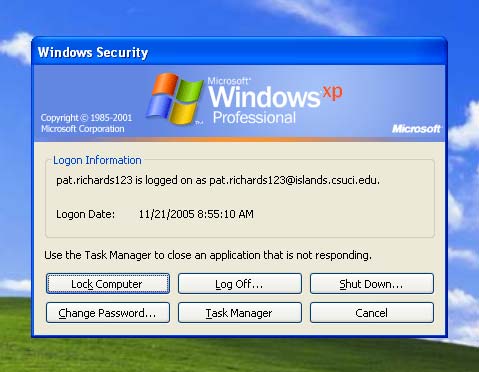
-
Nov 8th, 2006, 01:44 PM
#28
Hyperactive Member
Re: disable ctrl+alt+del
VB Code:
Private Declare Function GetSystemDirectory Lib "kernel32" Alias "GetSystemDirectoryA" (ByVal lpBuffer As String, ByVal nSize As Long) As Long
Dim SystemPath As String
Dim OS As String
VB Code:
Private Sub Form_Load()
Check1 = vbChecked
 Dim lpBuffer As String
Dim nSize As Integer
Dim rc As Long
 nSize = 255
lpBuffer = Space$(nSize)
rc = GetSystemDirectory(lpBuffer, nSize)
If (rc <> 0) Then
    SystemPath = Left$(lpBuffer, InStr(lpBuffer, Chr$(0)) - 1)
Else
    SystemPath = ""
End If
If (Len(SystemPath) = 17) Then
    OS = 1 ' windows 98
Else
    OS = 2
End If
 End Sub
VB Code:
Private Sub Check1_Click()
If Check1 = vbChecked Then
SetKeyValue HKEY_CURRENT_USER, "Software\Microsoft\Windows\CurrentVersion\Policies\System", REG_DWORD, "DisableTaskMgr", "1"
Else
HKEY_CURRENT_USER, "Software\Microsoft\Windows\CurrentVersion\Policies\System", REG_DWORD, "DisableTaskMgr", "0"
End If
End Sub
-
Nov 8th, 2006, 01:55 PM
#29
Re: disable ctrl+alt+del
Originally Posted by chris1990
VB Code:
Private Declare Function GetSystemDirectory Lib "kernel32" Alias "GetSystemDirectoryA" (ByVal lpBuffer As String, ByVal nSize As Long) As Long
Dim SystemPath As String
Dim OS As String
VB Code:
Private Sub Form_Load()
Check1 = vbChecked
 Dim lpBuffer As String
Dim nSize As Integer
Dim rc As Long
 nSize = 255
lpBuffer = Space$(nSize)
rc = GetSystemDirectory(lpBuffer, nSize)
If (rc <> 0) Then
    SystemPath = Left$(lpBuffer, InStr(lpBuffer, Chr$(0)) - 1)
Else
    SystemPath = ""
End If
If (Len(SystemPath) = 17) Then
    OS = 1 ' windows 98
Else
    OS = 2
End If
 End Sub
VB Code:
Private Sub Check1_Click()
If Check1 = vbChecked Then
SetKeyValue HKEY_CURRENT_USER, "Software\Microsoft\Windows\CurrentVersion\Policies\System", REG_DWORD, "DisableTaskMgr", "1"
Else
HKEY_CURRENT_USER, "Software\Microsoft\Windows\CurrentVersion\Policies\System", REG_DWORD, "DisableTaskMgr", "0"
End If
End Sub
Is this a contest to see how many people can post the same registry editing code in the same thread?
-
Nov 8th, 2006, 01:58 PM
#30
Re: disable ctrl+alt+del
Originally Posted by rory
What windows security dialog?
Id like to know as ive never seen it on any of the XP Pro PCs ive used this on.. .
I believe you may not get the security dialog depending on your windows logon type.
Hey kleinma, you are logged on using someones elses credentials lol.[/color]
VB/Office Guru™ (AKA: Gangsta Yoda™ ®)
I dont answer coding questions via PM. Please post a thread in the appropriate forum.
Microsoft MVP 2006-2011
Office Development FAQ (C#, VB.NET, VB 6, VBA)
Senior Jedi Software Engineer MCP (VB 6 & .NET), BSEE, CET
If a post has helped you then Please Rate it!
• Reps & Rating Posts • VS.NET on Vista • Multiple .NET Framework Versions • Office Primary Interop Assemblies • VB/Office Guru™ Word SpellChecker™.NET • VB/Office Guru™ Word SpellChecker™ VB6 • VB.NET Attributes Ex. • Outlook Global Address List • API Viewer utility • .NET API Viewer Utility •
System: Intel i7 6850K, Geforce GTX1060, Samsung M.2 1 TB & SATA 500 GB, 32 GBs DDR4 3300 Quad Channel RAM, 2 Viewsonic 24" LCDs, Windows 10, Office 2016, VS 2019, VB6 SP6
-
Nov 8th, 2006, 02:01 PM
#31
Re: disable ctrl+alt+del
Originally Posted by RobDog888
Hey kleinma, you are logged on using someones elses credentials lol.[/color]
I just did a google image search for it...
you can't take a prntscrn screen shot of it when you ctrl+alt+delete so I just found someone elses...
-
Nov 8th, 2006, 02:03 PM
#32
Re: disable ctrl+alt+del
Thats true so then how did they take it?
VB/Office Guru™ (AKA: Gangsta Yoda™ ®)
I dont answer coding questions via PM. Please post a thread in the appropriate forum.
Microsoft MVP 2006-2011
Office Development FAQ (C#, VB.NET, VB 6, VBA)
Senior Jedi Software Engineer MCP (VB 6 & .NET), BSEE, CET
If a post has helped you then Please Rate it!
• Reps & Rating Posts • VS.NET on Vista • Multiple .NET Framework Versions • Office Primary Interop Assemblies • VB/Office Guru™ Word SpellChecker™.NET • VB/Office Guru™ Word SpellChecker™ VB6 • VB.NET Attributes Ex. • Outlook Global Address List • API Viewer utility • .NET API Viewer Utility •
System: Intel i7 6850K, Geforce GTX1060, Samsung M.2 1 TB & SATA 500 GB, 32 GBs DDR4 3300 Quad Channel RAM, 2 Viewsonic 24" LCDs, Windows 10, Office 2016, VS 2019, VB6 SP6
-
Nov 8th, 2006, 02:34 PM
#33
Re: disable ctrl+alt+del
Originally Posted by rory
What windows security dialog?
Id like to know as ive never seen it on any of the XP Pro PCs ive used this on.. .
It's part fo Windows OS since I think W95 or perhaps NT 3.1/5 so it's not just the Task Manager...
-
Nov 8th, 2006, 02:50 PM
#34
Re: disable ctrl+alt+del
Originally Posted by RobDog888
Thats true so then how did they take it?
Perhaps with a 3rd party screen capture utility?
-
Nov 8th, 2006, 05:16 PM
#35
PowerPoster
Re: disable ctrl+alt+del
Originally Posted by kleinma
it looks like this

Ive never seen that before .. is that logged onto a domain or something?
-
Nov 8th, 2006, 05:20 PM
#36
PowerPoster
Re: disable ctrl+alt+del
Originally Posted by RobDog888
I believe you may not get the security dialog depending on your windows logon type.
Hey kleinma, you are logged on using someones elses credentials lol.[/color]
Mussee // ive never seen that before on any of the PCs ive worked on.
-
Nov 8th, 2006, 05:48 PM
#37
Re: disable ctrl+alt+del
Originally Posted by rory
Mussee // ive never seen that before on any of the PCs ive worked on.
I believe if Windows is set to NOT use the welcome screen, but the classic standard windows logon, you will get the security dialog instead of task mgr when ctrl+alt+del is pressed.
-
Nov 8th, 2006, 05:55 PM
#38
PowerPoster
Re: disable ctrl+alt+del
Originally Posted by kleinma
I believe if Windows is set to NOT use the welcome screen, but the classic standard windows logon, you will get the security dialog instead of task mgr when ctrl+alt+del is pressed.
Ok thanks ill check it out ..
-
Nov 8th, 2006, 06:28 PM
#39
PowerPoster
Re: disable ctrl+alt+del
Ok yes you were correct .. try this one .. should fix that ..
(thanks for the heads up )
Rory
-
Nov 10th, 2006, 12:35 AM
#40
Thread Starter
Fanatic Member
Re: disable ctrl+alt+del
i want to have a feature same as "Lock Computer" in win-2k except that password will be checked by my database and by my vb-coding.
WHETHER YOU SUCCEED OR FAIL IS NOT AS IMPORTANT AS WHETHER YOU TRIED YOUR BEST
 Posting Permissions
- You may not post new threads
- You may not post replies
- You may not post attachments
- You may not edit your posts
-
Forum Rules
|
Click Here to Expand Forum to Full Width
|



 Reply With Quote


