|

-
Aug 14th, 2008, 08:16 PM
#1
Thread Starter
New Member

 [RESOLVED] VText.dll, dependency info [RESOLVED] VText.dll, dependency info
I have a VB6 program which uses the Microsoft Voice Text component. The program runs OK on my PC, but I am having trouble with the Package and Deployment Wizard. I have not used the Wizard before, so I'll just say what I did:
Open Wizard > Click "Package" > Packaging Script = "(None)" > Package type = "Standard Setup Package" > (Select Folder Location)
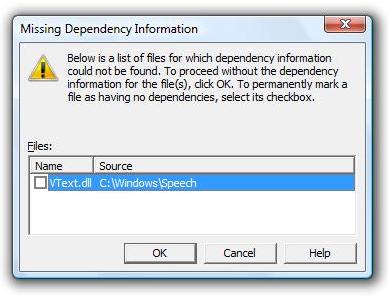
When I clcik "Next" at this point I get a message about VText.dll not having dependency information. I have attached a screenshot of this message.
What do I do from here? Thanks!
-
Aug 15th, 2008, 06:28 AM
#2
Re: VText.dll, dependency info
Moved To Application Deployement
Say OK and see what happens.
Do you have a "clean" test machine you can use to test out your install package?
-
Aug 17th, 2008, 09:58 PM
#3
Re: VText.dll, dependency info
See Speech SDK 5.1 or a later version.
There are over 130MB of dependencies.
If you want to redistribute the Speech API and/or the Speech engines to integrate and ship as a part of your product, download the Speech 5.1 SDK Redistributables file (SpeechSDK51MSM.exe).
Note that they are packaged as a Windows Installer merge module there. Thus there is no easy way to package via PDW and you might try VS Installer 1.1 instead.
Last edited by dilettante; Aug 17th, 2008 at 10:03 PM.
-
Aug 17th, 2008, 10:49 PM
#4
Thread Starter
New Member
Re: VText.dll, dependency info
Thanks Hack and dilettante.
I think I have resolved the problem. I installed the Visual Studio Installer 1.1 http://msdn.microsoft.com/en-us/vs2005/aa718352.aspx
and created an installer for my program through that. Everything seems to be working OK.

Edit: (I tried clicking OK on that dialog box in my first post, but when I tried to use that installer for my program it would not install successfully)
 Posting Permissions
- You may not post new threads
- You may not post replies
- You may not post attachments
- You may not edit your posts
-
Forum Rules
|
Click Here to Expand Forum to Full Width
|



 Reply With Quote

