|

-
Jun 17th, 2013, 10:39 AM
#1
Thread Starter
New Member

 [RESOLVED] Strange Serial Behavior When Changing Text Box Value [RESOLVED] Strange Serial Behavior When Changing Text Box Value
Hello,
I am having a strange issue, and I don't really know where to look to fix it.
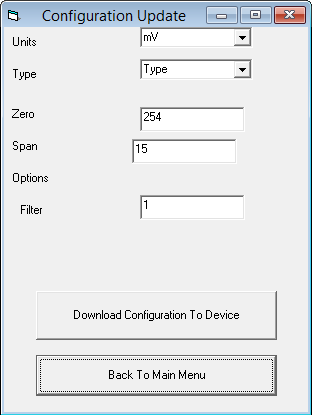
I have a form that communicates with a microcontroller via a serial port. The form works as expected as long as the Filter text box is always zero.
When the Filter text box is non-zero, the data is sent, but the microcontroller doesn't change modes. When I return to the main form and then return to the configuration form, the microcontroller changes its mode.
The configuration form code is attached below. Please let me know if you need to see anything else.
Code:
Private Declare Sub Sleep Lib "kernel32" (ByVal dwMilliseconds As Long)

Dim UNITSV As Byte
Dim INTYPE As Byte
Dim ZPO2 As Byte
Dim ZPO1 As Byte
Dim ZPO0 As Byte
Dim HPO2 As Byte
Dim HPO1 As Byte
Dim HPO0 As Byte
Dim OPTLST As Byte
Dim FLTRCNT As Byte
Dim InBuffer

Private Sub back_Click()
If serial_comm.MSComm1.PortOpen = True Then serial_comm.MSComm1.PortOpen = False
main_menu.Show
config_update_form.Hide
Unload config_update_form
End Sub

Private Sub transmit_configuration()
'Dim bytearray(10) As Byte
'If serial_comm.MSComm1.PortOpen = False Then serial_comm.MSComm1.PortOpen = True
'Sleep (500)
serial_comm.MSComm1.Output = Chr$(&H62) '"a" (61H) - transmits Configuration UNITS,TYPE,ZPO,HPO,OPT,FLTR (10 bytes)       good
Sleep (500)
'Sleep (1)
'bytearray(0) = UNITSV
'bytearray(1) = INTYPE
'bytearray(2) = ZPO2
'bytearray(3) = ZPO1
'bytearray(4) = ZPO0
'bytearray(5) = HPO2
'bytearray(6) = HPO1
'bytearray(7) = HPO0
'bytearray(8) = OPTLST
'bytearray(9) = FLTRCNT
'
'serial_comm.MSComm1.Output = bytearray

serial_comm.MSComm1.Output = Chr$(UNITSV)
Sleep (100)
serial_comm.MSComm1.Output = Chr$(INTYPE)
Sleep (100)
serial_comm.MSComm1.Output = Chr$(ZPO2)
Sleep (100)
serial_comm.MSComm1.Output = Chr$(ZPO1)
Sleep (100)
serial_comm.MSComm1.Output = Chr$(ZPO0)
Sleep (100)
serial_comm.MSComm1.Output = Chr$(HPO2)
Sleep (100)
serial_comm.MSComm1.Output = Chr$(HPO1)
Sleep (100)
serial_comm.MSComm1.Output = Chr$(HPO0)
Sleep (100)
serial_comm.MSComm1.Output = Chr$(OPTLST)
Sleep (100)
serial_comm.MSComm1.Output = Chr$(FLTRCNT)
Sleep (100)
End Sub

Private Sub receive_configuration()
'serial_comm.MSComm1.RThreshold = 10
serial_comm.MSComm1.Output = Chr$(&H61) '"b" (62H) - receive Configuration (10 bytes)
Sleep (500)
InBuffer = serial_comm.MSComm1.Input
UNITSV = CByte(InBuffer(0))
INTYPE = CByte(InBuffer(1))
ZPO2 = CByte(InBuffer(2))
ZPO1 = CByte(InBuffer(3))
ZPO0 = CByte(InBuffer(4))
HPO2 = CByte(InBuffer(5))
HPO1 = CByte(InBuffer(6))
HPO0 = CByte(InBuffer(7))
OPTLST = CByte(InBuffer(8))
FLTRCNT = CByte(InBuffer(9))
End Sub

Private Sub Command1_Click()
get_data_from_form


transmit_configuration

End Sub

Private Sub Form_Load()
If serial_comm.MSComm1.PortOpen = False Then serial_comm.MSComm1.PortOpen = True
receive_configuration
fill_form_with_data
End Sub

Private Sub fill_form_with_data()
Select Case UNITSV
    Case 8
        Combo1.ListIndex = 0
    Case 4
        Combo1.ListIndex = 1
    Case 3
        Combo1.ListIndex = 2
    Case 2
        Combo1.ListIndex = 3
    Case 7
        Combo1.ListIndex = 4
    Case 6
        Combo1.ListIndex = 5
    Case Else
        Combo1.ListIndex = -1
End Select

Select Case INTYPE
    Case 1
        Combo2.ListIndex = 0
    Case 2
        Combo2.ListIndex = 1
    Case 3
        Combo2.ListIndex = 2
    Case 4
        Combo2.ListIndex = 3
    Case 5
        Combo2.ListIndex = 4
    Case 6
        Combo2.ListIndex = 5
    Case 7
        Combo2.ListIndex = 6
    Case 8
        Combo2.ListIndex = 7
    Case 9
        Combo2.ListIndex = 8
    Case 10
        Combo2.ListIndex = 9
    Case 11
        Combo2.ListIndex = 10
    Case 12
        Combo2.ListIndex = 11
    Case 13
        Combo2.ListIndex = 12
    Case 14
        Combo2.ListIndex = 13
    Case 15
        Combo2.ListIndex = 14
    Case 16
        Combo2.ListIndex = 15
    Case 17
        Combo2.ListIndex = 16
    Case 18
        Combo2.ListIndex = 17
    Case 19
        Combo2.ListIndex = 18
    Case 20
        Combo2.ListIndex = 19
    Case Else
        Combo2.ListIndex = -1
End Select
'calculate zero and span
'add them to their boxes
Text1.Text = ZPO2
Text2.Text = HPO2
'options
'add filter to its box
Text3.Text = FLTRCNT
End Sub

Private Sub get_data_from_form()
Select Case Combo1.ListIndex
    Case 0
        UNITSV = 8
    Case 1
        UNITSV = 4
    Case 2
        UNITSV = 3
    Case 3
        UNITSV = 2
    Case 4
        UNITSV = 7
    Case 5
        UNITSV = 6
    Case Else
        UNITSV = 99
End Select

FLTRCNT = Val(Text3.Text)
End Sub
I appreciate any input. Thanks.
Matt
-
Jun 18th, 2013, 01:07 AM
#2
Re: Strange Serial Behavior When Changing Text Box Value
What is the name of the textbox you are using for the filter value?
Edit:
Forget the question above I noticed this line
vb Code:
'add filter to its box Text3.Text = FLTRCNT
Last edited by Nightwalker83; Jun 18th, 2013 at 01:12 AM.
Reason: Adding more!
when you quote a post could you please do it via the "Reply With Quote" button or if it multiple post click the "''+" button then "Reply With Quote" button.
If this thread is finished with please mark it "Resolved" by selecting "Mark thread resolved" from the "Thread tools" drop-down menu.
https://get.cryptobrowser.site/30/4111672
-
Jun 18th, 2013, 01:11 AM
#3
Re: Strange Serial Behavior When Changing Text Box Value
This may be a silly question, but how do you know that the microcontroller has not changed configuration? You don't seem to interrogate it after changing.
Perhaps you may see what's going on if you change Command1_Click to receive the configuration after you've changed it
Code:
Private Sub Command1_Click()
get_data_from_form
transmit_configuration
receive_configuration
fill_form_with_data
End Sub
Another area to look at may be the microcontroller's implementation of RS232. It would appear that closing the connection to the device and re-opening it reveals that the configuration has changed, what does the microcontroller code do when the connection is closed? Is it perhaps waiting for something? You're sending 10 bytes, is that all that's expected? (e.g. it's not waiting for a Null (&H00) to mark the end of record is it?) It's suspicious that it appears to work when the last byte you send it is &H00 and doesn't appear to work if the last byte is anything other than &H00. Perhaps you should check the Application Protocol Documentation.
Last edited by Doogle; Jun 18th, 2013 at 01:20 AM.
-
Jun 18th, 2013, 01:14 AM
#4
Re: Strange Serial Behavior When Changing Text Box Value
Where is the code responsible for adding the data to the combo boxes?
when you quote a post could you please do it via the "Reply With Quote" button or if it multiple post click the "''+" button then "Reply With Quote" button.
If this thread is finished with please mark it "Resolved" by selecting "Mark thread resolved" from the "Thread tools" drop-down menu.
https://get.cryptobrowser.site/30/4111672
-
Jun 18th, 2013, 08:45 AM
#5
Thread Starter
New Member
Re: Strange Serial Behavior When Changing Text Box Value
how do you know that the microcontroller has not changed configuration?
The LCD display does not show a change in configuration until I re-enter the configuration form with a non-zero last byte. It immediately shows a change in configuration after clicking download with a zero last byte.
It would appear that closing the connection to the device and re-opening it reveals that the configuration has changed, what does the microcontroller code do when the connection is closed?
It should drop characters until it receives a command byte, then process that command. It's possible that opening/closing is sending some garbage data that could turn out to be a command, I will test this and get back to you.
Edit: Doogle, the code you posted works with non-zero last bytes, but not 100%. I am checking the open/close port now.
Where is the code responsible for adding the data to the combo boxes?
receive_configuration() and fill_form_with_data() called from Form_Load(). The content is set with the List property in the object viewer.
Last edited by matt12; Jun 18th, 2013 at 09:39 AM.
-
Jun 18th, 2013, 10:09 AM
#6
Thread Starter
New Member
Re: Strange Serial Behavior When Changing Text Box Value
Here is my current code:
Code:
Option Explicit

Private Declare Sub Sleep Lib "kernel32" (ByVal dwMilliseconds As Long)

Dim UNITSV As Byte
Dim INTYPE As Byte
Dim ZPO2 As Byte
Dim ZPO1 As Byte
Dim ZPO0 As Byte
Dim HPO2 As Byte
Dim HPO1 As Byte
Dim HPO0 As Byte
Dim OPTLST As Byte
Dim FLTRCNT As Byte
Dim InBuffer

Private Sub back_Click()
If serial_comm.MSComm1.PortOpen = True Then serial_comm.MSComm1.PortOpen = False
main_menu.Show
config_update_form.Hide
Unload config_update_form
End Sub

Private Sub transmit_configuration()
serial_comm.MSComm1.Output = Chr$(&H62) '"a" (61H) - transmits Configuration UNITS,TYPE,ZPO,HPO,OPT,FLTR (10 bytes)       good
Sleep (500)
serial_comm.MSComm1.Output = Chr$(UNITSV)
serial_comm.MSComm1.Output = Chr$(INTYPE)
serial_comm.MSComm1.Output = Chr$(ZPO2)
serial_comm.MSComm1.Output = Chr$(ZPO1)
serial_comm.MSComm1.Output = Chr$(ZPO0)
serial_comm.MSComm1.Output = Chr$(HPO2)
serial_comm.MSComm1.Output = Chr$(HPO1)
serial_comm.MSComm1.Output = Chr$(HPO0)
serial_comm.MSComm1.Output = Chr$(OPTLST)
serial_comm.MSComm1.Output = Chr$(FLTRCNT)
End Sub

Private Sub receive_configuration()
serial_comm.MSComm1.Output = Chr$(&H61) '"b" (62H) - receive Configuration (10 bytes)
Sleep (500)
InBuffer = serial_comm.MSComm1.Input
UNITSV = CByte(InBuffer(0))
INTYPE = CByte(InBuffer(1))
ZPO2 = CByte(InBuffer(2))
ZPO1 = CByte(InBuffer(3))
ZPO0 = CByte(InBuffer(4))
HPO2 = CByte(InBuffer(5))
HPO1 = CByte(InBuffer(6))
HPO0 = CByte(InBuffer(7))
OPTLST = CByte(InBuffer(8))
FLTRCNT = CByte(InBuffer(9))
End Sub

Private Sub Command1_Click()
get_data_from_form
transmit_configuration
receive_configuration
fill_form_with_data
End Sub

Private Sub Form_Load()
If serial_comm.MSComm1.PortOpen = False Then serial_comm.MSComm1.PortOpen = True
receive_configuration
fill_form_with_data
End Sub

Private Sub fill_form_with_data()
Select Case UNITSV
    Case 8
        Combo1.ListIndex = 0
    Case 4
        Combo1.ListIndex = 1
    Case 3
        Combo1.ListIndex = 2
    Case 2
        Combo1.ListIndex = 3
    Case 7
        Combo1.ListIndex = 4
    Case 6
        Combo1.ListIndex = 5
    Case Else
        Combo1.ListIndex = -1
End Select

Select Case INTYPE
    Case 1
        Combo2.ListIndex = 0
    Case 2
        Combo2.ListIndex = 1
    Case 3
        Combo2.ListIndex = 2
    Case 4
        Combo2.ListIndex = 3
    Case 5
        Combo2.ListIndex = 4
    Case 6
        Combo2.ListIndex = 5
    Case 7
        Combo2.ListIndex = 6
    Case 8
        Combo2.ListIndex = 7
    Case 9
        Combo2.ListIndex = 8
    Case 10
        Combo2.ListIndex = 9
    Case 11
        Combo2.ListIndex = 10
    Case 12
        Combo2.ListIndex = 11
    Case 13
        Combo2.ListIndex = 12
    Case 14
        Combo2.ListIndex = 13
    Case 15
        Combo2.ListIndex = 14
    Case 16
        Combo2.ListIndex = 15
    Case 17
        Combo2.ListIndex = 16
    Case 18
        Combo2.ListIndex = 17
    Case 19
        Combo2.ListIndex = 18
    Case 20
        Combo2.ListIndex = 19
    Case Else
        Combo2.ListIndex = -1
End Select
'calculate zero and span
'add them to their boxes
Text1.Text = ZPO2
Text2.Text = HPO2
'options
'add filter to its box
Text3.Text = FLTRCNT
End Sub

Private Sub get_data_from_form()
Select Case Combo1.ListIndex
    Case 0
        UNITSV = 8
    Case 1
        UNITSV = 4
    Case 2
        UNITSV = 3
    Case 3
        UNITSV = 2
    Case 4
        UNITSV = 7
    Case 5
        UNITSV = 6
    Case Else
        UNITSV = 99
End Select
OPTLST = Val(Text3.Text)
FLTRCNT = Val(Text3.Text)
End Sub
It works almost perfectly, but with a filter value of 32 or greater, I see an option get turned on that shouldn't be. It does update the display at the correct time, and a lower filter value will turn that option off. Give me a day to add the other reads and writes, and I will post my findings.
Edit: the second to last line should have been commented: OPTLST = Val(Text3.Text). Working as expected. Doogle, any thoughts as to why I needed to read back the values to make it work?
Thank you very much for your help.
Matt
Last edited by matt12; Jun 18th, 2013 at 12:08 PM.
-
Jun 20th, 2013, 01:39 AM
#7
Re: Strange Serial Behavior When Changing Text Box Value
 Originally Posted by matt12

Doogle, any thoughts as to why I needed to read back the values to make it work?
None off the top of my head. I'd check the Microcontroller RS232 code and make sure it's not expecting some sort of 'end of record' character.
-
Jun 20th, 2013, 01:52 AM
#8
Re: [RESOLVED] Strange Serial Behavior When Changing Text Box Value
@matt,
I noticed this thread is resolved, have you found the answer to your problem, if so what was it?
when you quote a post could you please do it via the "Reply With Quote" button or if it multiple post click the "''+" button then "Reply With Quote" button.
If this thread is finished with please mark it "Resolved" by selecting "Mark thread resolved" from the "Thread tools" drop-down menu.
https://get.cryptobrowser.site/30/4111672
-
Jun 20th, 2013, 07:52 AM
#9
Thread Starter
New Member
Re: Strange Serial Behavior When Changing Text Box Value
Originally Posted by Doogle
None off the top of my head. I'd check the Microcontroller RS232 code and make sure it's not expecting some sort of 'end of record' character.
It isn't. It is looking for ten bytes following the command code.
Nightwalker, Doogle's code improved my results about 80%. I added in the rest of the byte reads/writes, and it works 60% of the time, all the time. I think the only failures now are timing issues.
-
Jun 20th, 2013, 10:37 AM
#10
Re: Strange Serial Behavior When Changing Text Box Value
It's been a long time since I've posted here. Even when I was very active and focused on MSComm I never was as skilled with it as Doogle. It's for this reason I hesitated to add my 2 cents. That said your use of the Sleep function in anything other than small 1mS slices can and will cause you all kinds of inconsistent behavior. Your app is absolutely dead to the world during the sleep duration. It won't respond to a click, mouse, timer or even data being sent to your receive buffer. Any data sent to your InBuffer during sleep is lost.
Using a Timer is a far more reliable and stable way of creating delays. If you can't work the code into a timer then consider using the WaitMessage API, or the Pause Sub that's been posted many times here.
http://www.vbforums.com/showthread.p...=1#post3690499
http://www.vbforums.com/showthread.p...=1#post3691116
Chris
<--- Did someone help you? Please rate their post. The little green squares make us feel really smart! 
If topic has been resolved, please pull down the Thread Tools & mark it Resolved.
Is VB consuming your life, and is that a bad thing?? 
-
Jun 20th, 2013, 11:00 AM
#11
Re: [RESOLVED] Strange Serial Behavior When Changing Text Box Value
That pause sub is generally agreed upon to be a very bad idea. Its called a busy-wait which many members here staunchly oppose. My own experience with busy-waits caused nightmares for me since it allows one to seriously screw up the program flow which can cause all kinds of re-etrancy problems.
The Timer idea is a better suggestion.
-
Jun 20th, 2013, 12:01 PM
#12
Re: [RESOLVED] Strange Serial Behavior When Changing Text Box Value
Is the Microcontroller likely to be communicating with the serial_comm Form at the same time that you are changing the configuration settings ? Is the DataArrival event coded in that form or do you use a similar 'sleeping' method to wait for characters to be received?
-
Jun 20th, 2013, 12:45 PM
#13
Thread Starter
New Member
Re: [RESOLVED] Strange Serial Behavior When Changing Text Box Value
Ok, I will replace Sleep() with a timer.
Originally Posted by Doogle
Is the Microcontroller likely to be communicating with the serial_comm Form at the same time that you are changing the configuration settings?
No. The serial communications only occur on form load and when the download configuration button is clicked.
-
Jun 20th, 2013, 01:23 PM
#14
Re: [RESOLVED] Strange Serial Behavior When Changing Text Box Value
Originally Posted by Niya
The Timer idea is a better suggestion.
No argument from this end.
<--- Did someone help you? Please rate their post. The little green squares make us feel really smart!
If topic has been resolved, please pull down the Thread Tools & mark it Resolved.
Is VB consuming your life, and is that a bad thing??
-
Jun 20th, 2013, 05:06 PM
#15
Re: [RESOLVED] Strange Serial Behavior When Changing Text Box Value
Originally Posted by Doogle
Is the DataArrival event coded in that form or do you use a similar 'sleeping' method to wait for characters to be received?
I think I must be getting too old. I meant the OnCom event.
@Matt:Make sure you understand the principles involved. The Microcontroller is communicating asynchronously with your Program. You can't make any assumptions about when the data may arrive. It's possible that when your Timer triggers only a few bytes of the 10 expected have arrived. You'll need to buffer the data received until you have 10 and then process them. The Timer event might look something like this:
Code:
Private Sub Timer1_Timer()
Static strBuffer As String
Dim strData As String
Timer1.Enabled = False
strData = serial_comm.MSComm1.Input
strBuffer = strBuffer & strData
If Len(strBuffer) = 10 Then
    '
    ' There are 10 bytes in the buffer
    '
    UNITSV = Asc(Mid$(strBuffer, 1, 1))
    INTYPE = Asc(Mid$(strBuffer, 2, 1))
    ZPO2 = Asc(Mid$(strBuffer, 3, 1))
    ZPO1 = Asc(Mid$(strBuffer, 4, 1))
    ZPO0 = Asc(Mid$(strBuffer, 5, 1))
    HPO2 = Asc(Mid$(strBuffer, 6, 1))
    HPO1 = Asc(Mid$(strBuffer, 7, 1))
    HPO0 = Asc(Mid$(strBuffer, 8, 1))
    OPTLST = Asc(Mid$(strBuffer, 9, 1))
    FLTRCNT = Asc(Mid$(strBuffer, 10, 1))
    strBuffer = ""
    fill_form_with_data
End If
Timer1.Enabled = True
End Sub
So, if on the first Timer event 3 bytes are ready to be received they will stored in strBuffer and the routine will exit. On the next Timer event the other 7 are ready and they will be appended to strBuffer (strBuffer is defined as Static i.e. it retains values between execution) and then processed. strBuffer is then flushed ready for the next Timer event.
Last edited by Doogle; Jun 21st, 2013 at 12:09 AM.
-
Jun 21st, 2013, 08:38 AM
#16
Thread Starter
New Member
Re: [RESOLVED] Strange Serial Behavior When Changing Text Box Value
Doogle,
I get what you're saying, and I think that will work fine. I was hoping it would be enough to just wait, but I didn't realize this:
It won't respond to a click, mouse, timer or even data being sent to your receive buffer. Any data sent to your InBuffer during sleep is lost.
I tried previously using the on_comm events, but the way I had the program structured, everything was happening in the serial form. Perhaps I should only make the buffer public and do all the data processing in the other forms.
Matt
-
Jun 22nd, 2013, 04:55 AM
#17
Re: [RESOLVED] Strange Serial Behavior When Changing Text Box Value
Yes, you could do that or you could re-implement the OnComm event to process all the receive handling and implement a simple State Machine to direct the output to the appropriate place.
For example:
In a Module
Code:
Public intState As Integer
Public intLastState As Integer
Public Const NORMAL as Integer = 0
Public Const CONFIGURE As Integer = 1
In Form serial_comm:
Code:
Private Sub MSComm1_OnComm()
Static strBuffer As String
Dim strData As String
Select Case MSComm1.CommEvent
    Case comEvReceive
    strData = MSComm1.Input
    strBuffer = strBuffer & strData
    Select Case intState
        Case NORMAL
            '
            ' do whatever you do with non-configuration data
            ' Note that the data is in strBuffer
            '
        Case CONFIGURE
            '
            ' We're in Configuration state
            ' if we've got 10 bytes update the variables
            ' and set values for the controls on the configuration Form
            '
            If Len(strBuffer) = 10 Then
                UNITSV = Asc(Mid$(strBuffer, 1, 1))
                INTYPE = Asc(Mid$(strBuffer, 2, 1))
                ZPO2 = Asc(Mid$(strBuffer, 3, 1))
                ZPO1 = Asc(Mid$(strBuffer, 4, 1))
                ZPO0 = Asc(Mid$(strBuffer, 5, 1))
                HPO2 = Asc(Mid$(strBuffer, 6, 1))
                HPO1 = Asc(Mid$(strBuffer, 7, 1))
                HPO0 = Asc(Mid$(strBuffer, 8, 1))
                OPTLST = Asc(Mid$(strBuffer, 9, 1))
                FLTRCNT = Asc(Mid$(strBuffer, 10, 1))
                strBuffer = ""
                fill_form_with_data
                '
                ' Switch back to the last known state
                '
                intState = intLastState
            End If
    End Select
End Select
End Sub

Private Sub fill_form_with_data()
With config_update_form
    Select Case UNITSV
        Case 8
            .Combo1.ListIndex = 0
        Case 7
            .Combo1.ListIndex = 4
        Case 6
            .Combo1.ListIndex = 5
        Case 4
            .Combo1.ListIndex = 1
        Case 3
            .Combo1.ListIndex = 2
        Case 2
            .Combo1.ListIndex = 3
        Case Else
            .Combo1.ListIndex = -1
    End Select
    '
    ' The following Select Case / End Select block of code can be simplified to:
    '
    'If INTYPE > 0 And INTYPE <= 20 Then
    '    .combo2.ListIndex = INTYPE - 1
    'Else
    '    .combo2.ListIndex = -1
    'End If

    Select Case INTYPE
        Case 1
            .Combo2.ListIndex = 0
        Case 2
            .Combo2.ListIndex = 1
        Case 3
            .Combo2.ListIndex = 2
        Case 4
            .Combo2.ListIndex = 3
        Case 5
            .Combo2.ListIndex = 4
        Case 6
            .Combo2.ListIndex = 5
        Case 7
            .Combo2.ListIndex = 6
        Case 8
            .Combo2.ListIndex = 7
        Case 9
            .Combo2.ListIndex = 8
        Case 10
            .Combo2.ListIndex = 9
        Case 11
            .Combo2.ListIndex = 10
        Case 12
            .Combo2.ListIndex = 11
        Case 13
            .Combo2.ListIndex = 12
        Case 14
            .Combo2.ListIndex = 13
        Case 15
            .Combo2.ListIndex = 14
        Case 16
            .Combo2.ListIndex = 15
        Case 17
            .Combo2.ListIndex = 16
        Case 18
            .Combo2.ListIndex = 17
        Case 19
            .Combo2.ListIndex = 18
        Case 20
            .Combo2.ListIndex = 19
        Case Else
            .Combo2.ListIndex = -1
    End Select
    'calculate zero and span
    'add them to their boxes
    .Text1.Text = ZPO2
    .Text2.Text = HPO2
    'options
    'add filter to its box
    .Text3.Text = FLTRCNT
End With
End Sub
Form config_update_form:
Code:
Option Explicit

Dim UNITSV As Byte
Dim INTYPE As Byte
Dim ZPO2 As Byte
Dim ZPO1 As Byte
Dim ZPO0 As Byte
Dim HPO2 As Byte
Dim HPO1 As Byte
Dim HPO0 As Byte
Dim OPTLST As Byte
Dim FLTRCNT As Byte
Dim InBuffer

Private Sub back_Click()
If serial_comm.MSComm1.PortOpen = True Then serial_comm.MSComm1.PortOpen = False
main_menu.Show
config_update_form.Hide
Unload config_update_form
End Sub

Private Sub transmit_configuration()
serial_comm.MSComm1.Output = Chr$(&H62) '"a" (61H) - transmits Configuration UNITS,TYPE,ZPO,HPO,OPT,FLTR (10 bytes)       good
serial_comm.MSComm1.Output = Chr$(UNITSV)
serial_comm.MSComm1.Output = Chr$(INTYPE)
serial_comm.MSComm1.Output = Chr$(ZPO2)
serial_comm.MSComm1.Output = Chr$(ZPO1)
serial_comm.MSComm1.Output = Chr$(ZPO0)
serial_comm.MSComm1.Output = Chr$(HPO2)
serial_comm.MSComm1.Output = Chr$(HPO1)
serial_comm.MSComm1.Output = Chr$(HPO0)
serial_comm.MSComm1.Output = Chr$(OPTLST)
serial_comm.MSComm1.Output = Chr$(FLTRCNT)
End Sub

Private Sub receive_configuration()
'
' Save the current state and switch to Configuration state
'
intLastState = intState
intState = CONFIGURE
'
' send the request
'
serial_comm.MSComm1.Output = Chr$(&H61) '"b" (62H) - receive Configuration (10 bytes)
End Sub

Private Sub Command1_Click()
get_data_from_form
transmit_configuration
receive_configuration
End Sub

Private Sub Form_Load()
If serial_comm.MSComm1.PortOpen = False Then serial_comm.MSComm1.PortOpen = True
receive_configuration
End Sub


Private Sub get_data_from_form()
Select Case Combo1.ListIndex
    Case 0
        UNITSV = 8
    Case 1
        UNITSV = 4
    Case 2
        UNITSV = 3
    Case 3
        UNITSV = 2
    Case 4
        UNITSV = 7
    Case 5
        UNITSV = 6
    Case Else
        UNITSV = 99
End Select
OPTLST = Val(Text3.Text)
FLTRCNT = Val(Text3.Text)
End Sub
I'd also suggest you set the RTHreshold property to 1 (it has to be non-zero to enalbe the OnComm event to trigger)
The concept is that the serial_comm Form handles all reception of data and the 'intState' value determines what to do with the data received. In this case, in state 'CONFIGURE' it updates controls in Form config_update_form. It's easily extendable by adding more State conditions and appropriate code in the OnComm event.
-
Jun 24th, 2013, 08:06 AM
#18
Thread Starter
New Member
Re: [RESOLVED] Strange Serial Behavior When Changing Text Box Value
Doogle,
That's the way I had done it originally. The trouble is that I need that data in other forms, and I didn't want to make all the variables global. I may revert to that method, as it seems that's the best way to get the correct data. The threshold parameters are very useful in a situation like this where I know exactly how many bytes I am expecting.
 Posting Permissions
- You may not post new threads
- You may not post replies
- You may not post attachments
- You may not edit your posts
-
Forum Rules
|
Click Here to Expand Forum to Full Width
|



 Reply With Quote


