|

-
May 25th, 2013, 09:52 AM
#1
Thread Starter
Junior Member

 [RESOLVED]Multiple adressof to 1 sub? [RESOLVED]Multiple adressof to 1 sub?
Hi all,
I'm trying to make a dynamic input form. But to do this I need to be able to pass multiple adressof's to 1 sub. Is this possible?
Here is my code:
Code:
    Public Function AddNewcombobox() 'As System.Windows.Forms.ComboBox
        Dim cmbSoort As New System.Windows.Forms.ComboBox()

        Me.Controls.Add(cmbSoort)
        cmbSoort.Top = cLeft
        cmbSoort.Left = 62
        cmbSoort.Items.Add("Maak een keuze")
        cmbSoort.Items.Add("Behuizingen")
        cmbSoort.Items.Add("Moederborden")
        cmbSoort.Items.Add("Processoren")
        cmbSoort.Items.Add("Grafische kaarten")
        cmbSoort.Items.Add("Geheugen")
        cmbSoort.Items.Add("DVD/Blu-ray")
        cmbSoort.Items.Add("Harddisks")
        cmbSoort.Items.Add("SSD")
        cmbSoort.Items.Add("Voedingen")
        cmbSoort.Items.Add("Invoerapparaten")
        cmbSoort.Items.Add("Monitoren")
        cmbSoort.SelectedIndex = 0
        cmbSoort.Name = "Soort" & mintI
        AddHandler cmbSoort.SelectedIndexChanged, AddressOf IndexVeranderd
        Return cmbSoort
    End Function

    Public Sub AddNewName()
        Dim cmbName As New System.Windows.Forms.ComboBox()

        Me.Controls.Add(cmbName)
        cmbName.Top = cLeft
        cmbName.Left = 292
        cmbName.Items.Add("Maak een keuze")
        cmbName.Name = "Naam" & mintI
        cmbName.Enabled = False
        CmbPrijs.Enabled = False
        txtStuks.Enabled = False
        'AddHandler AddNewcombobox.SelectedIndexChanged, AddressOf IndexVeranderd
        cLeft = cLeft + 40
        mintI += 1
    End Sub

    Private Sub cmbNaam_SelectedIndexChanged(ByVal sender As System.Object, ByVal e As System.EventArgs)
        'CmbPrijs.SelectedIndex = CmbNaam.SelectedIndex
    End Sub

    Private Sub IndexVeranderd(ByVal sender As System.Object, ByVal e As System.EventArgs)
        Dim ComboVeranderd = DirectCast(sender, ComboBox)
        Dim combonaam = DirectCast(sender, ComboBox)
        MsgBox(combonaam.ToString)
        If ComboVeranderd.SelectedIndex = 0 Then
            'ComboNaam.Enabled = False
            txtStuks.Enabled = False
        End If
        For i = 0 To EasybyteDataSet.Stock.Rows.Count - 1
            If ComboVeranderd.SelectedItem = EasybyteDataSet.Stock.Rows(i)("Soort") Then
                'ComboNaam.Enabled = True
                txtStuks.Enabled = True
                'ComboNaam.Items.Add(EasybyteDataSet.Stock.Rows(i)("Product naam"))
                CmbPrijs.Items.Add(EasybyteDataSet.Stock.Rows(i)("Prijs"))
            End If
        Next
    End Sub
I'm trying to make it that if the SelectedIndex of cmbSoort changes, the index of cmbNaam changes too.
Is this possible?
Last edited by DryGoldFish; May 26th, 2013 at 08:02 PM.
-
May 25th, 2013, 11:27 AM
#2
Re: Multiple adressof to 1 sub?
yes it's possible, but the sender object is the control that caused the handler to be called, so you can't cast it to 2 comboboxes, as they'll both be the same combobox
- Coding Examples:
- Features:
- Online Games:
- Compiled Games:
-
May 25th, 2013, 11:28 AM
#3
Thread Starter
Junior Member
Re: Multiple adressof to 1 sub?
Yeah I know it's the same combobox.
My question is on how to fix this.
Thanks in advance
-
May 25th, 2013, 11:33 AM
#4
Re: Multiple adressof to 1 sub?
Yes to the first part. Yes to the second as long as you don't try to do it using the method you describe in the first part. It's not strictly impossible but it is unnecessarily confusing. It's far simpler to use the individual SelectedIndexChanged event of each control to change the other.
As the 6-dimensional mathematics professor said to the brain surgeon, "It ain't Rocket Science!"
Reviews: "dunfiddlin likes his DataTables" - jmcilhinney
Please be aware that whilst I will read private messages (one day!) I am unlikely to reply to anything that does not contain offers of cash, fame or marriage!
-
May 25th, 2013, 11:33 AM
#5
Re: Multiple adressof to 1 sub?
Code:
dim cb as combobox = directcast(sender, combobox)
if cb is combobox1 then
   'sender is combobox1
else
   'sender is combobox2
end if
- Coding Examples:
- Features:
- Online Games:
- Compiled Games:
-
May 25th, 2013, 11:43 AM
#6
Thread Starter
Junior Member
Re: Multiple adressof to 1 sub?
 Originally Posted by dunfiddlin

Yes to the first part. Yes to the second as long as you don't try to do it using the method you describe in the first part. It's not strictly impossible but it is unnecessarily confusing. It's far simpler to use the individual SelectedIndexChanged event of each control to change the other.
Well the problem is the comboboxes get generated by the code (It's a form to order items, and If you press a button the code automaticly generates the next series of comboboxes for input).
I can't figure out how to define both cmbSoort and cmbName in the same sub.
Originally Posted by .paul.
Code:
dim cb as combobox = directcast(sender, combobox)
if cb is combobox1 then
   'sender is combobox1
else
   'sender is combobox2
end if
The problem is combobox1 doesn't exist in my form untill it loads (then it's generated).
Any other way I can do this?
-
May 25th, 2013, 11:55 AM
#7
Re: Multiple adressof to 1 sub?
Well the most obvious way would be not to create new comboboxes every time a selection is made but to use one pair of comboboxes and record the selections elsewhere. Alternatively you could use the table layout panel to give grid references to your sets of comboboxes or use a DataGridView where the new boxes are self-generating.
As the 6-dimensional mathematics professor said to the brain surgeon, "It ain't Rocket Science!"
Reviews: "dunfiddlin likes his DataTables" - jmcilhinney
Please be aware that whilst I will read private messages (one day!) I am unlikely to reply to anything that does not contain offers of cash, fame or marriage!
-
May 25th, 2013, 12:02 PM
#8
Thread Starter
Junior Member
Re: Multiple adressof to 1 sub?
Originally Posted by dunfiddlin
Well the most obvious way would be not to create new comboboxes every time a selection is made but to use one pair of comboboxes and record the selections elsewhere. Alternatively you could use the table layout panel to give grid references to your sets of comboboxes or use a DataGridView where the new boxes are self-generating.
Yeah I thought about those options, including using a DataGridView.
The problem is I'm trying to make it so that the customer can order more than 1 item (wich is all saved in a Access database).
For example:
Customer 1 orders 3 items
So in the database is would be like:
Order Nr.| Customer Nr. | Item
1 1 1
1 1 2
1 1 3
And the customer can order as many items as he want.
That's why I generate the comboboxes.
This seems nearly impossible with a DataGridView.
-
May 26th, 2013, 06:11 AM
#9
Thread Starter
Junior Member
Re: Multiple adressof to 1 sub?
Bump
I really have to figure out how to get this working :/
-
May 26th, 2013, 09:43 AM
#10
Re: Multiple adressof to 1 sub?
Your thread title is misleading - the multiple address issue is where you crashed technically but it appears your approach is not one that makes you happy anyway. How about explaining the problem from the root - what are you trying to achieve both visually and code-wise?
If you have stretched the capability of the datagridview - then how about considering another method of input.
For instance - how about a modal-popup like window that "loads" the entry of an order line - and you build your "variable" comboboxes onto that form and once they finish the entry the popup disappears and you display the results in the grid.
I do lots of financial and crm-type systems - grids are great for simple entry - but not so nice for complicated stuff.
-
May 26th, 2013, 10:05 AM
#11
Thread Starter
Junior Member
Re: Multiple adressof to 1 sub?
Originally Posted by szlamany
Your thread title is misleading - the multiple address issue is where you crashed technically but it appears your approach is not one that makes you happy anyway. How about explaining the problem from the root - what are you trying to achieve both visually and code-wise?
If you have stretched the capability of the datagridview - then how about considering another method of input.
For instance - how about a modal-popup like window that "loads" the entry of an order line - and you build your "variable" comboboxes onto that form and once they finish the entry the popup disappears and you display the results in the grid.
I do lots of financial and crm-type systems - grids are great for simple entry - but not so nice for complicated stuff.
I really appreciate your answer.
I'll explain with a screenshot what I'm trying to achieve.
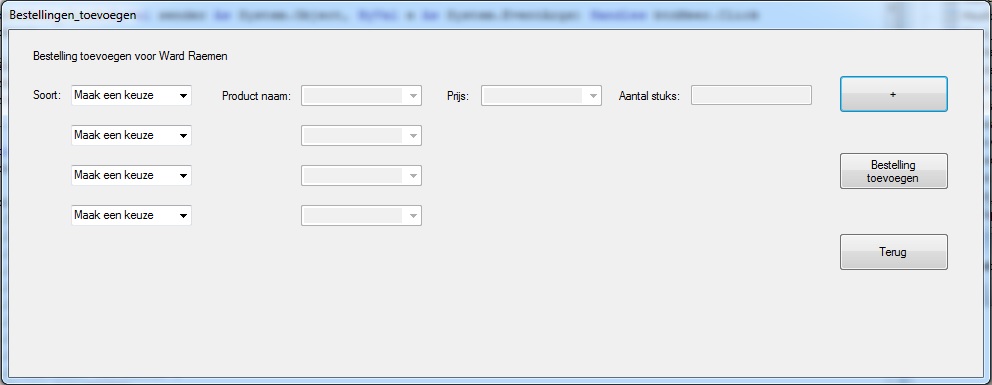 (Spoiler tags don't seem to work here :/) (Spoiler tags don't seem to work here :/)
So with the combobox "Maak een keuze" the user can choose if he wants to order a motherboard, gfx card, processor etc.
When the user selects gfx card for example, the second combobox shows the products in this category (like GTX460, GTX560, etc)
When the user clicks the "+" button, it adds another series of comboboxes so he can order another product.
Everything worked like it should untill I started using the "+" button (wich generates the comboboxes, so the comboboxes do not exist untill the "+" button is pressed.
So what I'm trying to achieve:
When the user changes the third combobox with "Maak een keuze", the third combobox with products becomes active and shows all the products in the category the user selected.
I hope you understand how it should work and I really hope you can help me.
-
May 26th, 2013, 11:13 AM
#12
Re: Multiple adressof to 1 sub?
You need to link the two boxes in some way. One obvious way to do that would be to create a user control with two comboboxes and their labels. Then you can dynamically add the user control rather than individual boxes and use a single event handler with sender as you originally intended.
As the 6-dimensional mathematics professor said to the brain surgeon, "It ain't Rocket Science!"
Reviews: "dunfiddlin likes his DataTables" - jmcilhinney
Please be aware that whilst I will read private messages (one day!) I am unlikely to reply to anything that does not contain offers of cash, fame or marriage!
-
May 26th, 2013, 11:58 AM
#13
Thread Starter
Junior Member
Re: Multiple adressof to 1 sub?
Hmm a usercontrol might work.
Do you know how I can generate it like I did with my comboboxes?
Like this:
Code:
Dim cmbName As New System.Windows.Forms.ComboBox()

        Me.Controls.Add(cmbName)
I tried
Code:
Dim ctlTest As New System.Windows.Forms.UserControl1
But this won't seem to work.
EDIT: Nvm, this worked. I'll post back to you
Code:
Dim ctlTest As New UserControl1
Last edited by DryGoldFish; May 26th, 2013 at 12:02 PM.
-
May 26th, 2013, 04:11 PM
#14
Thread Starter
Junior Member
Re: Multiple adressof to 1 sub?
Okay I solved it with a usercontrol.
Thank you very much!
SOLVED
 Posting Permissions
- You may not post new threads
- You may not post replies
- You may not post attachments
- You may not edit your posts
-
Forum Rules
|
Click Here to Expand Forum to Full Width
|



 Reply With Quote


