|

-
May 20th, 2013, 04:18 PM
#1
Thread Starter
New Member

GET Opera version
Hi guys,
i have this piece of code to retrieve Opera version, but doesn't seems to work. works well for IE
Public Function GetOperaVersion$()
Dim sOperaPath$, sOperaVer$, sOperaFriendlyVer$
On Error GoTo Error:
sOperaPath = RegGetString(HKEY_LOCAL_MACHINE, "Software\Microsoft\Windows\CurrentVersion\App Paths\Opera.exe", "")
If sOperaPath = "" Then GoTo EndOfFun:
If FileExists(sOperaPath) = False Then GoTo EndOfFun:
Dim hData&, lDataLen&, uBuf() As Byte, uVFFI As VS_FIXEDFILEINFO
lDataLen = GetFileVersionInfoSize(sOperaPath, ByVal 0)
If lDataLen = 0 Then
GoTo EndOfFun:
End If
ReDim uBuf(0 To lDataLen - 1)
'get handle to file props
GetFileVersionInfo sOperaPath, 0, lDataLen, uBuf(0)
VerQueryValue uBuf(0), "\", hData, lDataLen
CopyMemory uVFFI, ByVal hData, Len(uVFFI)
With uVFFI
sOperaVer = Format(.dwFileVersionMSh, "00") & "." & _
Format(.dwFileVersionMSl, "00") & "." & _
Format(.dwProductVersionLSh, "0000")
End With
If sOperaVer = "00.00.0000" Then GoTo EndOfFun:
EndOfFun:
If lDataLen > 0 And Left(sOperaFriendlyVer, 1) <> "0" Then
GetOperaVersion = "Opera v" & sOperaFriendlyVer & " (" & sOperaVer & ")"
Else
GetOperaVersion = "Unable to get Opera version!"
End If
Exit Function
Error:
ErrorMsg Err.Number, Err.Description, "GetOperaVersion"
End Function
if you have a better way to do just let me know
-
May 21st, 2013, 12:46 PM
#2
Re: GET Opera version
Not tested with Opera, although this works fine with IE and Mozilla:
Code:
Option Explicit

Private Type VS_FIXEDFILEINFO
    dwSignature         As Long
    dwStrucVersion      As Long
    dwFileVersionMSl    As Integer
    dwFileVersionMSh    As Integer
    dwFileVersionLSl    As Integer
    dwFileVersionLSh    As Integer
    dwProductVersionMSl As Integer
    dwProductVersionMSh As Integer
    dwProductVersionLSl As Integer
    dwProductVersionLSh As Integer
    dwFileFlagsMask     As Long
    dwFileFlags         As Long
    dwFileOS            As Long
    dwFileType          As Long
    dwFileSubtype       As Long
    dwFileDateMS        As Long
    dwFileDateLS        As Long
End Type

Private Declare Function GetFileVersionInfoW Lib "version.dll" (ByVal lptstrFilename As Long, ByVal dwHandle As Long, ByVal dwLen As Long, ByRef lpData As Any) As Long
Private Declare Function GetFileVersionInfoSizeW Lib "version.dll" (ByVal lptstrFilename As Long, Optional ByRef lpdwHandle As Long) As Long
Private Declare Function VerQueryValueW Lib "version.dll" (ByRef pBlock As Any, ByVal lpSubBlock As Long, ByRef lplpBuffer As Long, ByRef puLen As Long) As Long
Private Declare Sub CopyMemory Lib "kernel32.dll" Alias "RtlMoveMemory" (ByRef Destination As Any, ByRef Source As Any, ByVal Length As Long)

Public Function GetOperaVersion() As String
    Const HKEY_LOCAL_MACHINE = &H80000002
    Dim sOperaPath As String, sOperaVer As String, sOperaFriendlyVer As String
    Dim hData As Long, lDataLen As Long, uBuf() As Byte, uVFFI As VS_FIXEDFILEINFO

   'On Error GoTo Error

    sOperaFriendlyVer = "0"

    sOperaPath = RegGetString(HKEY_LOCAL_MACHINE, "Software\Microsoft\Windows\CurrentVersion\App Paths\Opera.exe", vbNullString)

    If LenB(sOperaPath) Then
        If FileExists(sOperaPath) Then

            lDataLen = GetFileVersionInfoSizeW(StrPtr(sOperaPath))
            If lDataLen Then
                ReDim uBuf(0& To lDataLen - 1&) As Byte

               'Get handle to file props
                If GetFileVersionInfoW(StrPtr(sOperaPath), 0&, lDataLen, uBuf(0&)) Then
                    If VerQueryValueW(uBuf(0&), StrPtr("\"), hData, lDataLen) Then
                        CopyMemory uVFFI, ByVal hData, lDataLen

                        With uVFFI
                            sOperaVer = Format$(.dwFileVersionMSh, "00") & "." & _
                                        Format$(.dwFileVersionMSl, "00") & "." & _
                                        Format$(.dwFileVersionLSh, "0000")          '.dwProductVersionLSh
                            sOperaFriendlyVer = CStr(.dwFileVersionMSh)
                        End With
                    End If
                End If

               'If sOperaVer = "00.00.0000" Then GoTo EndOfFun
            End If
        End If
    End If

    Select Case False
        Case lDataLen > 0&, AscW(sOperaFriendlyVer) <> 48   'AscW("0") = 48
            GetOperaVersion = "Unable to get Opera version!"
        Case Else
            GetOperaVersion = "Opera v" & sOperaFriendlyVer & " (" & sOperaVer & ")"
    End Select

   'Exit Function

'Error:
   'ErrorMsg Err, Err.Description, "GetOperaVersion"
End Function

Private Function FileExists(ByRef sFileName As String) As Boolean
    On Error Resume Next
    FileExists = (GetAttr(sFileName) And vbDirectory) <> vbDirectory
End Function
BTW, when posting code, please wrap them in [CODE] ... your code here ... [/CODE]. Also, when you're finished with this thread, don't forget to mark it  Resolved! Resolved!
On Local Error Resume Next: If Not Empty Is Nothing Then Do While Null: ReDim i(True To False) As Currency: Loop: Else Debug.Assert CCur(CLng(CInt(CBool(False Imp True Xor False Eqv True)))): Stop: On Local Error GoTo 0
Declare Sub CrashVB Lib "msvbvm60" (Optional DontPassMe As Any)
-
May 22nd, 2013, 08:54 AM
#3
Thread Starter
New Member
Re: GET Opera version
doesn't work, i get error compiling
-
May 22nd, 2013, 08:56 AM
#4
Re: GET Opera version
 Originally Posted by temp0

doesn't work, i get error compiling
What doesn't work? Can you be more specific?
On Local Error Resume Next: If Not Empty Is Nothing Then Do While Null: ReDim i(True To False) As Currency: Loop: Else Debug.Assert CCur(CLng(CInt(CBool(False Imp True Xor False Eqv True)))): Stop: On Local Error GoTo 0
Declare Sub CrashVB Lib "msvbvm60" (Optional DontPassMe As Any)
-
May 23rd, 2013, 01:54 PM
#5
Thread Starter
New Member
Re: GET Opera version
i get an error on GetFileVersionInfoSizeW not being declared
-
May 23rd, 2013, 02:18 PM
#6
Re: GET Opera version
I've used the W (Unicode) version of the APIs (because Microsoft recommends doing so) and I've also provided their declarations in post #2. Sorry, I didn't know that I should have mentioned that you should copy all of those code. 
On Local Error Resume Next: If Not Empty Is Nothing Then Do While Null: ReDim i(True To False) As Currency: Loop: Else Debug.Assert CCur(CLng(CInt(CBool(False Imp True Xor False Eqv True)))): Stop: On Local Error GoTo 0
Declare Sub CrashVB Lib "msvbvm60" (Optional DontPassMe As Any)
-
May 23rd, 2013, 02:28 PM
#7
Thread Starter
New Member
Re: GET Opera version
 this is what i did, i copied all the code you gave me, in different files on my project not everything at the same place. as the get opera function is part of a bas file and not the main form. but i'll try it again this is what i did, i copied all the code you gave me, in different files on my project not everything at the same place. as the get opera function is part of a bas file and not the main form. but i'll try it again
-
May 23rd, 2013, 02:38 PM
#8
Re: GET Opera version
I see. Well, you have to put the declarations and supporting FileExists function together with the GetOperaVersion function in the same module, be it a Form, BAS, Class, etc. module.
On Local Error Resume Next: If Not Empty Is Nothing Then Do While Null: ReDim i(True To False) As Currency: Loop: Else Debug.Assert CCur(CLng(CInt(CBool(False Imp True Xor False Eqv True)))): Stop: On Local Error GoTo 0
Declare Sub CrashVB Lib "msvbvm60" (Optional DontPassMe As Any)
-
May 23rd, 2013, 04:08 PM
#9
Thread Starter
New Member
Re: GET Opera version
ok so i did as you said, copied the code at the right place. and i get
Unable to get Opera version!
-
May 24th, 2013, 01:30 AM
#10
Re: GET Opera version
Calm down, don't panic.  Try debugging that code. Put a Stop statement right before the commented out On Error GoTo Error line. Now run the GetOperaVersion function. When the IDE pauses, press F8 to step through the code. Check the value of all the variables either by hovering your mouse on them or by adding them to the Watch window. See at which line you get unexpected values. By unexpected, I mean, values that causes that code to proceed unsuccessfully. When you have identified the problem, try to correct it. If you can't, post all your findings here. Try debugging that code. Put a Stop statement right before the commented out On Error GoTo Error line. Now run the GetOperaVersion function. When the IDE pauses, press F8 to step through the code. Check the value of all the variables either by hovering your mouse on them or by adding them to the Watch window. See at which line you get unexpected values. By unexpected, I mean, values that causes that code to proceed unsuccessfully. When you have identified the problem, try to correct it. If you can't, post all your findings here.
On Local Error Resume Next: If Not Empty Is Nothing Then Do While Null: ReDim i(True To False) As Currency: Loop: Else Debug.Assert CCur(CLng(CInt(CBool(False Imp True Xor False Eqv True)))): Stop: On Local Error GoTo 0
Declare Sub CrashVB Lib "msvbvm60" (Optional DontPassMe As Any)
-
May 24th, 2013, 01:10 PM
#11
Thread Starter
New Member
Re: GET Opera version
ok the issue seems to be here: at that point sOperaPath is equal to the right path, then it goes into this loop
If LenB(sOperaPath) Then
If FileExists(sOperaPath) Then
after jumps to:
Code:
Private Function FileExists(ByRef sFileName As String) As Boolean
    On Error Resume Next
    FileExists = (GetAttr(sFileName) And vbDirectory) <> vbDirectory
End Function
which does nothing and send me back to, where i get the Unable to get Opera version!:
Code:
End If

    Select Case False
        Case lDataLen > 0&, AscW(sOperaFriendlyVer) <> 48   'AscW("0") = 48
            GetOperaVersion = "Unable to get Opera version!"
        Case Else
            GetOperaVersion = "Opera v" & sOperaFriendlyVer & " (" & sOperaVer & ")"
    End Select
-
May 24th, 2013, 01:46 PM
#12
Re: GET Opera version
What does sOperaPath contain? Does it really exist in that location? Comment out the On Error Resume Next line in the FileExists function. Run the code again. If VB raises an error, what does it say?
On Local Error Resume Next: If Not Empty Is Nothing Then Do While Null: ReDim i(True To False) As Currency: Loop: Else Debug.Assert CCur(CLng(CInt(CBool(False Imp True Xor False Eqv True)))): Stop: On Local Error GoTo 0
Declare Sub CrashVB Lib "msvbvm60" (Optional DontPassMe As Any)
-
May 24th, 2013, 01:48 PM
#13
Thread Starter
New Member
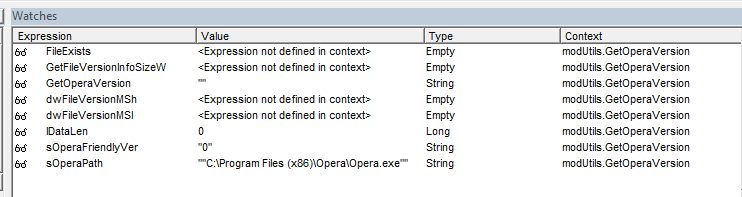
Re: GET Opera version
sOperaPath has the right value:
-
May 24th, 2013, 01:58 PM
#14
Thread Starter
New Member
Re: GET Opera version
well commenting out that line make the program goes really wrong into some loop in another frm file. Can't we avoid going into the FileExists function
-
May 24th, 2013, 02:30 PM
#15
Re: GET Opera version
You can take out If LenB(sOperaPath) and If FileExists(sOperaPath). They only serve to validate the path, which the GetFileVersionInfoSize API will do anyway.
Judging from your screenshot, it looks like you're using a 64-bit OS. Am I right? If so, and I'm not sure about this, the file system redirection may be in effect.
EDIT
BTW, Monitoring Data with Watch Expressions teaches you how to effectively use the Watch window.
Last edited by Bonnie West; May 24th, 2013 at 02:41 PM.
On Local Error Resume Next: If Not Empty Is Nothing Then Do While Null: ReDim i(True To False) As Currency: Loop: Else Debug.Assert CCur(CLng(CInt(CBool(False Imp True Xor False Eqv True)))): Stop: On Local Error GoTo 0
Declare Sub CrashVB Lib "msvbvm60" (Optional DontPassMe As Any)
 Posting Permissions
- You may not post new threads
- You may not post replies
- You may not post attachments
- You may not edit your posts
-
Forum Rules
|
Click Here to Expand Forum to Full Width
|



 Reply With Quote

