|

-
May 18th, 2013, 09:32 AM
#1
Thread Starter
Junior Member


 [RESOLVED] Tabbed web browser error [RESOLVED] Tabbed web browser error
Hello all! I'm currently in the process of re-writing a web browser I had.
Everything has been going well until now. The tab control is being a pain. The video I uploaded below will show you what I mean.
Is there any way I could fix this? It is really annoying, and I haven't found any way to resolve this myself.
Any help would really be nice!
Thank you for taking your time to read my post.
-
May 18th, 2013, 11:46 AM
#2
Re: Tabbed web browser error
It's got nothing to do with the tab control. You haven't added a webbrowser control to the new tab so it's not surprising that telling the non-existent control to navigate results in an error. As you've chosen the least helpful way to give us a view of your problem I'm not able to say exactly how you should go about correcting it in specific terms but the gist of it is simply add a new control to each tab page as it's created. Nothing comes of nothing!
As the 6-dimensional mathematics professor said to the brain surgeon, "It ain't Rocket Science!"
Reviews: "dunfiddlin likes his DataTables" - jmcilhinney
Please be aware that whilst I will read private messages (one day!) I am unlikely to reply to anything that does not contain offers of cash, fame or marriage!
-
May 18th, 2013, 11:53 AM
#3
Thread Starter
Junior Member
Re: Tabbed web browser error
I posted a youtube video of the problem in action. How would that be not helpful?
-
May 18th, 2013, 12:09 PM
#4
Re: Tabbed web browser error
 Originally Posted by ryanguy426

I posted a youtube video of the problem in action. How would that be not helpful?
Well let's see. It's difficult (near impossible for anyone with eyes as old as mine!) to read the code and impossible to copy it. In this case the only code we get to see is actually the least important (it doesn't show the cause of the error only the incidence of it). We have to plough through 1:37 of material, the bulk of which is faffing around doing nothing meaningful and, although I've no objection myself, we have to connect to YouTube which not everybody in the Universe is happy about. A clear statement of the problem, a readable recitation of the error message, and a properly formatted code snippet would help us to help you far, far better.
As the 6-dimensional mathematics professor said to the brain surgeon, "It ain't Rocket Science!"
Reviews: "dunfiddlin likes his DataTables" - jmcilhinney
Please be aware that whilst I will read private messages (one day!) I am unlikely to reply to anything that does not contain offers of cash, fame or marriage!
-
May 18th, 2013, 02:54 PM
#5
Re: Tabbed web browser error
The problem is, as dunfiddlin mention, that you don't add any webbrowser control to the new tab. Show us the code you're using to create the new tab.
-
May 18th, 2013, 07:35 PM
#6
Thread Starter
Junior Member
Re: Tabbed web browser error
The code I am using to create a new tab would be:
Code:
 Private Sub AddTabToolStripMenuItem_Click(sender As System.Object, e As System.EventArgs) Handles AddTabToolStripMenuItem.Click
        Dim Browser As New WebBrowser
        TabControl1.TabPages.Add("New Page")
        Browser.Name = "Derp Explorer"
        Browser.Dock = DockStyle.Fill
        TabControl1.SelectedTab.Controls.Add(Browser)
        AddHandler Browser.ProgressChanged, AddressOf loading
        AddHandler Browser.DocumentCompleted, AddressOf done

    End Sub
EDIT: Fixed code. Put in the wrong one before.
Last edited by ryanguy426; May 18th, 2013 at 08:03 PM.
-
May 18th, 2013, 08:06 PM
#7
Re: Tabbed web browser error
You're adding the browser to the SelectedTab but that tab is not the same as the newly created tab. Try this:
Code:
    Dim tabPage As New TabPage
    tabPage.Text = "New Page"
    TabControl1.TabPages.Add(tabPage)
    TabControl1.SelectedTab = tabPage
-
May 18th, 2013, 08:13 PM
#8
Thread Starter
Junior Member
Re: Tabbed web browser error
Thanks. That works. But when I open the new tab, and try to navigate to a new website, it freezes and then I get this:
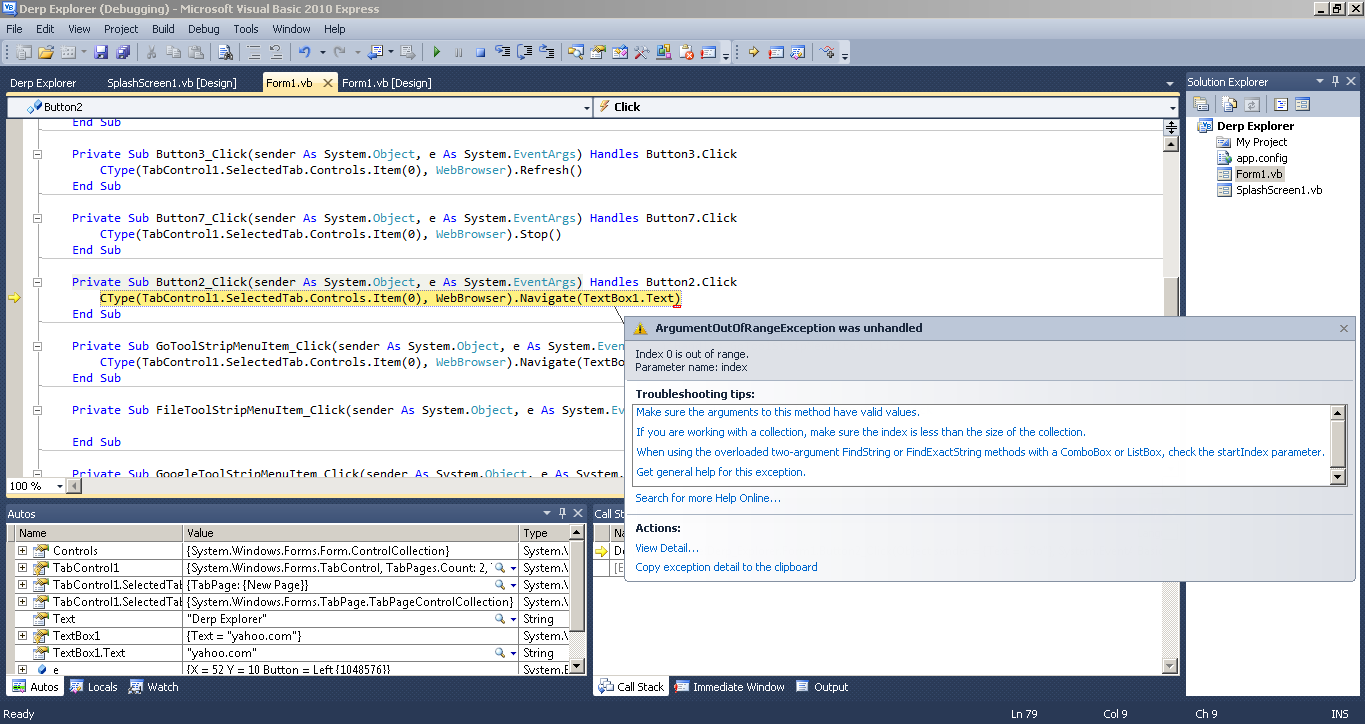
I really don't understand what's causing this problem? 
-
May 19th, 2013, 05:51 AM
#9
Re: Tabbed web browser error
The error is saying that there is no child control on the tab. You still must do something wrong, the code I posted was only to create the tab and set focus to it, you obviously still need to add the webbrowser control to it.
Code:
    Dim browser As New WebBrowser
    Dim tabPage As New TabPage
    tabPage.Text = "New Page"
    TabControl1.TabPages.Add(tabPage)
    TabControl1.SelectedTab = tabPage
    tabPage.Controls.Add(browser)
    browser.Dock = DockStyle.Fill
    AddHandler browser.ProgressChanged, AddressOf loading
    AddHandler Browser.DocumentCompleted, AddressOf done
-
May 19th, 2013, 08:36 AM
#10
Thread Starter
Junior Member
Re: Tabbed web browser error
Thanks a dozen! Joacim! It fixed the crash! Now I can continue on the project! I'm so glad the forums exist!
Marked as resolved.
 Posting Permissions
- You may not post new threads
- You may not post replies
- You may not post attachments
- You may not edit your posts
-
Forum Rules
|
Click Here to Expand Forum to Full Width
|



 Reply With Quote

