|

-
Apr 6th, 2013, 03:50 AM
#1
Thread Starter
Lively Member


Awesomium & QIOS Devsuite in conjunction
I'm attempting to use both the QIOS QTab element in conjunction with the Awesomium web framework, and the core problem I'm running into is when the user opens a new tab, the Awesomium element will obviously not be there, and a blank tab will appear. I'm not sure how to go about making the Awesomium element be in a newly opened tab, docked to the tab page (complete fill to area of tab page), and importantly, make the Awesomium address bar and navigation buttons (because neither of them are actually within the tab page itself) differentiate from just one tab, and be able to make the address bar/navigation controls control the selected active tab. To be honest, I have no idea how to do these things, or to actually think of a method to do it either. Help would be greatly appreciated in my endeavor if at all possible with people who may be familiar with either one, or both. Thanks! 
-
Apr 6th, 2013, 03:34 PM
#2
Re: Awesomium & QIOS Devsuite in conjunction
Well I've no experience with QTab but to adding a new control is the same procedure whatever ...
vb.net Code:
Dim awc As New Awesomium.Windows.Forms.WebControl ' declare
        awc.Dock = DockStyle.Fill ' set properties
        Controls.Add(awc) ' add (QTab presumably has its own method?)
As to using a single adress bar you can define the target using whatever selected tab property QTab has.
As the 6-dimensional mathematics professor said to the brain surgeon, "It ain't Rocket Science!"
Reviews: "dunfiddlin likes his DataTables" - jmcilhinney
Please be aware that whilst I will read private messages (one day!) I am unlikely to reply to anything that does not contain offers of cash, fame or marriage!
-
Apr 7th, 2013, 12:00 AM
#3
Thread Starter
Lively Member
Re: Awesomium & QIOS Devsuite in conjunction
Thank you for your reply to another one of my problems, dunfiddlin. After removing the previous code, and implementing the new one, I'm running into an error with a code that the QIOS folks have me to create a new QTab page. This is the code itself:
Code:
Dim TabTitle As String = "New Web Page"

                 Dim Ctl As New Control ' I,e. Gecko Control
                Dim tmp_oTabPage As New QTabPage() With {.Text = TabTitle}

                QTabControl1.Controls.Add(tmp_oTabPage)
                QTabControl1.ActivateNextTabPage(False)
                QTabControl1.ActiveTabPageRuntime.Controls.Add(Ctl)
The error I'm running into is that "'Ctl' is not declared. It may be inaccessible due to its protection level.". The Gecko Control part of it is when I was using a skybound Gecko engine in place of the current Awesomium framework. I'm not entirely sure which part of the code to remove so it can be replaced. I do know obviously line 1 has to go, and I'm imagining that the third and fifth line (or both) either have to be replaced or simply removed. Nonetheless, I need to get rid of the "Ctl" error which I'm positive means control. All I did was change the top code to this:
Code:
        Dim TabTitle As String = "New Tab"

        Dim awc As New Awesomium.Windows.Forms.WebControl ' declare
        awc.Dock = DockStyle.Fill ' set properties
        Controls.Add(awc) ' add (QTab presumably has its own method?)

        Dim tmp_oTabPage As New Qios.DevSuite.Components.QTabPage() With {.Text = TabTitle}

        QTabControl1.Controls.Add(tmp_oTabPage)
        QTabControl1.ActivateNextTabPage(False)
        QTabControl1.ActiveTabPageRuntime.Controls.Add(Ctl)
I didn't work with the code after that, but I'm just not positive on what to remove without screwing up the code to open a new QTab page.
-
Apr 7th, 2013, 11:07 AM
#4
Re: Awesomium & QIOS Devsuite in conjunction
Try ...
vb.net Code:
Dim TabTitle As String = "New Tab"
         Dim awc As New Awesomium.Windows.Forms.WebControl ' declare
        awc.Dock = DockStyle.Fill ' set properties
       ' Controls.Add(awc) ' add (QTab presumably has its own method?)
         Dim tmp_oTabPage As New Qios.DevSuite.Components.QTabPage() With {.Text = TabTitle}
         QTabControl1.Controls.Add(tmp_oTabPage)
        QTabControl1.ActivateNextTabPage(False)
        QTabControl1.ActiveTabPageRuntime.Controls.Add(awc)
As the 6-dimensional mathematics professor said to the brain surgeon, "It ain't Rocket Science!"
Reviews: "dunfiddlin likes his DataTables" - jmcilhinney
Please be aware that whilst I will read private messages (one day!) I am unlikely to reply to anything that does not contain offers of cash, fame or marriage!
-
Apr 8th, 2013, 11:13 AM
#5
Thread Starter
Lively Member
Re: Awesomium & QIOS Devsuite in conjunction
I fiddled around with the code, and ended up with the same thing you just posted. It didn't work correctly. At least Awesomium didn't appear to be in the new QTab page. Maybe I can figure it out properly after I figure out the address bar situation. I'm not sure how to define the target using the selected QTab property however.
-
Apr 8th, 2013, 11:22 AM
#6
Re: Awesomium & QIOS Devsuite in conjunction
I'm not completly sure how to go about doing this.
Unfortunately, having no experience of QTabControl, neither have I at the moment. I have downloaded the control and will play with it when I have some free time (won't be today I don't think, sorry).
Surprised to see it's built in .Net 2.0, don't know if that presents any problems? Anyway, I shall report anon.
As the 6-dimensional mathematics professor said to the brain surgeon, "It ain't Rocket Science!"
Reviews: "dunfiddlin likes his DataTables" - jmcilhinney
Please be aware that whilst I will read private messages (one day!) I am unlikely to reply to anything that does not contain offers of cash, fame or marriage!
-
Apr 8th, 2013, 02:31 PM
#7
Thread Starter
Lively Member
Re: Awesomium & QIOS Devsuite in conjunction
It is a rather useful devsuite for visual studio I'll give it that. I'm still learning how to use it myself, so I'm lacking quite a bit of experience with it as well as it does tend to operate differently that what you'd expect. And sounds good. In addition, I've also been getting support from the QIOS support forums, and thought about the idea of simply duplicating the QTab that already has the Awesomium control in it already just to inherit the same appearance. But even then, I'm still stuck with the address bar situation. Maybe I'll seek more support for that matter as well.
-
Apr 8th, 2013, 06:41 PM
#8
Re: Awesomium & QIOS Devsuite in conjunction
Seems I was nearer to the end of DROD: Gunthro and the Epic Blunder than I thought (rather disappointing anti-climax!) so some initial fiddling with the control suggests that it's actually a lot easier than you think. This worked perfectly first time out and I didn't even need to read any destructions.
vb.net Code:
Private Sub Button1_Click(sender As System.Object, e As System.EventArgs) Handles Button1.Click
        Dim awc As New Awesomium.Windows.Forms.WebControl
        Dim tabP As New Qios.DevSuite.Components.QTabPage
        awc.Dock = DockStyle.Fill
        awc.Source = New Uri("http://www.google.com")
        tabP.Controls.Add(awc)
        qtc.Controls.Add(tabP)
        qtc.ActivateTabPage(tabP)
    End Sub
As the 6-dimensional mathematics professor said to the brain surgeon, "It ain't Rocket Science!"
Reviews: "dunfiddlin likes his DataTables" - jmcilhinney
Please be aware that whilst I will read private messages (one day!) I am unlikely to reply to anything that does not contain offers of cash, fame or marriage!
-
Apr 8th, 2013, 07:22 PM
#9
Re: Awesomium & QIOS Devsuite in conjunction
Actually, this really is easy. Obviously I'm avoiding all the delightful byways and fancy options but I whipped up the bare bones of the whole program in minutes ...
vb.net Code:
Public Class Form1 Private Sub Button1_Click(sender As System.Object, e As System.EventArgs) Handles btnNewTab.Click Dim awc As New Awesomium.Windows.Forms.WebControl ' open in new tab Dim tabP As New Qios.DevSuite.Components.QTabPage awc.Dock = DockStyle.Fill awc.Source = GetUrl(AddressBox.Text) tabP.Controls.Add(awc) qtc.Controls.Add(tabP) qtc.ActivateTabPage(tabP) End Sub Private Sub btnCurrentTab_Click(sender As System.Object, e As System.EventArgs) Handles btnCurrentTab.Click 'open in current tab CType(qtc.ActiveTabPage.Controls(0), Awesomium.Windows.Forms.WebControl).Source = GetUrl(AddressBox.Text) End Sub Private Sub qtc_ActivePageChanged(sender As System.Object, e As Qios.DevSuite.Components.QTabPageChangeEventArgs) Handles qtc.ActivePageChanged ' update address bar when new tab selected If Not CType(e.ToPage.Controls(0), Awesomium.Windows.Forms.WebControl).Source Is Nothing Then AddressBox.Text = CType(e.ToPage.Controls(0), Awesomium.Windows.Forms.WebControl).Source.ToString ' I like the .ToPage & .FromPage properties! Much easier than the standard TabControl! End If End Sub Private Function GetUrl(ByVal uText As String) As Uri If uText <> "" Then ' allow for partial address completion If Not uText.StartsWith("http://") AndAlso Not uText.StartsWith("ftp:/") Then uText = "http://" & uText End If Try ' if valid Url isn't possible return blank ' you can obviously make both these sections more sophisticated Return New Uri(uText) Catch ex As Exception Return New Uri("about:blank") End Try Else Return New Uri("about:blank") End If End Function End Class
Must say I'm increasingly impressed with Awesomium too!
As the 6-dimensional mathematics professor said to the brain surgeon, "It ain't Rocket Science!"
Reviews: "dunfiddlin likes his DataTables" - jmcilhinney
Please be aware that whilst I will read private messages (one day!) I am unlikely to reply to anything that does not contain offers of cash, fame or marriage!
-
Apr 10th, 2013, 01:07 AM
#10
Thread Starter
Lively Member
Re: Awesomium & QIOS Devsuite in conjunction
Wow, you picked that up fast. I got everything you posted, but just ran into one problem. The "btn.CurrentTab" thing. I replaced everything I needed to in accordance with the control names in the project, but that one I can't seem to think of. "Handles clause requires a WithEvents variable defined in the containing type or one of its base types." And Awesomium is a pretty cool piece of software isn't it?
-
Apr 10th, 2013, 03:42 PM
#11
Re: Awesomium & QIOS Devsuite in conjunction
You need to add a button (btnCurrentTab). It may not register immediately if you've put the code in for it prior to adding it. Try retyping the Handles clause if that's the case. Usually works for me. You don't have to stick with the button, of course, if you'd rather use a context menu, for example. It was just a way of illustrating what's need to open the page in the active tab.
As the 6-dimensional mathematics professor said to the brain surgeon, "It ain't Rocket Science!"
Reviews: "dunfiddlin likes his DataTables" - jmcilhinney
Please be aware that whilst I will read private messages (one day!) I am unlikely to reply to anything that does not contain offers of cash, fame or marriage!
-
Apr 10th, 2013, 06:13 PM
#12
Thread Starter
Lively Member
Re: Awesomium & QIOS Devsuite in conjunction
I'm aware of that, but you wrote a note 'open in current tab'. That seems to me that it would simply open a webpage normally when clicking on a link for example within the current tab. I can't really think of a handler that would correspond with that if you understand what I mean. I mean, unless it's an external link from outside of the application itself. But even then, I'm still struggling to understand the meaning behind it's purpose. How would a button tell a website to open in the current tab? Maybe I'm simply not understanding something.
-
Apr 10th, 2013, 06:28 PM
#13
Thread Starter
Lively Member
Re: Awesomium & QIOS Devsuite in conjunction
Unless, that is a feature more designed for a context menu upon right clicking a link (which then I'm not sure how to make a combo box appear from that in Awesomium) like you suggested above.
-
Apr 10th, 2013, 07:33 PM
#14
Re: Awesomium & QIOS Devsuite in conjunction
The buttons are for opening pages from urls typed into the address box (which is a textbox in my world), that's all. It's just to make a distinction between opening a new tab and rendering the page in the currently open tab. If you were working from a combobox and always opening a new tab then obviously you'd use SelectedIndexChanged or the like. Links within pages will of course be handled automatically by the browser that they're clicked in.
As the 6-dimensional mathematics professor said to the brain surgeon, "It ain't Rocket Science!"
Reviews: "dunfiddlin likes his DataTables" - jmcilhinney
Please be aware that whilst I will read private messages (one day!) I am unlikely to reply to anything that does not contain offers of cash, fame or marriage!
-
Apr 19th, 2013, 01:31 AM
#15
Thread Starter
Lively Member
Re: Awesomium & QIOS Devsuite in conjunction
Btw, while I continue to develop my project, I've been running into problems with this paticular line of code.
Code:
If Not CType(e.ToPage.Controls(0), Awesomium.Windows.Forms.WebControl).Source Is Nothing Then
It's been throwing errors such as:
System.InvalidCastException was unhandled by user code
Message=Unable to cast object of type 'System.Windows.Forms.Panel' to type 'Awesomium.Windows.Forms.WebControl'.
Source=(project title)
StackTrace:
at (project title).MainBrowser.qtc_ActivePageChanged(Object sender, QTabPageChangeEventArgs e) in (project directory).vb:line 102
InnerException:
It's been happening with more frequency. And on top of that, the code that is supposed to open a new tab with the control hasn't been functioning correctly either. When a new tab comes up, it shows up with it's width shortened, and without a title. Awesomium also hasn't been appearing within a new tab.
-
Apr 19th, 2013, 05:39 PM
#16
Re: Awesomium & QIOS Devsuite in conjunction
The error would indicate that you have added a panel to those pages. If so then Controls(0) will be the panel and not the WebControl. Controls is an indexed collection, so you'll need to change the reference to get the right control.
As the 6-dimensional mathematics professor said to the brain surgeon, "It ain't Rocket Science!"
Reviews: "dunfiddlin likes his DataTables" - jmcilhinney
Please be aware that whilst I will read private messages (one day!) I am unlikely to reply to anything that does not contain offers of cash, fame or marriage!
-
Apr 30th, 2013, 07:10 PM
#17
Thread Starter
Lively Member
Re: Awesomium & QIOS Devsuite in conjunction
Ok, so I've fixed the first problem, and it was a duh problem. Happens to us all sometimes I guess. However, when still attempting to use the new tab function to QTabControl, it still actually throws an error. A different one. This is a screenshot of what's been going on.
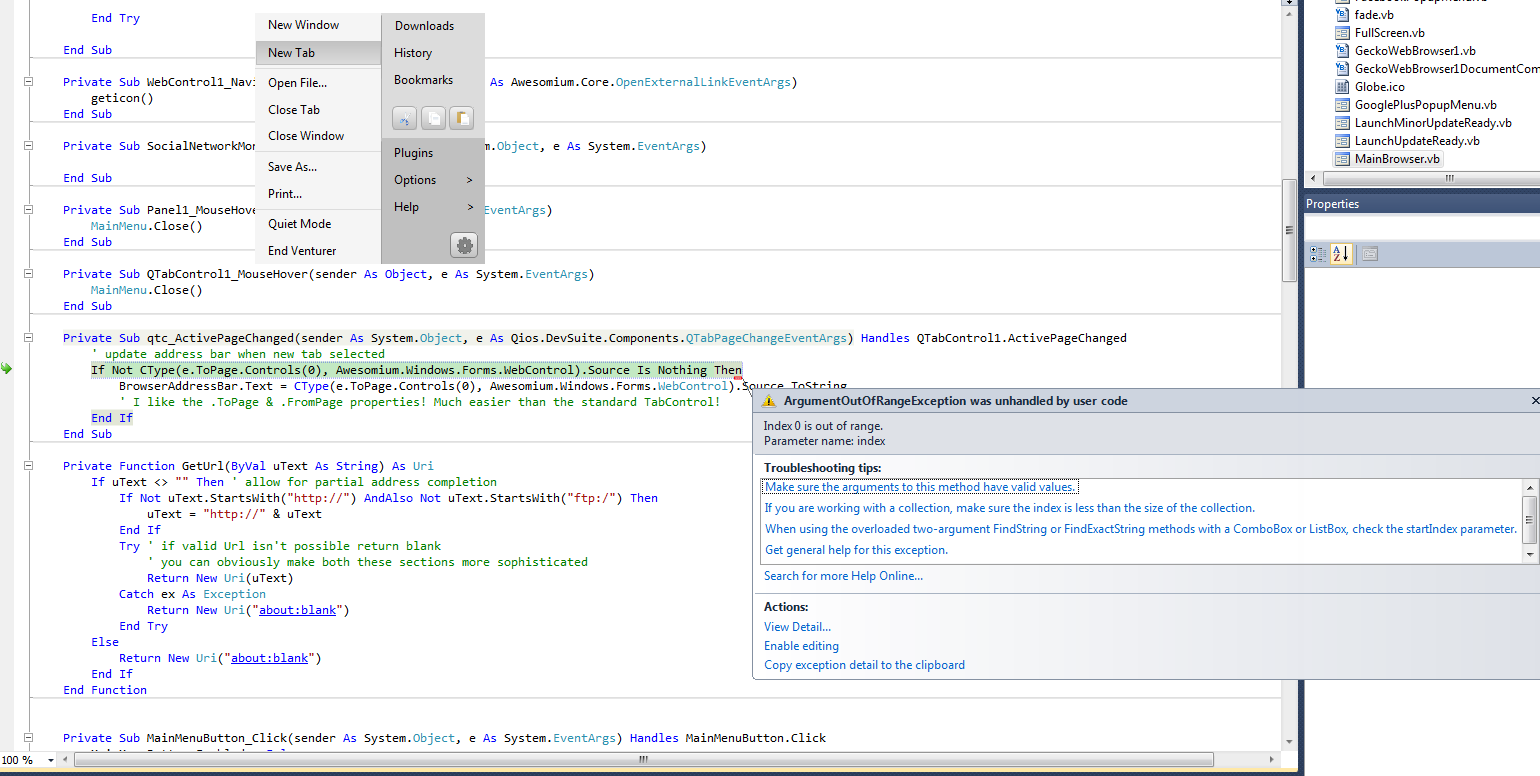
I thank you for your patience. I'm in the process of learning the finer details of things still.
-
Apr 30th, 2013, 07:16 PM
#18
Re: Awesomium & QIOS Devsuite in conjunction
If index 0 is out of range that suggests that there are no controls on the tabpage. Are you perchance trying to reference a control that you haven't yet actually added?
As the 6-dimensional mathematics professor said to the brain surgeon, "It ain't Rocket Science!"
Reviews: "dunfiddlin likes his DataTables" - jmcilhinney
Please be aware that whilst I will read private messages (one day!) I am unlikely to reply to anything that does not contain offers of cash, fame or marriage!
-
Apr 30th, 2013, 07:45 PM
#19
Thread Starter
Lively Member
Re: Awesomium & QIOS Devsuite in conjunction
The Awesomium control is placed correctly on the first tab page. That's what's confusing me.
-
Apr 30th, 2013, 07:57 PM
#20
Re: Awesomium & QIOS Devsuite in conjunction
Yes, but you're changing pages in that part of the code, so presumably the state of the first page isn't actually relevant. It's what's on the page you're going to that matters.
As the 6-dimensional mathematics professor said to the brain surgeon, "It ain't Rocket Science!"
Reviews: "dunfiddlin likes his DataTables" - jmcilhinney
Please be aware that whilst I will read private messages (one day!) I am unlikely to reply to anything that does not contain offers of cash, fame or marriage!
-
Apr 30th, 2013, 10:18 PM
#21
Thread Starter
Lively Member
Re: Awesomium & QIOS Devsuite in conjunction
Oh I see. But that was the point of all of this. So it'd automatically set the control to the new tab page?
-
May 1st, 2013, 10:29 AM
#22
Re: Awesomium & QIOS Devsuite in conjunction
Well that part of the code is only the response to a change of page so what you're doing to change the page is not evident. Obviously however it requires there to be a WebControl actually present on the newly selected page so if there isn't the fault clearly lies elsewhere either in the order in which you're doing things or in failing to ensure that all the controls are added before the page can be selected.
As the 6-dimensional mathematics professor said to the brain surgeon, "It ain't Rocket Science!"
Reviews: "dunfiddlin likes his DataTables" - jmcilhinney
Please be aware that whilst I will read private messages (one day!) I am unlikely to reply to anything that does not contain offers of cash, fame or marriage!
 Posting Permissions
- You may not post new threads
- You may not post replies
- You may not post attachments
- You may not edit your posts
-
Forum Rules
|
Click Here to Expand Forum to Full Width
|



 Reply With Quote
