|

-
Apr 26th, 2013, 12:26 PM
#1
Thread Starter
Addicted Member

Quick Question - how would you do this?
I'm creating an access inventory database, one product can have many serial numbers e.g. 10 laptops same model, different serial numbers
I have 2 tables:
1. Products (Columns=ProductID...)
2. SerialNumbers (Columns=ProductID, Serial)
So the SerialNumber table will be related to the Products table by the ProductID
I have 1 form, how can i save product data to the product table and the serial numbers to the serial table, whilst linking the 2 through the ProductID?
I was thinking of using the following however i need the ProductID which i wont have until the product has been added
Code:
'Save to the ProductsTable
  Try
            Dim sql1 As String
            sql1 = "INSERT INTO Products (SKU, Brand, ProductName, Category, SubCategory, DateAdded, Condition, Warranty, Barcode, PurchasePrice, RetailPrice, Taxable, Location, LocationBinRack, Variation, Colour, Specification, Compatability, Includes, Length, Width, Height, WeightG, WeightOz, WeightLb, WeightKg) VALUES ('" & SKUTextBox.Text & "','" & BrandTextBox.Text & "','" & NameTextBox.Text & "','" & CategoryComboBox.Text & "','" & SubCategoryComboBox.Text & "','" & DateTimePicker1.Text & "','" & ConditionComboBox.Text & "','" & WarrantyTextBox.Text & "','" & BarcodeTextBox.Text & "','" & PurchasePriceTextBox.Text & "','" & RetailPriceTextBox.Text & "','" & TaxableComboBox.Text & "','" & LocationTextBox.Text & "','" & LocationBinRackTextBox.Text & "','" & VariationTextBox.Text & "','" & ColourTextBox.Text & "','" & SpecificationTextBox.Text & "','" & CompatabilityTextBox.Text & "','" & IncludesTextBox.Text & "','" & LengthTextBox.Text & "','" & WidthTextBox.Text & "','" & HeightTextBox.Text & "','" & GramTextBox.Text & "','" & OzTextBox.Text & "','" & LbTextBox.Text & "','" & KgTextBox.Text & "') "
            Dim adapter As New OleDbDataAdapter(sql1, con1)
            Dim dt As New DataTable("Products")
            adapter.Fill(dt)
            adapter.Update(dt)
            con1.Close()

 'Save the Serial Numbers to the SerialNumbers table
            Dim sql2 As String
            sql2 = "INSERT INTO SerialNumbers (ProductID, Serial) VALUES ('" & ProductIDTextBox.Text & "','" & SerialTextBox.Text & "') "
            Dim adapter2 As New OleDbDataAdapter(sql2, con1)
            Dim dt2 As New DataTable("SerialNumbers")
            adapter.Fill(dt2)
            adapter.Update(dt2)
            con1.Close()
            Me.Refresh()
            Me.Close()
        Catch ex As Exception
            MessageBox.Show(ex.Message)
        End Try
-
Apr 26th, 2013, 12:59 PM
#2
Re: Quick Question - how would you do this?
which part do you want advice on? the coding or the database calls? there's an issue in both...
strictly answering the question, I'd say it depends on what ProductID is... if it's an autoincrement field... then you would use the scope_identity() call or what ever the Access equivalent is... take a look at this:
http://www.vbforums.com/showthread.p...ed-May-13-2011
Under the General section heading is a link:
How can I get the auto-generated AutoNumber/Identity value for the record just added?
I think that's what you want.
If it's a GUID or UniqueIdentifier, then you can generate that in code and pass it in.
-tg
-
Apr 26th, 2013, 02:10 PM
#3
Thread Starter
Addicted Member
Re: Quick Question - how would you do this?
I want to work out how to add the productid and serialnumber to the serialnumber table
This adds the product details to the products table without any issues
Code:
           Dim sql1 As String
            sql1 = "INSERT INTO Products (SKU, Brand, ProductName, Category, SubCategory, DateAdded, Condition, Warranty, Barcode, PurchasePrice, RetailPrice, Taxable, Location, LocationBinRack, Variation, Colour, Specification, Compatability, Includes, Length, Width, Height, WeightG, WeightOz, WeightLb, WeightKg) VALUES ('" & SKUTextBox.Text & "','" & BrandTextBox.Text & "','" & NameTextBox.Text & "','" & CategoryComboBox.Text & "','" & SubCategoryComboBox.Text & "','" & DateTimePicker1.Text & "','" & ConditionComboBox.Text & "','" & WarrantyTextBox.Text & "','" & BarcodeTextBox.Text & "','" & PurchasePriceTextBox.Text & "','" & RetailPriceTextBox.Text & "','" & TaxableComboBox.Text & "','" & LocationTextBox.Text & "','" & LocationBinRackTextBox.Text & "','" & VariationTextBox.Text & "','" & ColourTextBox.Text & "','" & SpecificationTextBox.Text & "','" & CompatabilityTextBox.Text & "','" & IncludesTextBox.Text & "','" & LengthTextBox.Text & "','" & WidthTextBox.Text & "','" & HeightTextBox.Text & "','" & GramTextBox.Text & "','" & OzTextBox.Text & "','" & LbTextBox.Text & "','" & KgTextBox.Text & "') "
            Dim adapter As New OleDbDataAdapter(sql1, con1)
            Dim dt As New DataTable("Products")
            adapter.Fill(dt)
            adapter.Update(dt)
            con1.Close()
I think i need to alter the sql query and insert an inner join?
-
Apr 26th, 2013, 02:12 PM
#4
Thread Starter
Addicted Member
Re: Quick Question - how would you do this?
That link you sent may contain the answer 
-
Apr 29th, 2013, 11:22 AM
#5
Thread Starter
Addicted Member
Re: Quick Question - how would you do this?
Unfortunately i'm still having trouble getting this to work 
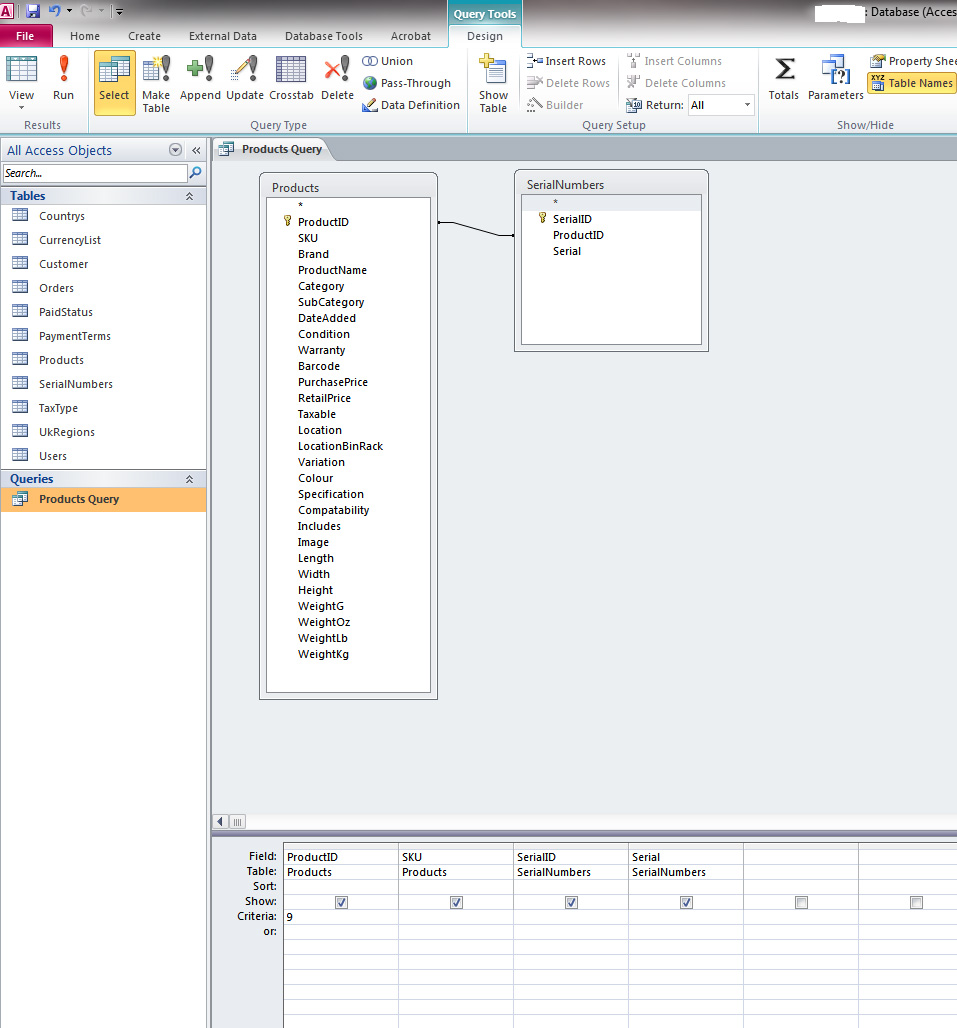
The pic below shows the 2 tables (Products & SerialNumbers)
I thought it was best if the serial numbers were put in their own table - so 1 product could have 500 serial numbers, and the tables are linked by the ProductID (Primary keys are set to autonumber in both tables)
I've tried to do a simple query but it wont work, any ideas what i'm doing wrong?
-
Apr 29th, 2013, 11:29 AM
#6
Re: Quick Question - how would you do this?
So you have to insert into the Product table first... get the ID... then used that for the ProductID when inserting into the Serial table, it's a 3-step process... that link I provided has the solution in it...
-tg
-
Apr 29th, 2013, 11:35 AM
#7
Thread Starter
Addicted Member
Re: Quick Question - how would you do this?
Hi, yes i just cant get the code suggested to work with my existing insert statement
Existing
Code:
           Dim sql1 As String
            sql1 = "INSERT INTO Products (SKU, Brand, ProductName, Category, SubCategory, DateAdded, Condition, Warranty, Barcode, PurchasePrice, RetailPrice, Taxable, Location, LocationBinRack, Variation, Colour, Specification, Compatability, Includes, Length, Width, Height, WeightG, WeightOz, WeightLb, WeightKg) VALUES ('" & SKUTextBox.Text & "','" & BrandTextBox.Text & "','" & NameTextBox.Text & "','" & CategoryComboBox.Text & "','" & SubCategoryComboBox.Text & "','" & DateTimePicker1.Text & "','" & ConditionComboBox.Text & "','" & WarrantyTextBox.Text & "','" & BarcodeTextBox.Text & "','" & PurchasePriceTextBox.Text & "','" & RetailPriceTextBox.Text & "','" & TaxableComboBox.Text & "','" & LocationTextBox.Text & "','" & LocationBinRackTextBox.Text & "','" & VariationTextBox.Text & "','" & ColourTextBox.Text & "','" & SpecificationTextBox.Text & "','" & CompatabilityTextBox.Text & "','" & IncludesTextBox.Text & "','" & LengthTextBox.Text & "','" & WidthTextBox.Text & "','" & HeightTextBox.Text & "','" & GramTextBox.Text & "','" & OzTextBox.Text & "','" & LbTextBox.Text & "','" & KgTextBox.Text & "') "
            Dim adapter As New OleDbDataAdapter(sql1, con1)
            Dim dt As New DataTable("Products")
            adapter.Fill(dt)
            adapter.Update(dt)
            con1.Close()
New
Code:
    Dim NewID as Long  'this will contain the number
      With objRS
        .AddNew
        .Fields("MyNumberField").Value = 3
        .Fields("MyTextField").Value = "hello"
        .Update
        NewID = .Fields("MyAutoNumberField").Value
      End With
objRS throws a not declared error - i dont know what it is referring to - the serialnumber table?
-
Apr 29th, 2013, 02:26 PM
#8
Thread Starter
Addicted Member
Re: Quick Question - how would you do this?
Am i right in thinking that scope_identity() & @@IDENTITY cannot be used with an Access database?
-
Apr 29th, 2013, 10:18 PM
#9
Re: Quick Question - how would you do this?
 Originally Posted by from_the_link
Method 2 - ask the database for the last created number
Many database systems allow you to specifically ask for the last number that was generated. The syntax for this varies by system, but generally it is a simple Select query.
For Access you can use "SELECT @@identity", and this will return a recordset with a single field that contains the last value that was created for you.
For SQL Server you could use "SELECT @@identity", but this is not safe - as it returns the last value that was created in the database by any user. Instead you should use "SELECT Scope_Identity()", which returns the last value that was created for you.
For MySQL you can use "SELECT LAST_INSERT_ID()"
http://www.vbforums.com/showthread.p...ord-just-added
I think that bears repeating...
For Access you can use "SELECT @@identity", and this will return a recordset with a single field that contains the last value that was created for you.
Let me say that one more time....
For Access you can use "SELECT @@identity", and this will return a recordset with a single field that contains the last value that was created for you.
-tg
-
Apr 30th, 2013, 07:21 AM
#10
Thread Starter
Addicted Member
Re: Quick Question - how would you do this?
Thanks  - Sorry just read other threads across google and some people said you couldnt use @@IDENTITY in access - Sorry just read other threads across google and some people said you couldnt use @@IDENTITY in access
However, i found a great webpage showing how to retrieve the LastID with plenty of examples
http://www.mikesdotnetting.com/Artic...y-added-record
I've amended my code and its now working
Code:
        Try
            Dim ID As Integer
            Dim query As String = "INSERT INTO Products (SKU, Brand, ProductName, Category, SubCategory, DateAdded, Condition, Warranty, Barcode, PurchasePrice, RetailPrice, Taxable, Location, LocationBinRack, Variation, Colour, Specification, Compatability, Includes, Length, Width, Height, WeightG, WeightOz, WeightLb, WeightKg) VALUES ('" & SKUTextBox.Text & "','" & BrandTextBox.Text & "','" & NameTextBox.Text & "','" & CategoryComboBox.Text & "','" & SubCategoryComboBox.Text & "','" & DateTimePicker1.Text & "','" & ConditionComboBox.Text & "','" & WarrantyTextBox.Text & "','" & BarcodeTextBox.Text & "','" & PurchasePriceTextBox.Text & "','" & RetailPriceTextBox.Text & "','" & TaxableComboBox.Text & "','" & LocationTextBox.Text & "','" & LocationBinRackTextBox.Text & "','" & VariationTextBox.Text & "','" & ColourTextBox.Text & "','" & SpecificationTextBox.Text & "','" & CompatabilityTextBox.Text & "','" & IncludesTextBox.Text & "','" & LengthTextBox.Text & "','" & WidthTextBox.Text & "','" & HeightTextBox.Text & "','" & GramTextBox.Text & "','" & OzTextBox.Text & "','" & LbTextBox.Text & "','" & KgTextBox.Text & "') "
            Dim query2 As String = "Select @@Identity"
            Dim connect As String = Strings.DBConnectstrings
            Using conn As New OleDbConnection(connect)
                Using cmd As New OleDbCommand(query, conn)
               'cmd.Parameters.AddWithValue("", "")
                    conn.Open()
                    cmd.ExecuteNonQuery()
                    cmd.CommandText = query2
                    ID = cmd.ExecuteScalar()
                End Using
            End Using
            Dim query3 As String = "INSERT INTO SerialNumbers (ProductID, Serial) VALUES ('" & ID & "','" & SerialTextBox.Text & "')"
            Dim adapter As New OleDbDataAdapter(query3, con1)
            Dim dt As New DataTable("SerialNumbers")
            adapter.Fill(dt)
            adapter.Update(dt)
            con1.Close()
            Me.Refresh()
        Catch ex As Exception
            MessageBox.Show(ex.Message)
        End Try
On the example i followed, the following code is used - but i dont know what it is meant to insert? - i've removed it as shown in green above as it doesnt affect my code but not sure if i should be using ?
Code:
cmd.Parameters.AddWithValue("", Category.Text)
 Posting Permissions
- You may not post new threads
- You may not post replies
- You may not post attachments
- You may not edit your posts
-
Forum Rules
|
Click Here to Expand Forum to Full Width
|



 Reply With Quote
