|

-
Jul 12th, 2005, 11:15 AM
#1
Thread Starter
Lively Member


EAN-13,CODE39,UPC,CODE128 Code Bar Generator
Here is a code to produce a bar code which complies with EAN13 specifications. I adapted It from a JS Script by Ghislain Lavoie I found on this web site.
VB Code:
Public Class EAN13
        Private bitsCode As ArrayList
         Public Sub New()
            bitsCode = New ArrayList
            bitsCode.Add(New String(3) {"0001101", "0100111", "1110010", "000000"})
            bitsCode.Add(New String(3) {"0011001", "0110011", "1100110", "001011"})
            bitsCode.Add(New String(3) {"0010011", "0011011", "1101100", "001101"})
            bitsCode.Add(New String(3) {"0111101", "0100001", "1000010", "001110"})
            bitsCode.Add(New String(3) {"0100011", "0011101", "1011100", "010011"})
            bitsCode.Add(New String(3) {"0110001", "0111001", "1001110", "011001"})
            bitsCode.Add(New String(3) {"0101111", "0000101", "1010000", "011100"})
            bitsCode.Add(New String(3) {"0111011", "0010001", "1000100", "010101"})
            bitsCode.Add(New String(3) {"0110111", "0001001", "1001000", "010110"})
            bitsCode.Add(New String(3) {"0001011", "0010111", "1110100", "011010"})
        End Sub
         Public Function Generate(ByVal Code As String) As Image
            Dim a As Integer = 0
            Dim b As Integer = 0
            Dim imgCode As Image
            Dim g As Graphics
            Dim i As Integer
            Dim bCode As Byte()
            Dim bitCode As Byte()
            Dim tmpFont As Font
             If Code.Length <> 12 Or Not IsNumeric(Code.Replace(".", "_").Replace(",", "_")) Then Throw New Exception("Le code doit être composé de 12 chiffres")
             ReDim bCode(12)
            For i = 0 To 11
                bCode(i) = CInt(Code.Substring(i, 1))
                If (i Mod 2) = 1 Then
                    b += bCode(i)
                Else
                    a += bCode(i)
                End If
            Next
             i = (a + (b * 3)) Mod 10
            If i = 0 Then
                bCode(12) = 0
            Else
                bCode(12) = 10 - i
            End If
            bitCode = getBits(bCode)
             tmpFont = New Font("times new roman", 14, FontStyle.Regular, GraphicsUnit.Pixel)
            imgCode = New Bitmap(110, 50)
            g = Graphics.FromImage(imgCode)
            g.Clear(Color.White)
             g.DrawString(Code.Substring(0, 1), tmpFont, Brushes.Black, 2, 30)
            a = g.MeasureString(Code.Substring(0, 1), tmpFont).Width
             For i = 0 To bitCode.Length - 1
                If i = 2 Then
                    g.DrawString(Code.Substring(1, 6), tmpFont, Brushes.Black, a, 30)
                ElseIf i = 48 Then
                    g.DrawString(Code.Substring(7, 5) & bCode(12).ToString, tmpFont, Brushes.Black, a, 30)
                End If
                 If i = 0 Or i = 2 Or i = 46 Or i = 48 Or i = 92 Or i = 94 Then
                    If bitCode(i) = 1 Then 'noir
                        g.DrawLine(Pens.Black, a, 0, a, 40)
                        a += 1
                    End If
                Else
                    If bitCode(i) = 1 Then 'noir
                        g.DrawLine(Pens.Black, a, 0, a, 30)
                        a += 1
                    Else 'blanc
                        a += 1
                    End If
                End If
            Next
            g.Flush()
            Return imgCode
        End Function
         Private Function getBits(ByVal bCode As Byte()) As Byte()
            Dim i As Integer
            Dim res As Byte()
            Dim bits As String = "101"
            Dim cle As String = bitsCode(bCode(0))(3)
            For i = 1 To 6
                bits &= bitsCode(bCode(i))(CInt(cle.Substring(i - 1, 1)))
            Next
            bits &= "01010"
            For i = 7 To 12
                bits &= bitsCode(bCode(i))(2)
            Next
            bits += "101"
            ReDim res(bits.Length - 1)
            For i = 0 To bits.Length - 1
                res(i) = Asc(bits.Chars(i)) - 48
            Next
            Return res
        End Function
     End Class
I didn't actually checked if it was really compliant with EAN13 but I trust Ghislain Lavoie when he says it is, I tested It now and it works.
For UPC, it's just a EAN13 code bar starting with a 0
Last edited by matt3011; Aug 5th, 2005 at 03:51 AM.
-
Aug 5th, 2005, 03:41 AM
#2
Thread Starter
Lively Member
Re: EAN-13 Code Bar Generator
I added 2 classes : 1 for Code39 And 1 for Code128 (CharacterSetB)
I found Code39 on a French VB Forum and I updated It
I coded Code128 from the specifications which can be found there
Here is the code :
VB Code:
Public Class Code39
        Public Function Generate(ByVal Code As String) As Image
            Dim bmp As Image
            Dim ValidInput As String = "0123456789ABCDEFGHIJKLMNOPQRSTUVWXYZ-. $/+%"
            Dim ValidCodes As String = "4191459566472786097041902596264733841710595784729059950476626106644590602984801043246599624767444602600464775861090446866032248034439186013047842447705803036526582823575858090365863556658042365383495434978353624150635770"
            Dim i As Integer
             If Code = "" Then Throw New Exception("Le code est incorrect")
            For i = 0 To Code.Length - 1
                If ValidInput.IndexOf(Code.Substring(i, 1)) = -1 Then Throw New Exception("Le code est incorrect")
            Next
            Code = "*" & Code & "*"
            ValidInput &= "*"
             bmp = New Bitmap(Code.Length * 16, 58)
            Dim g As Graphics = Graphics.FromImage(bmp)
            g.FillRectangle(New SolidBrush(Color.White), 0, 0, Code.Length * 16, 58)
            Dim p As New Pen(Color.Black, 1)
            Dim BarValue, BarX As Integer
            Dim BarSlice As Short
             ' Create font and brush.
            Dim drawFont As New Font("Arial", 8)
            Dim drawBrush As New SolidBrush(Color.Black)
            ' Create point for upper-left corner of drawing.
            Dim x As Single = (Code.Length * 16) / 3
            Dim y As Single = 42
            ' Set format of string.
            Dim drawFormat As New StringFormat
            drawFormat.FormatFlags = StringFormatFlags.NoWrap
             For i = 0 To Code.Length - 1
                Try
                    BarValue = Val(ValidCodes.Substring(ValidInput.IndexOf(Code.Substring(i, 1)) * 5, 5))
                    If BarValue = 0 Then BarValue = 36538
                    For BarSlice = 15 To 0 Step -1
                        If BarValue >= 2 ^ BarSlice Then
                            g.DrawLine(p, BarX, 0, BarX, 40)
                            BarValue = BarValue - (2 ^ BarSlice)
                        End If
                        BarX += 1
                    Next
                Catch
                End Try
            Next
            g.DrawString(Code, drawFont, drawBrush, x, y, drawFormat)
             Return bmp
        End Function
    End Class
     Public Class Code128_CharacterSetB
        Private bitsCode As ArrayList
         Public Sub New()
            bitsCode = New ArrayList
            bitsCode.Add("11011001100")
            bitsCode.Add("11001101100")
            bitsCode.Add("11001100110")
            bitsCode.Add("10010011000")
            bitsCode.Add("10010001100")
            bitsCode.Add("10001001100")
            bitsCode.Add("10011001000")
            bitsCode.Add("10011000100")
            bitsCode.Add("10001100100")
            bitsCode.Add("11001001000")
            bitsCode.Add("11001000100")
            bitsCode.Add("11000100100")
            bitsCode.Add("10110011100")
            bitsCode.Add("10011011100")
            bitsCode.Add("10011001110")
            bitsCode.Add("10111001100")
            bitsCode.Add("10011101100")
            bitsCode.Add("10011100110")
            bitsCode.Add("11001110010")
            bitsCode.Add("11001011100")
            bitsCode.Add("11001001110")
            bitsCode.Add("11011100100")
            bitsCode.Add("11001110100")
            bitsCode.Add("11101101110")
            bitsCode.Add("11101001100")
            bitsCode.Add("11100101100")
            bitsCode.Add("11100100110")
            bitsCode.Add("11101100100")
            bitsCode.Add("11100110100")
            bitsCode.Add("11100110010")
            bitsCode.Add("11011011000")
            bitsCode.Add("11011000110")
            bitsCode.Add("11000110110")
            bitsCode.Add("10100011000")
            bitsCode.Add("10001011000")
            bitsCode.Add("10001000110")
            bitsCode.Add("10110001000")
            bitsCode.Add("10001101000")
            bitsCode.Add("10001100010")
            bitsCode.Add("11010001000")
            bitsCode.Add("11000101000")
            bitsCode.Add("11000100010")
            bitsCode.Add("10110111000")
            bitsCode.Add("10110001110")
            bitsCode.Add("10001101110")
            bitsCode.Add("10111011000")
            bitsCode.Add("10111000110")
            bitsCode.Add("10001110110")
            bitsCode.Add("11101110110")
            bitsCode.Add("11010001110")
            bitsCode.Add("11000101110")
            bitsCode.Add("11011101000")
            bitsCode.Add("11011100011")
            bitsCode.Add("11011101110")
            bitsCode.Add("11101011000")
            bitsCode.Add("11101000110")
            bitsCode.Add("11100010110")
            bitsCode.Add("11101101000")
            bitsCode.Add("11101100010")
            bitsCode.Add("11100011010")
            bitsCode.Add("11101111010")
            bitsCode.Add("11001000010")
            bitsCode.Add("11110001010")
            bitsCode.Add("10100110000")
            bitsCode.Add("10100001100")
            bitsCode.Add("10010110000")
            bitsCode.Add("10010000110")
            bitsCode.Add("10000101100")
            bitsCode.Add("10000100110")
            bitsCode.Add("10110010000")
            bitsCode.Add("10110000100")
            bitsCode.Add("10011010000")
            bitsCode.Add("10011000010")
            bitsCode.Add("10000110100")
            bitsCode.Add("10000110010")
            bitsCode.Add("11000010010")
            bitsCode.Add("11001010000")
            bitsCode.Add("11110111010")
            bitsCode.Add("11000010100")
            bitsCode.Add("10001111010")
            bitsCode.Add("10100111100")
            bitsCode.Add("10010111100")
            bitsCode.Add("10010011110")
            bitsCode.Add("10111100100")
            bitsCode.Add("10011110100")
            bitsCode.Add("10011110010")
            bitsCode.Add("11110100100")
            bitsCode.Add("11110010100")
            bitsCode.Add("11110010010")
            bitsCode.Add("11011011110")
            bitsCode.Add("11011110110")
            bitsCode.Add("11110110110")
            bitsCode.Add("10101111000")
            bitsCode.Add("10100011110")
            bitsCode.Add("10001011110")
            bitsCode.Add("10111101000")
            bitsCode.Add("10111100010")
            bitsCode.Add("11110101000")
            bitsCode.Add("11110100010")
            bitsCode.Add("10111011110")
            bitsCode.Add("10111101110")
            bitsCode.Add("11101011110")
            bitsCode.Add("11110101110")
            bitsCode.Add("11010000100")
            bitsCode.Add("11010010000")
            bitsCode.Add("11010011100")
            bitsCode.Add("1100011101011")
        End Sub
        Public Function Generate(ByVal Code As String) As Image
            Dim bmp As Image
            Dim ValidInput As String = " !""#$%&'()*+,-./0123456789:;<=>?@ABCDEFGHIJKLMNOPQRSTUVWXYZ[\]^_`abcdefghijklmnopqrstuvwxyz{|}~"
            Dim CheckSum As Integer
            Dim BarCode As String
            Dim i As Integer
             If Code = "" Then Throw New Exception("Le code est incorrect")
            BarCode = bitsCode(104)
            For i = 0 To Code.Length - 1
                If ValidInput.IndexOf(Code.Substring(i, 1)) = -1 Then Throw New Exception("Le code est incorrect")
                CheckSum += ((i + 1) * ValidInput.IndexOf(Code.Substring(i, 1)))
                BarCode &= bitsCode(ValidInput.IndexOf(Code.Substring(i, 1)))
            Next
            CheckSum += 104 'Start B
            CheckSum = CheckSum Mod 103
            BarCode &= bitsCode(CheckSum)
            BarCode &= bitsCode(106) 'Stop symbol
             bmp = New Bitmap(BarCode.Length, 58)
            Dim g As Graphics = Graphics.FromImage(bmp)
            g.FillRectangle(New SolidBrush(Color.White), 0, 0, BarCode.Length, 58)
            Dim p As New Pen(Color.Black, 1)
            Dim BarX As Integer
             ' Create font and brush.
            Dim drawFont As New Font("Arial", 8)
            Dim drawBrush As New SolidBrush(Color.Black)
            ' Create point for upper-left corner of drawing.
            Dim y As Single = 42
            ' Set format of string.
            Dim drawFormat As New StringFormat
            drawFormat.FormatFlags = StringFormatFlags.NoWrap
            drawFormat.Alignment = StringAlignment.Center
             For i = 0 To BarCode.Length - 1
                Try
                    If BarCode.Chars(i) = "1" Then g.DrawLine(p, BarX, 0, BarX, 40)
                    BarX += 1
                Catch
                End Try
            Next
            g.DrawString(Code, drawFont, drawBrush, New RectangleF(0, y, BarCode.Length, 16), drawFormat)
             Return bmp
        End Function
    End Class
Note that Code128 is CharacterSetB but you can easily update it so it uses Character Set A or C, all bit patterns are included in bitsCode.
-
Oct 24th, 2005, 02:34 PM
#3
Re: EAN-13,CODE39,UPC,CODE128 Code Bar Generator
Very Nice ! Thanks for putting this in.
Bill
-
Dec 4th, 2005, 04:54 PM
#4
Hyperactive Member
Re: EAN-13,CODE39,UPC,CODE128 Code Bar Generator
Could you please Zip it up and post an example project using VB2005 so we can see it in action? I'm very much interested in this.
If it is not too much to ask of course.
If you don't have the time at least give me the steps so I can do it myself.
Thanks A LOT.....
-
Aug 9th, 2006, 05:21 PM
#5
Re: EAN-13,CODE39,UPC,CODE128 Code Bar Generator
You are awsome, this helped me so much.
-
Jul 20th, 2010, 08:22 AM
#6
Member
Re: EAN-13,CODE39,UPC,CODE128 Code Bar Generator
Looks good... This might solve my most bar code related issues... Let's see...
-
Feb 13th, 2013, 08:59 AM
#7
Lively Member

Re: EAN-13,CODE39,UPC,CODE128 Code Bar Generator
piscis
Re: EAN-13,CODE39,UPC,CODE128 Code Bar Generator
Could you please Zip it up and post an example project using VB2005 so we can see it in action? I'm very much interested in this.
If it is not too much to ask of course.
If you don't have the time at least give me the steps so I can do it myself.
Thanks A LOT.....
I know this thread is old but I am trying to add the other Code 128 A and C any pointers? Here is the test app all original code from above.Code Bar Generator.zip
Do I Just change this line
Code:
BarCode = bitsCode(104) 'Charset B
to
Code:
BarCode = bitsCode(103) 'Charset A
or
Code:
BarCode = bitsCode(105) 'Charset C
Last edited by polecat; Feb 13th, 2013 at 10:58 AM.
Reason: Added guess at change
-
Mar 21st, 2014, 12:49 PM
#8
Lively Member
Re: EAN-13,CODE39,UPC,CODE128 Code Bar Generator
Dear All,
Can any one tell me how to convert numbers to EAN-13 bar codes using the below code, usually i got series of numbers in notepad file and i need to convert those numbers to EAN-13 and show output in crystal report.
I am using VB.net 2010.
Code:
    Public Class EAN13
            Private bitsCode As ArrayList

            Public Sub New()
                bitsCode = New ArrayList
                bitsCode.Add(New String(3) {"0001101", "0100111", "1110010", "000000"})
                bitsCode.Add(New String(3) {"0011001", "0110011", "1100110", "001011"})
                bitsCode.Add(New String(3) {"0010011", "0011011", "1101100", "001101"})
                bitsCode.Add(New String(3) {"0111101", "0100001", "1000010", "001110"})
                bitsCode.Add(New String(3) {"0100011", "0011101", "1011100", "010011"})
                bitsCode.Add(New String(3) {"0110001", "0111001", "1001110", "011001"})
                bitsCode.Add(New String(3) {"0101111", "0000101", "1010000", "011100"})
                bitsCode.Add(New String(3) {"0111011", "0010001", "1000100", "010101"})
                bitsCode.Add(New String(3) {"0110111", "0001001", "1001000", "010110"})
                bitsCode.Add(New String(3) {"0001011", "0010111", "1110100", "011010"})
            End Sub

            Public Function Generate(ByVal Code As String) As Image
                Dim a As Integer = 0
                Dim b As Integer = 0
                Dim imgCode As Image
                Dim g As Graphics
                Dim i As Integer
                Dim bCode As Byte()
                Dim bitCode As Byte()
                Dim tmpFont As Font

                If Code.Length <> 12 Or Not IsNumeric(Code.Replace(".", "_").Replace(",", "_")) Then Throw New Exception("Le code doit être composé de 12 chiffres")

                ReDim bCode(12)
                For i = 0 To 11
                    bCode(i) = CInt(Code.Substring(i, 1))
                    If (i Mod 2) = 1 Then
                        b += bCode(i)
                    Else
                        a += bCode(i)
                    End If
                Next

                i = (a + (b * 3)) Mod 10
                If i = 0 Then
                    bCode(12) = 0
                Else
                    bCode(12) = 10 - i
                End If
                bitCode = getBits(bCode)

                tmpFont = New Font("times new roman", 14, FontStyle.Regular, GraphicsUnit.Pixel)
                imgCode = New Bitmap(110, 50)
                g = Graphics.FromImage(imgCode)
                g.Clear(Color.White)

                g.DrawString(Code.Substring(0, 1), tmpFont, Brushes.Black, 2, 30)
                a = g.MeasureString(Code.Substring(0, 1), tmpFont).Width

                For i = 0 To bitCode.Length - 1
                    If i = 2 Then
                        g.DrawString(Code.Substring(1, 6), tmpFont, Brushes.Black, a, 30)
                    ElseIf i = 48 Then
                        g.DrawString(Code.Substring(7, 5) & bCode(12).ToString, tmpFont, Brushes.Black, a, 30)
                    End If

                    If i = 0 Or i = 2 Or i = 46 Or i = 48 Or i = 92 Or i = 94 Then
                        If bitCode(i) = 1 Then 'noir
                            g.DrawLine(Pens.Black, a, 0, a, 40)
                            a += 1
                        End If
                    Else
                        If bitCode(i) = 1 Then 'noir
                            g.DrawLine(Pens.Black, a, 0, a, 30)
                            a += 1
                        Else 'blanc
                            a += 1
                        End If
                    End If
                Next
                g.Flush()
                Return imgCode
            End Function

            Private Function getBits(ByVal bCode As Byte()) As Byte()
                Dim i As Integer
                Dim res As Byte()
                Dim bits As String = "101"
                Dim cle As String = bitsCode(bCode(0))(3)
                For i = 1 To 6
                    bits &= bitsCode(bCode(i))(CInt(cle.Substring(i - 1, 1)))
                Next
                bits &= "01010"
                For i = 7 To 12
                    bits &= bitsCode(bCode(i))(2)
                Next
                bits += "101"
                ReDim res(bits.Length - 1)
                For i = 0 To bits.Length - 1
                    res(i) = Asc(bits.Chars(i)) - 48
                Next
                Return res
            End Function

        End Class
-
Mar 24th, 2014, 07:07 PM
#9
Re: EAN-13,CODE39,UPC,CODE128 Code Bar Generator
I found that it's way easier to download a font, rather than trying to draw bar codes. Do a search for EAN-13 fonts, there should be a free one, then install it and start using it.
That is the very essence of human beings and our very unique capability to perform complex reasoning and actually use our perception to further our understanding of things. We like to solve problems. -Kleinma
Does your code in post #46 look like my code in #45? No, it doesn't. Therefore, wrong is how it looks. - jmcilhinney
-
Mar 26th, 2014, 11:55 AM
#10
Lively Member
Re: EAN-13,CODE39,UPC,CODE128 Code Bar Generator
 Originally Posted by wild_bill

I found that it's way easier to download a font, rather than trying to draw bar codes. Do a search for EAN-13 fonts, there should be a free one, then install it and start using it.
wild_bill - Thanks for your reply...
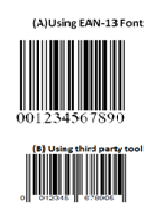
I tried your suggestion before posting this thread, when i convert the bar code its like (A) but i need as (B) please refer below images (A) and (B)
-
May 24th, 2014, 02:19 AM
#11
Frenzied Member
Re: EAN-13,CODE39,UPC,CODE128 Code Bar Generator
Originally Posted by tnncprojects
wild_bill - Thanks for your reply...
I tried your suggestion before posting this thread, when i convert the bar code its like (A) but i need as (B) please refer below images (A) and (B)
If Code.Length <> 12 in EAN13.vb???
so called EAN13 means 13 numbers.
-
Oct 8th, 2014, 01:46 AM
#12
New Member
Re: EAN-13,CODE39,UPC,CODE128 Code Bar Generator
Originally Posted by tnncprojects
Dear All,
Can any one tell me how to convert numbers to EAN-13 bar codes using the below code, usually i got series of numbers in notepad file and i need to convert those numbers to EAN-13 and show output in crystal report.
I am using VB.net 2010.
Code:
    Public Class EAN13
            Private bitsCode As ArrayList

            Public Sub New()
                bitsCode = New ArrayList
                bitsCode.Add(New String(3) {"0001101", "0100111", "1110010", "000000"})
                bitsCode.Add(New String(3) {"0011001", "0110011", "1100110", "001011"})
                bitsCode.Add(New String(3) {"0010011", "0011011", "1101100", "001101"})
                bitsCode.Add(New String(3) {"0111101", "0100001", "1000010", "001110"})
                bitsCode.Add(New String(3) {"0100011", "0011101", "1011100", "010011"})
                bitsCode.Add(New String(3) {"0110001", "0111001", "1001110", "011001"})
                bitsCode.Add(New String(3) {"0101111", "0000101", "1010000", "011100"})
                bitsCode.Add(New String(3) {"0111011", "0010001", "1000100", "010101"})
                bitsCode.Add(New String(3) {"0110111", "0001001", "1001000", "010110"})
                bitsCode.Add(New String(3) {"0001011", "0010111", "1110100", "011010"})
            End Sub

            Public Function Generate(ByVal Code As String) As Image
                Dim a As Integer = 0
                Dim b As Integer = 0
                Dim imgCode As Image
                Dim g As Graphics
                Dim i As Integer
                Dim bCode As Byte()
                Dim bitCode As Byte()
                Dim tmpFont As Font

                If Code.Length <> 12 Or Not IsNumeric(Code.Replace(".", "_").Replace(",", "_")) Then Throw New Exception("Le code doit être composé de 12 chiffres")

                ReDim bCode(12)
                For i = 0 To 11
                    bCode(i) = CInt(Code.Substring(i, 1))
                    If (i Mod 2) = 1 Then
                        b += bCode(i)
                    Else
                        a += bCode(i)
                    End If
                Next

                i = (a + (b * 3)) Mod 10
                If i = 0 Then
                    bCode(12) = 0
                Else
                    bCode(12) = 10 - i
                End If
                bitCode = getBits(bCode)

                tmpFont = New Font("times new roman", 14, FontStyle.Regular, GraphicsUnit.Pixel)
                imgCode = New Bitmap(110, 50)
                g = Graphics.FromImage(imgCode)
                g.Clear(Color.White)

                g.DrawString(Code.Substring(0, 1), tmpFont, Brushes.Black, 2, 30)
                a = g.MeasureString(Code.Substring(0, 1), tmpFont).Width

                For i = 0 To bitCode.Length - 1
                    If i = 2 Then
                        g.DrawString(Code.Substring(1, 6), tmpFont, Brushes.Black, a, 30)
                    ElseIf i = 48 Then
                        g.DrawString(Code.Substring(7, 5) & bCode(12).ToString, tmpFont, Brushes.Black, a, 30)
                    End If

                    If i = 0 Or i = 2 Or i = 46 Or i = 48 Or i = 92 Or i = 94 Then
                        If bitCode(i) = 1 Then 'noir
                            g.DrawLine(Pens.Black, a, 0, a, 40)
                            a += 1
                        End If
                    Else
                        If bitCode(i) = 1 Then 'noir
                            g.DrawLine(Pens.Black, a, 0, a, 30)
                            a += 1
                        Else 'blanc
                            a += 1
                        End If
                    End If
                Next
                g.Flush()
                Return imgCode
            End Function

            Private Function getBits(ByVal bCode As Byte()) As Byte()
                Dim i As Integer
                Dim res As Byte()
                Dim bits As String = "101"
                Dim cle As String = bitsCode(bCode(0))(3)
                For i = 1 To 6
                    bits &= bitsCode(bCode(i))(CInt(cle.Substring(i - 1, 1)))
                Next
                bits &= "01010"
                For i = 7 To 12
                    bits &= bitsCode(bCode(i))(2)
                Next
                bits += "101"
                ReDim res(bits.Length - 1)
                For i = 0 To bits.Length - 1
                    res(i) = Asc(bits.Chars(i)) - 48
                Next
                Return res
            End Function

        End Class
 You can use the ASCII Chart to convert numbers to EAN-13 barcodes,because every code corresponding to a number.This can be used not only EAN-13,but also code128,code39 and so on.This is the chart: http://www.ascii-code.com/ You can use the ASCII Chart to convert numbers to EAN-13 barcodes,because every code corresponding to a number.This can be used not only EAN-13,but also code128,code39 and so on.This is the chart: http://www.ascii-code.com/
 Posting Permissions
- You may not post new threads
- You may not post replies
- You may not post attachments
- You may not edit your posts
-
Forum Rules
|
Click Here to Expand Forum to Full Width
|



 Reply With Quote

