|

-
Jan 23rd, 2013, 09:35 AM
#1
Thread Starter
Lively Member

 help on altering tables on vb.net help on altering tables on vb.net
i have created a form which have DataGridView on it, it will bring up the tables from a Microsoft SQL Database.
i managed to do it and even implement to insert values to the tables using insert button.
however i cannot seem to alter the table when i run the application, i can only insert values and when i go to view the tables, it allow me to change the information of the tables but when i press back button and go back to view the tables again, the information was not changed.
can anyone help me with a save button with some codes in it so that when i press save button, the information i have edited on the tables will be saved.
thank you.
Regards,
public.
-
Jan 23rd, 2013, 10:12 AM
#2
Re: help on altering tables on vb.net
Hello,
I would recommend showing code or detailing how your code gets and sets data, for instance are you hand writing code for SqlClient data provider, using a Data Context class etc. This will assist others to help you with suggestions.
-
Jan 23rd, 2013, 10:38 AM
#3
Thread Starter
Lively Member
Re: help on altering tables on vb.net
 Originally Posted by kevininstructor

Hello,
I would recommend showing code or detailing how your code gets and sets data, for instance are you hand writing code for SqlClient data provider, using a Data Context class etc. This will assist others to help you with suggestions.
ok,this is an image of the table from the form i mentioned.
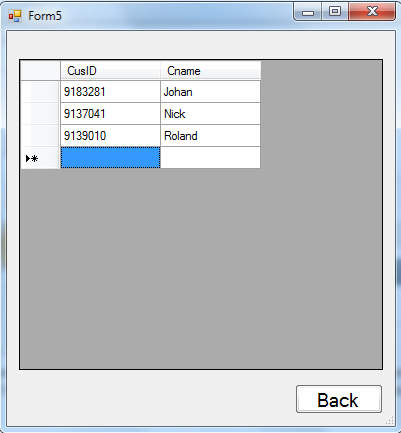
currently those 3 entries are entered by me using the insert button on another form
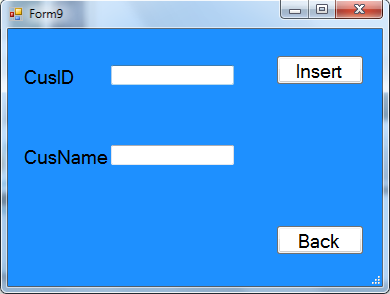
as the insert button is coded to link to the database, the entries i entered will be saved.
however if i were to alter any of the entries, probably change any of the name or ID, and i can't seem to be able to save it.
currently i only can insert to the table, but not alter the data.
can anyone help me?
-
Jan 23rd, 2013, 10:42 AM
#4
Re: help on altering tables on vb.net
What is the method to get to the data as I asked in my first reply?
-
Jan 23rd, 2013, 10:45 AM
#5
Re: help on altering tables on vb.net
Yeah, but we need more information, still. The problem is that there are MANY ways you could have gotten to the point you have shown. If we suggest a technique using raw SQL, but you used the datasource capabilities included in VS, then our suggestion would do you no good, and vice versa. The problem with working with databases is that there isn't just one way to do anything, but every technique falls into a category of methods. You need a suggestion that is in the same category that you have been using to get this far. Without knowing that category, we can't suggest anything meaningful. If you aren't sure what I mean by that, then show us the code (wrapped in CODE tags, please) behind the INSERT button, and we should be able to figure out what suggestion would be meaningful.
My usual boring signature: Nothing
 
-
Jan 23rd, 2013, 10:51 AM
#6
Thread Starter
Lively Member
Re: help on altering tables on vb.net
Originally Posted by kevininstructor
What is the method to get to the data as I asked in my first reply?
i used DataGridView and point it to my database.
-
Jan 23rd, 2013, 10:53 AM
#7
Thread Starter
Lively Member
Re: help on altering tables on vb.net
Originally Posted by kevininstructor
What is the method to get to the data as I asked in my first reply?
i used DataGridView and point it to my database.
Originally Posted by Shaggy Hiker
Yeah, but we need more information, still. The problem is that there are MANY ways you could have gotten to the point you have shown. If we suggest a technique using raw SQL, but you used the datasource capabilities included in VS, then our suggestion would do you no good, and vice versa. The problem with working with databases is that there isn't just one way to do anything, but every technique falls into a category of methods. You need a suggestion that is in the same category that you have been using to get this far. Without knowing that category, we can't suggest anything meaningful. If you aren't sure what I mean by that, then show us the code (wrapped in CODE tags, please) behind the INSERT button, and we should be able to figure out what suggestion would be meaningful.
Private Sub Insert_Click_1(ByVal sender As System.Object, ByVal e As System.EventArgs) Handles Insert.Click
'Structure Oledbconnection string
Dim cnnstr As String
'cnnstr string varies depending on the SQL server you are connecting to
cnnstr = "Provider=SQLOLEDB;" & _
"Data Source=T923-DC01;" & _
"Initial Catalog= xyzdesign;" & _
"uid=student19;pwd=G_password;"
' " Integrated Security=SSPI;"
'Establish the connection with string
Dim myconnection As OleDbConnection = New OleDbConnection(cnnstr)
'Open the connection
myconnection.Open()
'Structure SQL string for inserting data
Dim SQLStr =
"insert into Customer values('" & CusID.Text & "','" & CusName.Text & "')"
'Declare insert commmand object
Dim myCmd As New OleDbCommand
'Set oleDbCommand properties
myCmd.Connection = myconnection
myCmd.CommandText = SQLStr
myCmd.CommandType = CommandType.Text
Try
myCmd.ExecuteNonQuery()
Catch err As OleDbException
MessageBox.Show("err.Message")
myconnection.Close()
myCmd = Nothing
Exit Sub
End Try
MessageBox.Show("One record added to the Customer database table")
myconnection.Close()
myCmd = Nothing
End Sub
i was able to insert data to the table, but wasn't able to alter it and save it.
Last edited by public; Jan 23rd, 2013 at 10:56 AM.
-
Jan 23rd, 2013, 10:59 AM
#8
Re: help on altering tables on vb.net
Ah, good. That's a raw SQL approach, which is a good way to go about it.
There are a couple possibilities. The first is that, since you can't "point a DGV at a database", you aren't really updating anything at all. This is pretty likely. A DGV (usually) has a datasource, which is generally a datatable, dataview, or some other closely related animal. The datatable or dataview is populated from the database, often using a dataadapter or tableadapter. The actual data isn't in the database, though, but rather it is brought into whatever datasource the DGV is using. When you edit a record, you may well be editing this source, but you are probably not pushing those changes back to the database, so they aren't really recorded for very long. The solution is to update the datasource back to the database, but once again, the means to do that depends on what the datasource is and how you are obtaining it. Technically, you could use raw SQL to perform the update in a fashion similar to the INSERT button, but that is almost certainly going about it the hardest possible way.
My usual boring signature: Nothing
-
Jan 23rd, 2013, 11:25 AM
#9
Thread Starter
Lively Member
Re: help on altering tables on vb.net
Originally Posted by Shaggy Hiker
Ah, good. That's a raw SQL approach, which is a good way to go about it.
There are a couple possibilities. The first is that, since you can't "point a DGV at a database", you aren't really updating anything at all. This is pretty likely. A DGV (usually) has a datasource, which is generally a datatable, dataview, or some other closely related animal. The datatable or dataview is populated from the database, often using a dataadapter or tableadapter. The actual data isn't in the database, though, but rather it is brought into whatever datasource the DGV is using. When you edit a record, you may well be editing this source, but you are probably not pushing those changes back to the database, so they aren't really recorded for very long. The solution is to update the datasource back to the database, but once again, the means to do that depends on what the datasource is and how you are obtaining it. Technically, you could use raw SQL to perform the update in a fashion similar to the INSERT button, but that is almost certainly going about it the hardest possible way.
i can make a button on the form5 and name it as save.
but i cannot seem to find the command to update the table, which is to be implemented in the 'save' button.
the 'update' command on mssql requires a 'set' and 'where' clause.
-
Jan 23rd, 2013, 12:59 PM
#10
Re: help on altering tables on vb.net
So you tried it and got an error about some missing clauses? Show us that code. You are probably close, and there may be an easy way to get around the clauses.
My usual boring signature: Nothing
-
Jan 24th, 2013, 01:36 AM
#11
Thread Starter
Lively Member
Re: help on altering tables on vb.net
Originally Posted by Shaggy Hiker
So you tried it and got an error about some missing clauses? Show us that code. You are probably close, and there may be an easy way to get around the clauses.
i did not try it as i do not know how to do it.
The UPDATE statement allows you to update a single record or multiple records in a table.
the syntax is
Code:
UPDATE table_name
SET column1=value, column2=value2,...
WHERE some_column=some_value;
-
Jan 24th, 2013, 11:17 AM
#12
Re: help on altering tables on vb.net
Do you have a datatable behind that DGV? If so, then you can probably use a dataadpater to push all updates back to the DB with one call. Of course, you have to supply the dataadpater with the necessary UPDATE, INSERT, and DELETE commands. However, it is fairly likely that you can have all of those commands built for you by a CommandBuilder object. The limit on the CommandBuilder is that you must have a valid SELECT statement (which you must have if you are showing data), and the data being shown has to come from a single table, so the SELECT can't have JOINs in it. Interestingly, the latter obstacle may not be as great as it might appear. Still, the first question is whether you are using a datatable being that DGV, and if so, how did you fill it?
My usual boring signature: Nothing
 Posting Permissions
- You may not post new threads
- You may not post replies
- You may not post attachments
- You may not edit your posts
-
Forum Rules
|
Click Here to Expand Forum to Full Width
|



 Reply With Quote


