|

-
Dec 7th, 2012, 12:53 AM
#1
Thread Starter
Junior Member

How to fill up these details for connecting a mdf file to crystal report vb2010
I have made a crystal report to assign a database to it i created a module with following code and added this module to my form
Collapse | Copy Code
Imports System.Data.SqlClient
Imports System.Data.Sql
Module Module1
Public acscmd As New SqlCommand
Public acsconn As New SqlConnection
Public acsda As New SqlDataAdapter
Public acsds As New DataSet
Public strsql As String
Public Strreportname As String
Sub Connect()
acsconn.ConnectionString = "Data Source=.\SQLEXPRESS;AttachDbFilename=|DataDirectory|\Items.mdf;Integrated Security=True;Connect Timeout=30;User Instance=True;"
acsconn.Open()
If acsconn.State = ConnectionState.Open Then
MsgBox("Connected")
End If
End Sub
End Module
and in form 2 i dropped a crystal report viewer and crystal report document for that i write this code and a print button
Collapse | Copy Code
Imports CrystalDecisions.CrystalReports.Engine
Public Class Form2
Private Sub Form2_Load(ByVal sender As System.Object, ByVal e As System.EventArgs) Handles MyBase.Load
strsql = "select * from Items"
acscmd.CommandText = strsql
acscmd.Connection = acsconn
acsda.SelectCommand = acscmd
acsda.Fill(acsds)
Strreportname = "CrystalReport1"
Dim Strreportpath As String = Application.StartupPath & "\" & Strreportname & ".rpt"
If Not IO.File.Exists(Strreportpath) Then
Throw (New Exception("Unable to load report charu"))
End If
Dim rptdocument As New CrystalDecisions.CrystalReports.Engine.ReportDocument
rptdocument.Load(Strreportpath)
rptdocument.SetDataSource(acsds.Tables(0))
CrystalReportViewer1.ShowRefreshButton = False
CrystalReportViewer1.ShowCloseButton = False
CrystalReportViewer1.ShowGroupTreeButton = False
CrystalReportViewer1.ReportSource = rptdocument
End Sub
Private Sub Button1_Click(ByVal sender As System.Object, ByVal e As System.EventArgs) Handles Button1.Click
Dim cryRpt As New ReportDocument
cryRpt.Load("C:\Users\Dell\Desktop\WindowsApplication3\WindowsApplication3\CrystalReport1.rpt")
CrystalReportViewer1.ReportSource = cryRpt
CrystalReportViewer1.RefreshReport()
End Sub
End Class
when compiling no error see this image i dont know how to fill up these details please help me how to fill up these connection details.
see image :http://www.mediafire.com/view/?oz0nmmqkm2nw232
please give which details to be filled and how can i determine them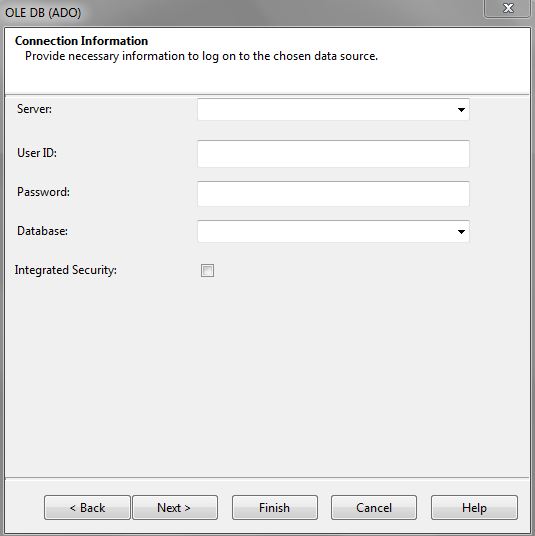
Tags for this Thread
 Posting Permissions
- You may not post new threads
- You may not post replies
- You may not post attachments
- You may not edit your posts
-
Forum Rules
|
Click Here to Expand Forum to Full Width
|



 Reply With Quote