|

-
Nov 11th, 2012, 11:35 AM
#1
Thread Starter
Member

How to return and separate values from listbox?
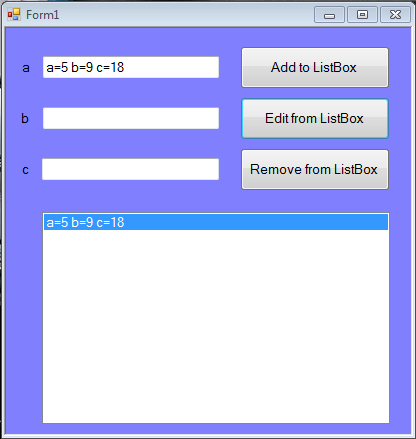
Code:
Public Class Form1
'//Add button
    Private Sub Button1_Click(ByVal sender As System.Object, ByVal e As System.EventArgs) Handles Button1.Click
        ListBox1.Items.Add("a=" & TextBox1.Text & " " & "b=" & TextBox2.Text & " " & "c=" & TextBox3.Text)
        TextBox1.Text = ""
        TextBox2.Text = ""
        TextBox3.Text = ""

    End Sub
'//Remove button
    Private Sub Button3_Click(ByVal sender As System.Object, ByVal e As System.EventArgs) Handles Button3.Click
        ListBox1.Items.Remove(ListBox1.SelectedItem)
    End Sub

'//Edit button
    Private Sub Button2_Click(ByVal sender As System.Object, ByVal e As System.EventArgs) Handles Button2.Click
        TextBox1.Text = ListBox1.SelectedItem()'//There is a problem because it returns all values into one textbox and I just wanna to separate values just like in input
    End Sub
-
Nov 11th, 2012, 11:43 AM
#2
Re: How to return and separate values from listbox?
As the 6-dimensional mathematics professor said to the brain surgeon, "It ain't Rocket Science!"
Reviews: "dunfiddlin likes his DataTables" - jmcilhinney
Please be aware that whilst I will read private messages (one day!) I am unlikely to reply to anything that does not contain offers of cash, fame or marriage!
-
Nov 11th, 2012, 12:19 PM
#3
Re: How to return and separate values from listbox?
Or as usual there's allways the Regex-route (remember to import System.Text.RegularExpressions):
vb.net Code:
Private Sub Button2_Click(sender As System.Object, e As System.EventArgs) Handles Button2.Click Static reg As New Regex("^a=(?<a>.*)\sb=(?<b>.*)\sc=(?<c>.*)$", RegexOptions.Compiled) Dim m As Match = reg.Match(ListBox1.SelectedItem) If m.Success Then TextBox1.Text = m.Groups(1).Value TextBox2.Text = m.Groups(2).Value TextBox3.Text = m.Groups(3).Value End If End Sub
Regards Tom
In truth, a mature man who uses hair-oil, unless medicinally , that man has probably got a quoggy spot in him somewhere. As a general rule, he can't amount to much in his totality. (Melville: Moby Dick)
 Posting Permissions
- You may not post new threads
- You may not post replies
- You may not post attachments
- You may not edit your posts
-
Forum Rules
|
Click Here to Expand Forum to Full Width
|



 Reply With Quote

