Hi there
I have made a login program where I used an Access Database and ADO for populating data. I have made a common module, named 'modCommon' where connecting string code exist like this:
VBCode Code:
Option Explicit
Public rsData As ADODB.Recordset
Public conData As ADODB.Connection
'Public DBConn As ADODB.Connection
Public Function LoadDatabase() As ADODB.Connection
Set conData = New ADODB.Connection
conData.Provider = "Microsoft.Jet.OLEDB.4.0"
conData.ConnectionString = "Data Source = " & App.Path & "\database.mdb"
conData.Properties("Jet OLEDB:Database Password") = "password"
conData.CursorLocation = adUseClient
conData.Open
Set LoadDatabase = conData
End Function
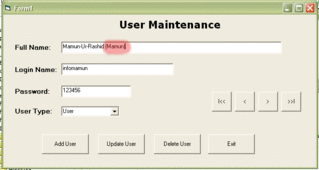
Now I have made a user maintenance form which is like below:

When I try to update a record like adding a nick name to fullname like this:
Record is being updated successfully:
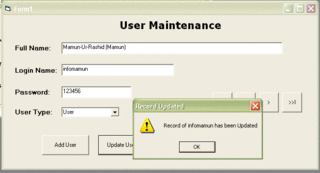
But If I press 'Next' Button and then 'Previous' the form is not showing updated data:
But If I exit the form and reopen the form, then I can see the updated data.
Name of the user maintenance form is form_admin in vb6 project.
Code for form_load is as follows:
VBCode Code:
Private Sub Form_Load()
Set rsData = LoadDatabase.Execute("Select * FROM users order by ID asc")
DisplayRecord
End Sub
Private Function DisplayRecord()
Dim Ut As String
Ut = rsData.Fields("utype").Value
txtFname.Text = rsData.Fields("fname").Value
txtUser.Text = rsData.Fields("uname").Value
txtPassword.Text = rsData.Fields("pword").Value
cmboUType.Clear
cmboUType.AddItem rsData("utype").Value
cmboUType.ListIndex = 0
If Ut <> "User" Then
cmboUType.AddItem "User"
End If
If Ut <> "Admin" Then
cmboUType.AddItem "Admin"
End If
If Ut <> "Banned" Then
cmboUType.AddItem "Banned"
End If
If Ut <> "Restricted" Then
cmboUType.AddItem "Restricted"
End If
If Ut <> "SuperAdmin" Then
cmboUType.AddItem "SuperAdmin"
End If
End Function
And code for Update button is as follows:
VBCode Code:
Private Sub cmdUpdate_Click()
Dim staffName As String
Dim uid As Integer
'rsBookmark = rsData.Bookmark
staffName = rsData("uname").Value
uid = rsData("ID").Value
If MsgBox("If you click 'Yes', data will be updated." & vbCrLf & "Are you sure to update the data?", vbQuestion + vbYesNo, "Confirm Update") = vbYes Then
LoadDatabase.Execute ("UPDATE users SET fname='" & txtFname.Text & "',uname='" & txtUser.Text & "',pword='" & txtPassword.Text & "',utype='" & cmboUType.List(cmboUType.ListIndex) & "' WHERE ID=" & uid & "")
MsgBox "Record of " & staffName & " has been Updated", vbExclamation, "Record Updated"
rsData.Requery
End If
End If
End Sub
And the code for the 'Next' button is as follows:
VBCode Code:
Private Sub cmdNext_Click()
rsData.MoveNext
If rsData.EOF = True Then
rsData.MoveLast
MsgBox "No More User Exist!", vbInformation, "No User"
Exit Sub
Else
DisplayRecord
End If
End Sub
My question is why updated data is not showing after executing update sql query even after recordset.requery(rsData.Requery)? Where is the problem?
Thanks in Advance



 [RESOLVED] Updated data is not showing using sql update query

 Reply With Quote