


Introduction
A question often asked is how to use Visual Basic to submit information to server side web scripts. Such as form variables. This small demonstration application shows how to accomplish this with the use of VB6 and the WinSock control.
In order to add the Winsock Control to your VB6 application, right click on the tool box, select components from the menu and check the box "Microsoft Winsock Control".
A Bit about HTTP
The Winsock control enables you to establish a connection to another computer using either TCP / UDP and transfer data over that connection. HTTP (Hypertext Transfer Protocol) is used to request and send data to web resources and it is up to the programmer to construct the HTTP request and parse the response.
There are two types of HTTP request, a POST request and a GET request. A POST request is used to send data to the server resource and a GET request is used to retrieve data from the server.
Data can also be passed to the server resource by means of a query string in both GET and POST requests. The query string is appended to the end of a URL in the form:
[http://www.domain.com/resource.php?variable1=value&variable2=value
Using the Demo Application
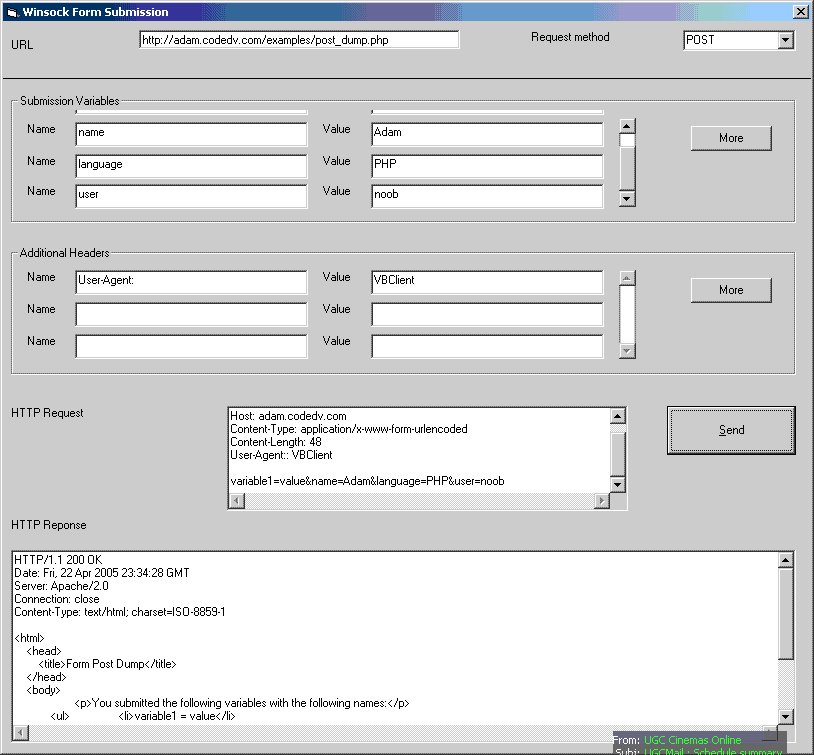
The demo application allows you to enter a URL and choose between a HTTP GET and HTTP POST request. The variable's section gives you the opportunity to send additional variables along with the HTTP request.
Variables
If you choose the GET method these variables will be added to the URL's query string. If you choose a POST request, they will be put into the body of the HTTP request.
Headers
The headers section allows you to add some custom HTTP headers, such as a user agent and cookies.
Sending the Request
Once the request has been sent you will be able to see the exact HTTP request sent to the server. After a short time you will also see the HTTP response.
You can test the application using the following URL:
http://adam.codedv.com/examples/post_dump.php


 Reply With Quote