|

-
Jan 2nd, 2012, 10:17 PM
#1
Thread Starter
Junior Member

Need Help with Victory Screen(for my MMO)
Hell! I need help with my Victory Screen. Basically when you win a battle, the Victory Screen Comes up. Everything is good BUT i'm kinda having trouble with something. I made 2 Timers for 2 labels, tmrCoins(for lblCoins), and tmrSP(for lblEXP). Basically what i want it to do is count down the label to 0/ subtract it till it hits 0. But it wont do anything. I also want it so in the Timer, if you press Enter/Return, it skips the count down and exits the form.
vb Code:
Option Explicit
Private Declare Function GetAsyncKeyState Lib "user32" (ByVal vKey As Long) As Integer
Public FrmMove As Boolean
Public DragX As Long
Public Dragy As Long
 Private Sub Form_Load()
Dim I As Integer
    MakeTransparent Me.hwnd, 100
    'Ex: all transparent at ratio 140/255
    'ActiveTransparency Me, True, False, 140, Me.BackColor
    'Ex: Form transparent, visible component at ratio 140/255
    'ActiveTransparency Me, True, True, 140, Me.BackColor

    'Example display the form transparency degradation
    ActiveTransparency Me, True, False, 0
    Me.Show
    For I = 0 To 255 Step 3
        ActiveTransparency Me, True, False, I
        Me.Refresh
    Next I
    Call StopBGM
    'Call StopSound
    frmVictory.SetFocus
End Sub
 Private Sub Form_KeyPress(KeyAscii As Integer)
    If KeyAscii = vbKeyReturn Then
        tmrCoins.Enabled = True
        tmrSP.Enabled = True
    End If
End Sub
 Private Sub Form_MouseDown(Button As Integer, Shift As Integer, X As Single, Y As Single)
    FrmMove = True
    DragX = X
    Dragy = Y
End Sub
 Private Sub Form_MouseMove(Button As Integer, Shift As Integer, X As Single, Y As Single)
Dim nx, ny
    If FrmMove Then
        nx = frmVictory.Left + X - DragX
        ny = frmVictory.top + Y - Dragy
        frmVictory.Left = nx
        frmVictory.top = ny
    End If
End Sub
 Private Sub Form_MouseUp(Button As Integer, Shift As Integer, X As Single, Y As Single)
Dim nx, ny
    nx = frmVictory.Left + X - DragX
    ny = frmVictory.top + Y - Dragy
    frmVictory.Left = nx
    frmVictory.top = ny
    FrmMove = False
End Sub
 Private Sub tmrCoins_Timer()
Dim Num As Integer
 If GetAsyncKeyState(vbKeyReturn) And tmrCoins.Enabled = True Then
    tmrCoins.Enabled = False
    frmVictory.Visible = False
    Call StopBGS
    Call PlayBGM(Map(GetPlayerMap(MyIndex)).Music)
End If
 Num = Val(lblCoins.Caption)
 If Num <= 0 Then
    tmrCoins.Enabled = False
Else
    Num = Num - 1
    Call PlaySound("MP_Coin.wav.wav")
End If
End Sub
 Private Sub tmrSP_Timer()
Dim Num As Integer
 If GetAsyncKeyState(vbKeyReturn) And tmrSP.Enabled = True Then
    tmrSP.Enabled = False
    frmVictory.Visible = False
    Call StopBGS
    Call PlayBGM(Map(GetPlayerMap(MyIndex)).Music)
End If
 Num = Val(lblEXP.Caption)
 If Num <= 0 Then
    tmrSP.Enabled = False
Else
    Num = Num - 1
    Call PlaySound("Magic_coin.wav")
End If
End Sub
It doesnt Count down/ Subtract to 0, and when you press Enter once, it exits the form. I tried to have it so when you press enter once, it activates the timers, then when you press enter again it skips the countdown/ subtracting and Exits the form. Any Help? And sorry, im still learning VB, so I might've not done it properly.
-
Jan 2nd, 2012, 10:59 PM
#2
Re: Need Help with Victory Screen(for my MMO)
It's a bad idea to use multiple Timers (let alone Timers in general) in games. The reason why is cause it is hideously slow, inconsistent, inaccurate, and get worse the more timers you use at the same time cause you have to wait on one timer to fire before the other one can perform. What you will need is a realtime managed game loop locked at 60 frames per second:
vb Code:
Option Explicit Private Declare Function QueryPerformanceCounter Lib "kernel32" (lpPerformanceCount As Currency) As Long Private Declare Function QueryPerformanceFrequency Lib "kernel32" (lpFrequency As Currency) As Long Private Ticks_Per_Second As Currency Private Start_Time As Currency Private Milliseconds As Long Private Get_Frames_Per_Second As Long Private Frame_Count As Long Private Running As Boolean Public Function Hi_Res_Timer_Initialize() As Boolean If QueryPerformanceFrequency(Ticks_Per_Second) = 0 Then Hi_Res_Timer_Initialize = False Else QueryPerformanceCounter Start_Time Hi_Res_Timer_Initialize = True End If End Function Public Function Get_Elapsed_Time() As Single Dim Last_Time As Currency Dim Current_Time As Currency QueryPerformanceCounter Current_Time Get_Elapsed_Time = (Current_Time - Last_Time) / Ticks_Per_Second QueryPerformanceCounter Last_Time End Function Private Sub Lock_Framerate(Target_FPS As Long) Static Last_Time As Currency Dim Current_Time As Currency Dim FPS As Single Do QueryPerformanceCounter Current_Time FPS = Ticks_Per_Second / (Current_Time - Last_Time) Loop While (FPS > Target_FPS) QueryPerformanceCounter Last_Time End Sub Private Function Get_FPS() As String Frame_Count = Frame_Count + 1 If Get_Elapsed_Time - Milliseconds >= 1 Then Get_Frames_Per_Second = Frame_Count Frame_Count = 0 Milliseconds = Get_Elapsed_Time End If Get_FPS = "FPS: " & Get_Frames_Per_Second End Function Private Sub Shutdown() Running = False Unload Me End Sub Private Sub Main() With Me .Show .ScaleMode = 3 .AutoRedraw = True .BackColor = RGB(0, 0, 0) End With Running = True Hi_Res_Timer_Initialize Milliseconds = Get_Elapsed_Time Main_Loop End Sub Private Sub Main_Loop() Do While Running = True '//Timer Code Goes Here Me.Caption = Get_FPS DoEvents Lock_Framerate 60 Loop End Sub Private Sub Form_Load() Main End Sub Private Sub Form_KeyDown(KeyCode As Integer, Shift As Integer) If KeyCode = vbKeyEscape Then Shutdown End If End Sub Private Sub Form_Unload(Cancel As Integer) Shutdown End Sub
Your game code should be within game loop. If you are wanting something to count down, do this:
vb Code:
Option Explicit Private Declare Function QueryPerformanceCounter Lib "kernel32" (lpPerformanceCount As Currency) As Long Private Declare Function QueryPerformanceFrequency Lib "kernel32" (lpFrequency As Currency) As Long Private Ticks_Per_Second As Currency Private Start_Time As Currency Private Milliseconds As Long Private Get_Frames_Per_Second As Long Private Frame_Count As Long 'Countdown variables Private Time As Long Private Time_Milliseconds As Long Private Countdown As Long Private Running As Boolean Public Function Hi_Res_Timer_Initialize() As Boolean If QueryPerformanceFrequency(Ticks_Per_Second) = 0 Then Hi_Res_Timer_Initialize = False Else QueryPerformanceCounter Start_Time Hi_Res_Timer_Initialize = True End If End Function Public Function Get_Elapsed_Time() As Single Dim Last_Time As Currency Dim Current_Time As Currency QueryPerformanceCounter Current_Time Get_Elapsed_Time = (Current_Time - Last_Time) / Ticks_Per_Second QueryPerformanceCounter Last_Time End Function Private Sub Lock_Framerate(Target_FPS As Long) Static Last_Time As Currency Dim Current_Time As Currency Dim FPS As Single Do QueryPerformanceCounter Current_Time FPS = Ticks_Per_Second / (Current_Time - Last_Time) Loop While (FPS > Target_FPS) QueryPerformanceCounter Last_Time End Sub Private Function Get_FPS() As String Frame_Count = Frame_Count + 1 If Get_Elapsed_Time - Milliseconds >= 1 Then Get_Frames_Per_Second = Frame_Count Frame_Count = 0 Milliseconds = Get_Elapsed_Time End If Get_FPS = "FPS: " & Get_Frames_Per_Second End Function Private Sub Shutdown() Running = False Unload Me End Sub Private Sub Main() With Me .Show .ScaleMode = 3 .AutoRedraw = True .BackColor = RGB(0, 0, 0) .ForeColor = RGB(0, 255, 0) End With Hi_Res_Timer_Initialize Countdown = 10 'This starts the countdown Milliseconds = Get_Elapsed_Time Time_Milliseconds = Get_Elapsed_Time Running = True Main_Loop End Sub Private Sub Main_Loop() Do While Running = True '//Timer Code Goes Here Time = (Get_Elapsed_Time - Time_Milliseconds) If Time >= 1 Then Countdown = Countdown - 1 Time_Milliseconds = Get_Elapsed_Time End If Cls Print Countdown Me.Caption = Get_FPS If Countdown <= 0 Then MsgBox ("VICTORY!!!"), vbExclamation Shutdown End If DoEvents Lock_Framerate 60 Loop End Sub Private Sub Form_Load() Main End Sub Private Sub Form_KeyDown(KeyCode As Integer, Shift As Integer) If KeyCode = vbKeyEscape Then Shutdown End If End Sub Private Sub Form_Unload(Cancel As Integer) Shutdown End Sub
Also note the PlaySound API doesn't play multiple sounds at once, only one sound at a time. I have multiple game tutorials in my signature if you wanna learn how to make games, and can answer anything you need game related as I am the game expert in this forum. 
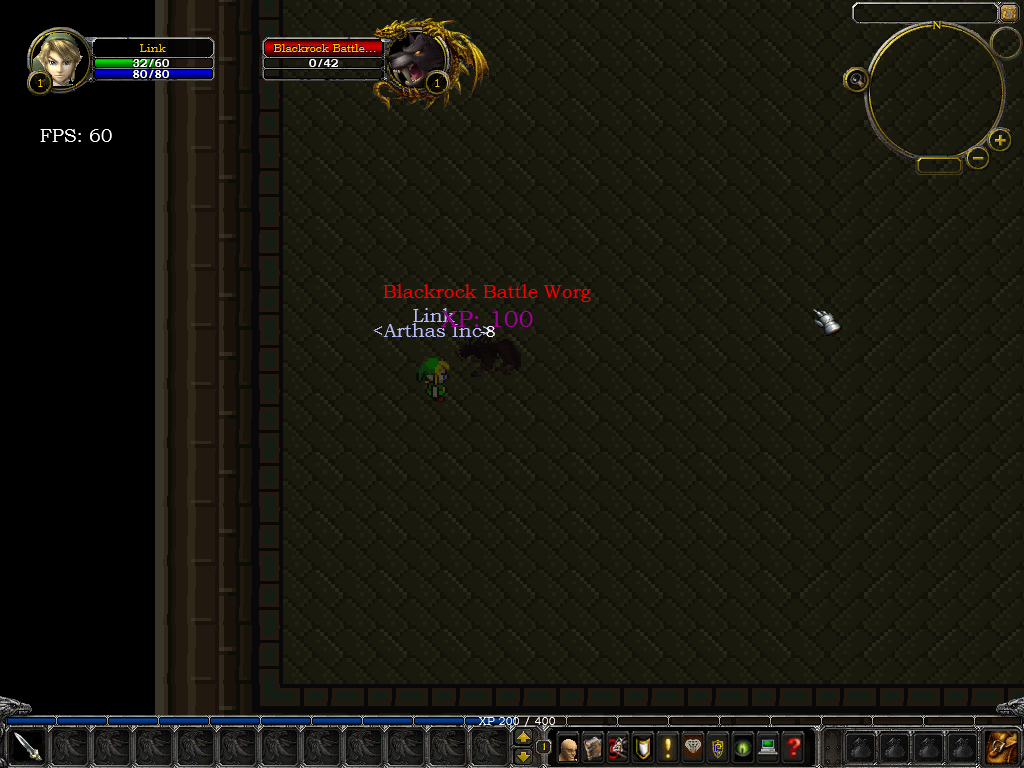
Speaking of MMO's, I'm currently making one in VB6 using DirectX8:
 Posting Permissions
- You may not post new threads
- You may not post replies
- You may not post attachments
- You may not edit your posts
-
Forum Rules
|
Click Here to Expand Forum to Full Width
|



 Reply With Quote


 Mark Thread Resolved