|

-
Sep 4th, 2010, 03:18 PM
#1
Calculating a gaussian lookup table
I've been pondering on writing a relatively efficient drop shadow effect using a gaussian blur. I've pretty much everything nailed except the most important thing: the calculation of the gaussian lookup table itself.
I'm planning to use a very simple one dimensional table, starting from the furthest away value and then getting up to the peak value. I'll then apply the weighted average first in X dimension and then in Y dimension using this lookup table: I can only assume this will give good enough results for my needs vs. the speed I wish to have. I'm dealing with a single color so it shouldn't be that bad.
Anyway... the biggest problem is that I don't understand how to turn the mathematical function into a real function to fill the lookup table values. I've taken a look into Wikipedia, but all it gives is maths functions. For example, for a gaussian blur that will effect 9 pixels I need a lookup table with 5 values, I guess roughly 0.05, 0.09, 0.12, 0.15 and 0.18 – and calculating these dynamically goes over my head.
From Wikipedia's Gaussian blur article:
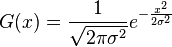
Yeah, I'm simply not compatible with that stuff. I guess I can understand it up to the pi.
I've tried to find a code example, but I've failed in it pretty badly. There is this gaussian blur example, but it isn't actually gaussian because the average it uses isn't weighted: every pixel is equal!
-
Sep 6th, 2010, 02:00 PM
#2
Re: Calculating a gaussian lookup table
First you need to pick a value for sigma [the Greek letter next to pi in the image you linked]. That value determines how "squashed" your distribution will be. Smaller values of sigma mean less blur; larger values of sigma mean more blur.
For your application, it turns out you can ignore the 1/Sqrt(2 pi sigma^2) term. I can tell you why if you want. The rest of the equation is e^(-x^2 / (2 sigma^2)), where e is Euler's number. Alternatively, it can be written as Exp(-x^2 / (2 * sigma^2)), which is executable VB6 code. In .NET it's probably something like Math.Exp(...).
You wanted 4 pixels to the left of the center and 4 to the right for 9 total. You can calculate the necessary weights using the above. Taking sigma = 2 ('cause I felt like it), for example, yields weights of...
Code:
0.13534
0.32465
0.60653
0.88250
1
0.88250
0.60653
0.32465
0.13534
generated by (VB6)
Code:
sigma = 2
For x = -4 To 4
    MsgBox Exp(-x ^ 2 / (2 * sigma ^ 2))
Next x
However, there's one more thing you need--these weights need to be normalized. Otherwise, you'll brighten or darken the whole image instead of just blurring. To normalize, add up your weights and divide each weight by that sum. In the example above, the weights add up to about 4.89803, so the normalized weights are given in the second column of the following table:
Code:
w -> w / sum

0.13534 -> 0.02763
0.32465 -> 0.06628
0.60653 -> 0.12383
0.88250 -> 0.18017
1.00000 -> 0.20416
0.88250 -> 0.18017
0.60653 -> 0.12383
0.32465 -> 0.06628
0.13534 -> 0.02763
-------
sum = 4.89803
Hopefully that's what you were after.
Last edited by jemidiah; Sep 6th, 2010 at 02:05 PM.
The time you enjoy wasting is not wasted time.
Bertrand Russell
<- Remember to rate posts you find helpful.
-
Sep 6th, 2010, 08:07 PM
#3
Re: Calculating a gaussian lookup table
That'll help a whole lot, too bad I can't get into implementation very soon as I have other more important projects going on right now 
-
Sep 7th, 2010, 03:26 AM
#4
Re: Calculating a gaussian lookup table
 Posting Permissions
- You may not post new threads
- You may not post replies
- You may not post attachments
- You may not edit your posts
-
Forum Rules
|
Click Here to Expand Forum to Full Width
|



 Reply With Quote
