|

-
Jun 3rd, 2010, 02:05 AM
#1
Carrige Return and <br /> messing up problem
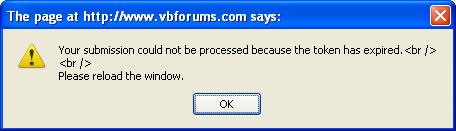
Why <br /> <br /> ??
Shouldn't it be the invisible characters [CRLF] [CRLF] instead?
-
Jun 3rd, 2010, 06:03 AM
#2
Re: Carrige Return and <br /> messing up problem
When did you get this?
Is this the first time, or have you gotten it before?
-
Jun 3rd, 2010, 06:23 AM
#3
Re: Carrige Return and <br /> messing up problem
No I see this quite too often. But just thought of getting it corrected today.
This will come up if page is left idle for a long time (say 24 hours or so). I'm not sure of the exact time for session expire though.
I have my browser set to show the last webpage it was showing when I closed it. So the next day when I open the browser (firefox), and feel like repping someone, reply to post etc. on that page itself, this comes up. After I refresh the page, the message will not appear again.
-
Jun 3rd, 2010, 09:57 AM
#4
Re: Carrige Return and <br /> messing up problem
It's because you're using Firefox and it is showing you a cached page.
-
Jun 3rd, 2010, 10:17 AM
#5
Re: Carrige Return and <br /> messing up problem
 Originally Posted by JPnyc

It's because you're using Firefox and it is showing you a cached page.
Yes, that's right.
But my question was about the <br /> part. 
-
Jun 3rd, 2010, 12:18 PM
#6
Re: Carrige Return and <br /> messing up problem
I'm not sure. It's probably due to a phrase we changed to alter its display elsewhere. Is it really that important?
-
Jun 3rd, 2010, 12:32 PM
#7
Re: Carrige Return and <br /> messing up problem
Not at all!
In fact you can concentrate on more important ones while work on this on least priority basis. Afterall how many people get this box anyways? I think I'm just the first, and that too due to my browser settings and addiction to forums. This is usually the last site I visit before shutting down the system. 
-
Jun 3rd, 2010, 01:35 PM
#8
Re: Carrige Return and <br /> messing up problem
Originally Posted by Pradeep1210
This is usually the last site I visit before shutting down the system.
Well, if you actuall "shut down" the system, closed your browser, and powered off your machine, then you probably wouldn't get that message either.
-
Jun 3rd, 2010, 02:03 PM
#9
Re: Carrige Return and <br /> messing up problem
Hack needs to borrow one of mendhak's extra eyebolls:
I have my browser set to show the last webpage it was showing when I closed it.
he does close the browser and shut down (I'm assuming) .. .but then whyen the browser is re-opened, it opens the last page that was open...
-tg
-
Jun 3rd, 2010, 02:06 PM
#10
Re: Carrige Return and <br /> messing up problem
Originally Posted by Hack
Well, if you actuall "shut down" the system, closed your browser, and powered off your machine, then you probably wouldn't get that message either.
If he saved the tabs, then when the system is powered up and he re-opens firefox the page displayed is from the cache, so the message would still show.
Fixing that message should be a quick thing to fix, I wonder why JPnyc seems against it. It is a forum bug after all.
-
Jun 3rd, 2010, 02:25 PM
#11
Re: Carrige Return and <br /> messing up problem
Originally Posted by Hack
Well, if you actuall "shut down" the system, closed your browser, and powered off your machine, then you probably wouldn't get that message either.
If you're using Firefox, you sure will. It's not widely known but Firefox has a real issue when it comes to loading cached pages. I know it because I've been dealing with users on 30 forums for the last five years and it's come up a number of times. As a browser, it's a brilliant marketing job.
-
Jun 3rd, 2010, 08:29 PM
#12
Re: Carrige Return and <br /> messing up problem
Why not set Fire fox to clear the cache when Fire fox closes? Bookmark the important links.
Edit:
Which version of Fire fox are you using?
Last edited by Nightwalker83; Jun 3rd, 2010 at 08:33 PM.
Reason: Adding more!
when you quote a post could you please do it via the "Reply With Quote" button or if it multiple post click the "''+" button then "Reply With Quote" button.
If this thread is finished with please mark it "Resolved" by selecting "Mark thread resolved" from the "Thread tools" drop-down menu.
https://get.cryptobrowser.site/30/4111672
-
Jun 3rd, 2010, 11:44 PM
#13
Re: Carrige Return and <br /> messing up problem
Originally Posted by Nightwalker83
Why not set Fire fox to clear the cache when Fire fox closes? Bookmark the important links.
Edit:
Which version of Fire fox are you using?
If I clear the cache, I need to relogin by putting in the userID/password again for each site I visit that requires authentication. Additionally, all sites I visit will take longer to load than it takes now. That's a bigger pain.
Also just as I said in earlier post, I'm really not bothered when this issue is fixed since it is just a string formatting issue and I can understand the meaning of the message very well. It is just that no one had pointed out this error till now. So I just did that, so that it gets into their list of bugs and is fixed some day or the other.
-
Jun 4th, 2010, 07:51 AM
#14
Re: Carrige Return and <br /> messing up problem
@: Pradeep: I am also using firefox with the same settings that you have. I never log out of VBF and in fact I never even close the tabs. I directly close the FF like you do. Next day when I open the FF, I get my pages back but never have I got that message. Probably because I refresh the page before answering any post... Never tried 'repping' someone the moment I open FF though 
A good exercise for the Heart is to bend down and help another up...
Please Mark your Thread " Resolved", if the query is solved
MyGear: Resolved", if the query is solved
MyGear:
★ CPU ★ Ryzen 5 5800X
★ GPU ★ NVIDIA GeForce RTX 3080 TI Founder Edition
★ RAM ★ G. Skill Trident Z RGB 32GB 3600MHz
★ MB ★ ASUS TUF GAMING X570 (WI-FI) ATX Gaming
★ Storage ★ SSD SB-ROCKET-1TB + SEAGATE 2TB Barracuda IHD
★ Cooling ★ NOCTUA NH-D15 CHROMAX BLACK 140mm + 10 of Noctua NF-F12 PWM
★ PSU ★ ANTEC HCG-1000-EXTREME 1000 Watt 80 Plus Gold Fully Modular PSU
★ Case ★ LIAN LI PC-O11 DYNAMIC XL ROG (BLACK) (G99.O11DXL-X)
★ Monitor ★ LG Ultragear 27" 240Hz Gaming Monitor
★ Keyboard ★ TVS Electronics Gold Keyboard
★ Mouse ★ Logitech G502 Hero
-
Jun 4th, 2010, 08:18 AM
#15
Re: Carrige Return and <br /> messing up problem
Next time just click the rep link/image on any post for a test. This box should come up.
Don't worry about accidentally repping a bad post because the site prevents you doing so until you refresh the page
-
Jun 4th, 2010, 09:42 AM
#16
Re: Carrige Return and <br /> messing up problem
Ok I will try it on JPnyc as he has already got his rep disabled...
A good exercise for the Heart is to bend down and help another up...
Please Mark your Thread "Resolved", if the query is solved
MyGear:
★ CPU ★ Ryzen 5 5800X
★ GPU ★ NVIDIA GeForce RTX 3080 TI Founder Edition
★ RAM ★ G. Skill Trident Z RGB 32GB 3600MHz
★ MB ★ ASUS TUF GAMING X570 (WI-FI) ATX Gaming
★ Storage ★ SSD SB-ROCKET-1TB + SEAGATE 2TB Barracuda IHD
★ Cooling ★ NOCTUA NH-D15 CHROMAX BLACK 140mm + 10 of Noctua NF-F12 PWM
★ PSU ★ ANTEC HCG-1000-EXTREME 1000 Watt 80 Plus Gold Fully Modular PSU
★ Case ★ LIAN LI PC-O11 DYNAMIC XL ROG (BLACK) (G99.O11DXL-X)
★ Monitor ★ LG Ultragear 27" 240Hz Gaming Monitor
★ Keyboard ★ TVS Electronics Gold Keyboard
★ Mouse ★ Logitech G502 Hero
 Posting Permissions
- You may not post new threads
- You may not post replies
- You may not post attachments
- You may not edit your posts
-
Forum Rules
|
Click Here to Expand Forum to Full Width
|



 icon on the left of the post.


 Reply With Quote


