WPF Expander : Changing expand/collapse arrow position
hi,
I am using an expander and want to give an expand/collapse look like copy/paste function of windows vista.
when you click on expand button, the arrow position will be pointing downwards. and the expander header flows to bottom and details will be shown above. now the position of expander arrow will be pointing to upwards. when click, the expander header section goes up and expander arrow points downwards.
the same i have tried to do in wpf. now the flow of content and header are fine. but the expander arrow position is opposite to the above functioning.
how we can change the arrow position in expander control property.
for more understanding please find attached image of what i am trying to work out............
Re: WPF Expander : Changing expand/collapse arrow position
I can't help you with your own version of this dialog, but I would recommend looking into using a TaskDialog, which is basically what you're trying to recreate.
"The only thing that interferes with my learning is my education."
Re: WPF Expander : Changing expand/collapse arrow position
The WPF expander works exactly the same as a 'standard' expander - you must just be using it incorrectly. It looks to me like you are just moving things around and making things visible when the user clicks the expander, which is not how it is really meant to be used - you are supposed to place your controls (so in your case a textblock/label) inside the expander and then it will automatically make them appear when the user clicks it (and the arrow will show the correct way round). I can tell that you have not done this in your example because the expander has ended up below the controls that you are pretending are inside the expander - if you had got the controls (textblock/label) inside the expander then when the expander is clicked the controls will appear below the expander.
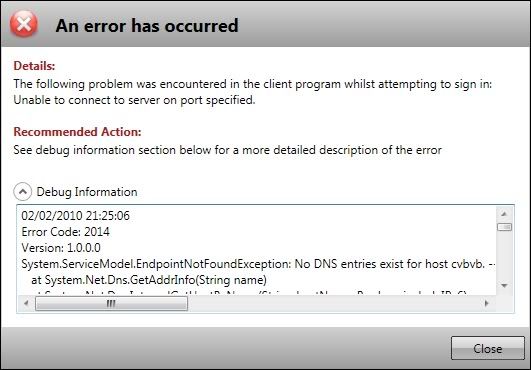
Here's an example from one of my WPF error dialogs - this is BEFORE the user has clicked the expander:
and this is after:
Last edited by chris128; Feb 2nd, 2010 at 04:28 PM.



 Reply With Quote