|

-
Jan 21st, 2010, 04:46 AM
#1
Thread Starter
Fanatic Member

 [RESOLVED] Datagridview Header [RESOLVED] Datagridview Header
At runtime when the dgv is shown,then on clicking the header of a particular row of the dgv,i want to pop up a form...........how to do this?
please help
thank you
-
Jan 21st, 2010, 05:10 AM
#2
Thread Starter
Fanatic Member
Re: Datagridview Header
initially this is my dgv when the form loads:

when i click a button the dgv is loaded with the values:
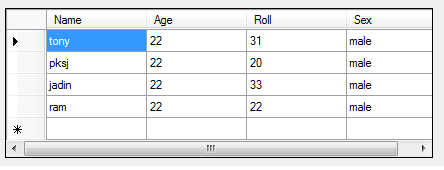
now when i click the header of a particular row of the dgv,then i want to show a form ......how to do this?
-
Jan 21st, 2010, 05:12 AM
#3
Re: Datagridview Header
You have the ColumnHeaderMouseDoubleClick and ColumnHeaderMouseClick...
Just need to put there the statement to open the form.
 Rate People That Helped You
Mark Thread Resolved When Resolved Rate People That Helped You
Mark Thread Resolved When Resolved
-
Jan 21st, 2010, 05:14 AM
#4
Thread Starter
Fanatic Member
Re: Datagridview Header
but the dgv is loaded with the data at the runtime.....then how to do this?
-
Jan 21st, 2010, 05:18 AM
#5
Thread Starter
Fanatic Member
Re: Datagridview Header
its not the column header mickey.......when the user clicks the > arrow sign of my second image (just beside the first cell) then i want to show the form.....
-
Jan 21st, 2010, 05:53 AM
#6
Re: Datagridview Header
Just use the mouse cell click/doubleclick event, and check what's the index of the column...
If the index of the column it's -1 then it's the header..
EDIT Example:
vb.net Code:
Private Sub DGV_CellMouseClick(ByVal sender As Object, ByVal e As System.Windows.Forms.DataGridViewCellMouseEventArgs) Handles DGV.CellMouseClick
        If e.RowIndex >= 0 AndAlso e.ColumnIndex = -1 Then
            'Show your form
        End If
    End Sub
Rate People That Helped You
Mark Thread Resolved When Resolved
-
Jan 21st, 2010, 05:53 AM
#7
Thread Starter
Fanatic Member
Re: Datagridview Header
ok i did this:
Code:
Private Sub DataGridView1_RowHeaderMouseClick(ByVal sender As Object, ByVal e As System.Windows.Forms.DataGridViewCellMouseEventArgs) Handles DataGridView1.RowHeaderMouseClick
        Select Case e.RowIndex
            Case e.RowIndex
                Form2.Show()
                Form2.TextBox1.Text = Me.DataGridView1.Rows(e.RowIndex).Cells("Name").Value
                Form2.TextBox2.Text = Me.DataGridView1.Rows(e.RowIndex).Cells("Age").Value
                Form2.TextBox3.Text = Me.DataGridView1.Rows(e.RowIndex).Cells("Roll").Value
                Form2.TextBox4.Text = Me.DataGridView1.Rows(e.RowIndex).Cells("Sex").Value
        End Select

        Form2.Show()
    End Sub
it works but tell that should i use the select case here
or
i should do the same using a loop?
-
Jan 21st, 2010, 06:03 AM
#8
Thread Starter
Fanatic Member
Re: Datagridview Header
though i pass the values between the two forms directly by this:
Code:
Form2.TextBox1.Text = Me.DataGridView1.Rows(e.RowIndex).Cells("Name").Value
many use the property....get...set
i cant understand the get...set properly....
can you explain the two mickey....
need your help
-
Jan 21st, 2010, 06:49 AM
#9
Re: Datagridview Header
You can use it like that, i think there's no problem...
Read this about propertys... and this
Rate People That Helped You
Mark Thread Resolved When Resolved
 Posting Permissions
- You may not post new threads
- You may not post replies
- You may not post attachments
- You may not edit your posts
-
Forum Rules
|
Click Here to Expand Forum to Full Width
|



 Reply With Quote