|

-
Mar 16th, 2009, 01:10 PM
#1
Thread Starter
Frenzied Member

spy++ call
I used spy++ to get this information:
WM_SHOWWINDOW fShow:True fuStatus:SW_PARENTOPENING.
Does anyone know how to convert this message into vb api call send message?
-
Mar 16th, 2009, 02:02 PM
#2
Frenzied Member
Re: spy++ call
Those are messages sent via the SendMessage API, you need to look up these constants with your API viewer.
Good Luck
-
Mar 16th, 2009, 02:04 PM
#3
Thread Starter
Frenzied Member
Re: spy++ call
vb5, I realize that. I have sendmessage api declared, but I don't know what else to put in that sendmessage according to the above statement from spy++
-
Mar 16th, 2009, 02:13 PM
#4
PowerPoster
Re: spy++ call
- wParam
TRUE (nonzero) if the window is being shown, zero if it is being hidden.
- lParam
One of the following constants:
SW_OTHERUNZOOM: Indicates that the window is being uncovered because a maximize window
was restored or minimized.
SW_OTHERZOOM: Indicates that the window is being covered by another window that has been
maximized.
SW_PARENTCLOSING: Indicates that the parent window is being hidden or minimized.
SW_PARENTOPENING: Indicates that the parent window is being displayed.
-
Mar 16th, 2009, 02:26 PM
#5
Thread Starter
Frenzied Member
Re: spy++ call
So this is what I end up with:
SendMessage Hwnd, WM_SHOWWINDOW, 1, SW_PARENTOPENING
Is this correct?
-
Mar 16th, 2009, 02:30 PM
#6
PowerPoster
Re: spy++ call
It depends on what you want to do -- replicate the spy++ message?
Try it and see what happens!!
-
Mar 16th, 2009, 02:31 PM
#7
Thread Starter
Frenzied Member
Re: spy++ call
I am trying to do what the spy++ does in that piece of line.
-
Mar 16th, 2009, 02:47 PM
#8
PowerPoster
-
Mar 16th, 2009, 02:48 PM
#9
Thread Starter
Frenzied Member
Re: spy++ call
SendMessage Hwnd, WM_SHOWWINDOW, 1, SW_PARENTOPENING
Yes, tried this one but my window is still in minimized state 
-
Mar 16th, 2009, 03:08 PM
#10
Re: spy++ call
Per MSDN documentation
The WM_SHOWWINDOW message is sent to a window when the window is about to be hidden or shown
So, sending the message directly probably has no effect on actually showing the window. The window will most likely use this info for personal use, like maybe setting flags for example.
See if this line of code helps. Maybe the window itself is trapping certain messages and handling them uniquely. Don't know why it would do that unless it custom drawing itself. The following will bypass the window (if it is subclassing) and send it directly to the window's default window procedure.
Code:
Call DefWindowProc(hWnd, WM_SYSCOMMAND, SC_RESTORE, 0&)
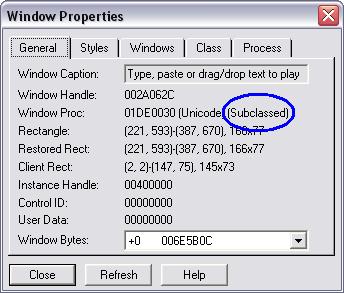
Speaking of subclassing, is the window subclassed? You can determine this from spy++ by looking at the general tab of the properties window:
-
Mar 16th, 2009, 05:18 PM
#11
Thread Starter
Frenzied Member
Re: spy++ call
Is hWnd is the hwnd of my window or of the system? How to get hwnd of the system?
-
Mar 16th, 2009, 05:43 PM
#12
Re: spy++ call
hWnd is the window handle you are trying to restore from the tray.
-
Mar 16th, 2009, 06:09 PM
#13
Thread Starter
Frenzied Member
Re: spy++ call
Is there a way i can get the system hwnd?
 Posting Permissions
- You may not post new threads
- You may not post replies
- You may not post attachments
- You may not edit your posts
-
Forum Rules
|
Click Here to Expand Forum to Full Width
|



 Reply With Quote
