PDA

Click to See Complete Forum and Search --> : geometry question


kleinma
Mar 19th, 2008, 11:14 AM
I am building a custom view (UI control) for an application I am working on, but it has been so long since I have really had to use any applied geometry other than the basics that I am not sure if there is an easy geometry formula to tackle this.

The issue at hand, is I will have a window of variable size. This window will contain images, and the number of images is also variable.

The images displayed within the window, need to size and position themselves based on the number of images to be shown. So if only 1 image is to be shown, it will take up as much of the window as possible, if 2 images, they will fill as much of the window is possible. 10 images, same thing.

One key thing here also is the images will at least be in constant proportion in terms of their size to each other, and also their height and width. So all images will all be the same size for the given layout, and also when the height and width gets calculated based on the number of images to show, the height/width ratio should stay the same (ie I don't want to stretch the image just to fill the entire window)

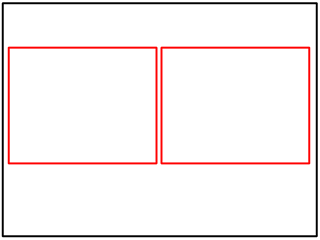
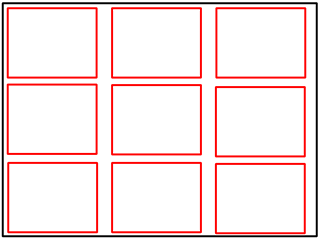
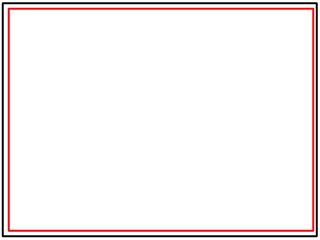
Here are a few images to illustrate this (note sizes of red rectangles in each image are always the same). Is there any specific geometric formula to do this?
http://www.vbforums.com/attachment.php?attachmentid=62949&stc=1&d=1205943199http://www.vbforums.com/attachment.php?attachmentid=62950&stc=1&d=1205943199http://www.vbforums.com/attachment.php?attachmentid=62951&stc=1&d=1205943199

Shaggy Hiker
Mar 19th, 2008, 12:15 PM
No.

The problem is that you chose some non-random examples, and the cases in between them will be really problematic. One image is easy, two images is not, because there are MANY different ways to display them (such as the way you have them, or rotate that 90 degrees, or put one upper right, and the other lower left, etc.). Why is one option superior to the other? Your next example is nine objects, but if you had chosen 7 or 8, you would have a much harder time deciding where to put them. Three and five would also be difficult, though there are only two reasonable arrangements for five. Four would be easy, and so forth.

Basically, the aesthetics will be up to you for all but a handful of cases (which happen to be perfect squares, for the obvious reason).

TheBigB
Mar 19th, 2008, 12:18 PM
I'm not sure whether I understand your question correctly, but lets give it a try.

(I'm going through this in baby-steps, so if you just need the answer, scroll to the last paragraph :D)

The first thing you want to know, is how many rows and columns you need.
Looking at the 3rd example you can see that having equal rows and columns gives you the most efficient structure in a rectangle.

Having that defined, you have to find out how you get the rows and columns equally filled.
Taking a second look at example 3, you see that you have 3x3 rows and columns and 9 images total. So it's obvious you need to square root the number of images.

But let's say we have 18 images, you would get something like 4.24.
So what you want to do is take the floor of that decimal answer in this case 4. (I know PHP (http://php.net/floor)has this function, but I don't know about VB)
Now we know that we need a grid of at least 4x4 or maybe 5x4 (or 4x5) if 4² differs from 18, which in this case it does. 4² = 16 and 18-16=2, meaning we need a grid of 5x4 where one row consists of only 2 images.

Now to cut things short you want something like:

baseGrid = floor(numImg ^ 0.5)
Columns = baseGrid
If (baseGrid²) = numImg
Rows = baseGrid
Else
Rows = numImg - (baseGrid²)
End If

and then the heights and widths of the images is simply dividing the window length by the number of rows and columns and then subtracting the spaces between them from it

kleinma
Mar 19th, 2008, 12:19 PM
The layout is less important than the size calculation Shaggy.

The layout would be left to right, top to bottom.

I might add code later to horizontally center lets say 2 images if it were a 8 image layout, so it was 3 across for 2 rows, and then 2 across for the final row.

However right now I am just concerned with the calculation for the sizes.

kleinma
Mar 19th, 2008, 12:48 PM
If it makes it any easier to follow what I am trying to do, the concept is actually pretty similar to the feature in IE7 that allows you to see preview screenshots of all the currently opened tabs. This layout is the same layout I need to achieve for my images.

Depending on how many tabs you have open in IE, this preview page sizes each screenshot accordingly, so they all fit in the page.

At a certain very large amount of tabs (20), it does stop shrinking the previews, and just uses a vertical scrollbar.

jemidiah
Mar 19th, 2008, 05:16 PM
Geometrically, you can imagine stretching the entire control to make everything a square, which is easier to deal with initially (at least for me). Doing so makes it obvious that your tilings will be subsets of size n2 grid boxes; I don't think that other tilings would fit into your initial box without having to have an extra gutter on the sides (so a 4x5 as suggested earlier would actually hurt efficiency).

For 1 image, you'll have a 1x1 box. For 2-4 images, you'll need a 2x2; 5-9, 3x3, etc. The IE7 feature you referenced starts doing this for 5+ images; the rest appear to be hard-coded layouts, to keep the images from getting too big and resizing too often as you add a few more tabs.

Similar to what TheBigB suggested, you want to know the number of rows and columns. Since they're both effectively equal (not all rows will be entirely filled, but they'll still be there), we just need to find one. Using the pattern above, the formula n(numImages) = Ceiling(Sqrt(numImages)) appears to work: n(1) = 1 -> 1x1; n(2) = 2 -> 2x2; n(4) = 2 -> 2x2; n(5) = 3 -> 3x3; n(9) = 3 -> 3x3, n(10) = 4 -> 4x4, etc.

Now it's a simple matter to find the dimensions of each image in the tiling: the width is just boxWidth / n, and the height is just boxHeight / n.


So, given numImages images, and boxWidth and boxHeight, we can find picWidth and picHeight with:

n = Ceiling(Sqr(numImages))
picWidth = boxWidth / n
picHeight = boxHeight / n


assuming you've defined the Ceiling function as usual.

anhn
Mar 19th, 2008, 08:25 PM
If the ratio of the given Image equals to the ratio of the Box then jemidiah's solution is perfect. (Is this what kleinma wants?)

A simple Ceiling() function for this case:
x = Sqr(numImages)
n = Int(x) - (x > Int(x))
'-- note: if x > Int(x) then (x > Int(x)) = -1 else (x > Int(x)) = 0
In general case it is not as simple as that.

Check this case: Box = 800 x 600 pixels; Image = 200 x 400 pixels; NumberOfImages = 20.
jemidiah's solution will give: n = 5; picWidthMax = 800/5 = 160; picHeightMax = 600/5 = 120.
After resize without distortion: picWidth = 60; picHeight = 120.

The optimum solutions for this case will be: picWidth = 100; picHeight = 200 with 7 or 8 columns and 3 rows.
Box Size: 800 x 600
Original Image Size: 200 x 400
Number of Images: 20
Cols Rows Width Height
---- ---- ----- ------
1 20 15.00 30.00
2 10 30.00 60.00
3 7 42.86 85.71
4 5 60.00 120.00
5 4 75.00 150.00
6 4 75.00 150.00
7 3 100.00 200.00
8 3 100.00 200.00
9 3 88.89 177.78
10 2 80.00 160.00
11 2 72.73 145.45
12 2 66.67 133.33
13 2 61.54 123.08
14 2 57.14 114.29
15 2 53.33 106.67
16 2 50.00 100.00
17 2 47.06 94.12
18 2 44.44 88.89
19 2 42.11 84.21
20 1 40.00 80.00
---- ---- ----- ------
8 3 100.00 200.00 <-- one of optimum results
If you want to see the code that produces the above result I will post it.
I do not post the code I wrote now because I feel it is not a fast way to calculate as it has to go through all options.
We need to find a function, from that we can find the pick point.

Logophobic
Mar 19th, 2008, 09:42 PM
An even simpler Ceiling function:
Ceiling(x) = -Floor(-x) = -Int(-x)

Here's something for you to play with.

WidthRatio = BoxWidth / ImgWidth
HeightRatio = BoxHeight / ImgHeight
NumRows = -Int(-Sqr(NumImages * HeightRatio / WidthRatio))
NumCols = -Int(-Sqr(NumImages * WidthRatio / HeightRatio))

anhn
Mar 19th, 2008, 10:15 PM
Good point! It cannot be simpler than that.

kleinma
Mar 19th, 2008, 11:14 PM
An even simpler Ceiling function:
Ceiling(x) = -Floor(-x) = -Int(-x)

Here's something for you to play with.

WidthRatio = BoxWidth / ImgWidth
HeightRatio = BoxHeight / ImgHeight
NumRows = -Int(-Sqr(NumImages * HeightRatio / WidthRatio))
NumCols = -Int(-Sqr(NumImages * WidthRatio / HeightRatio))


The problem with this I think, is going to be that I don't know the width and height of the image before I know how many rows/columns I need. This is because the number of rows/columns I need would depend on the number of images, which would determine how many images could fit into the encompassing rectangle, since I want to make the images bigger when there are less to show, but always be the same size as the other images at the given moment.

So I think the order in which things need to be solved, would be

1) the number of images that can fit the given rectangle
2) the size of the images

so if number 2 is needed to calculate number 1, then perhaps some sort of loop to back into the value is what is needed...

anhn
Mar 19th, 2008, 11:37 PM
If the width and height ratios between display image and the box are equal then you have no problem as (HeightRatio = WidthRatio),
so you need only 3 lines of code: (combined two methods of Logophobic and jemidiah)
n = -Int(-Sqr(NumImages))
ImgWidth = BoxWidth / n
ImgHeight = BoxHeight / n
where n= number of rows = number of columns (last row or last column may not be filled up).

jemidiah
Mar 20th, 2008, 02:40 AM
Yay for making up words! I'll call each big box in your original image a panel.

Inside each panel, the ratio of width to height of each tile is constant, yes? However, that ratio is not necessarily the same ratio as the width to height of the panel? It sounds like it from what you've said (though your first pictures don't seem to reflect this). This is the case that Anhn posted test results for, and the case that I didn't want to think about :cool:

How are you determining the number of panels to show? And how are you grouping these images? It seems like every image with the same aspect ratio should go into a single panel, which would necessarily determine the number of images in that panel. From there, you could figure out what tiling is optimal (we'd have to figure out the formula for that but it shouldn't be too bad), and load in the images. This all hinges on you not splitting up a group of images into several panels--that is, we need to know how many panels there are and what groups the images will go into to solve this, I think....


I got to starting to derive a formula for this more difficult case. It looks ugly, though, since the tiles don't fit exactly within the panels. Here's what I have so far:

Image dimensions (original):
x (width) by y (height)

Panel dimensions (original):
p by q

m rows, n columns


Each panel box is of size p/n by q/m. Each panel box must have the same aspect ratio as the initial image, so

(p/n) / (q/m) = (x/y)
(pm)/(qn) = (x/y)
pm = xqn / y
m = (xqn) / (yp)


We want to maximize the area of each box, so maximize

A(n, m) = (p/n) * (q/m) = (pq) / (nm)

Plug in m from above to get

A(n, m) = (pqyp) / (nxqn) = (p^2 y) / (n^2 x).


The trick now becomes to maximize A(n), but using only discrete values of n (and therefore cutting off the last row given by m). Brute force may actually be a viable, if inelegant, way to solve this.