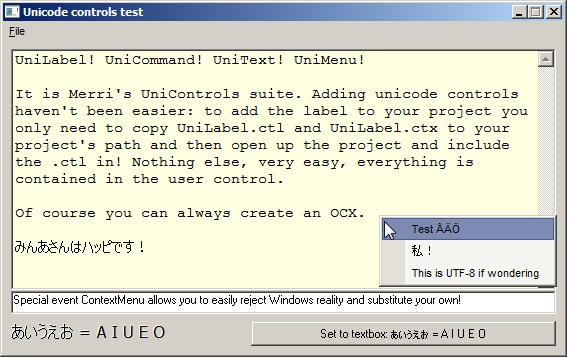
I've finally come to a point at which I'm happy enough to the results: my unicode controls as solid standalone one file user controls. LaVolpe's version of Paul Caton's SelfSub and SelfHook are being used to gain something that has been very hard before.
These controls are aimed to be basic controls, with a little twist or two. UniLabel is currently the only control that is nearly polished to it's maximum, it has one remaining issue with transparent ZOrder. Other controls are still on beta level: UniMenu needs work on easing it's usage, UniText needs polishing and adding functionality, UniCommand is an non-subclassed older version which will be replaced by subclassed one once I've resolved a few issues.
Feedback and bug reports very much appreciated!
Last edited by Merri; Jun 19th, 2008 at 12:29 AM.
Reason: New version
Yeah, this is a known problem. I fixed it already at one point (after the release), but after messing around the code it is back in my current source. Will see if I get it fixed for the next release.
I have some nice news for you all: the next version of UniLabel will support Vista's themed text, meaning you can have glows, shadows and borders around text when your app runs on Vista.
At this point I already have support for glowing text and I don't think it would be too hard to add support for the rest.
Left one with solid background, right one with transparent background. So as you can see, there is a bug remaining with the transparent background. For some reason it doesn't draw properly the first time window pops up back to being visible. I'll just have to figure out why.
At this point...
New properties: Border, BorderColor, Glow, Shadow, ShadowColor, ShadowX, ShadowY, UseThemeText
New methods: SetShadow, SetShadowOffset, ThemeText
ThemeText returns True if DrawThemeTextEx can be used. It can't be used when Vista's theming is disabled and classic theme is being used instead.
Could you give more details? Which version and what did you do?
Edit!
I tried to write some Chinese and it worked ok. Not that I understood anything of what I wrote, but the characters came out like they're supposed to. This on a Finnish Vista.
There is one possible place when characters don't go the Unicode route, so lets rule that one out: open UniText source, locate UserControl_ReadProperties and the following line:
If ssc_Subclass(UserControl.hWnd, , 1, , Ambient.UserMode) Then
change to
If ssc_Subclass(UserControl.hWnd, , 1, , Ambient.UserMode, True) Then
This should change the subclassing of messages of the usercontrol itself (not the textbox that has been created using API) to Unicode. This may cause other problems or not, but lets see if this has any effect for the Chinese not working.
Other than this, I don't have an idea at this point what might cause the problem.
See the regional settings and check if the setting for possible alternative fonts is checked. On English XP, you have to tick option "Install fonts for Far East languages" or something similar to be able to see Chinese, Japanese, Korean etc.
I can't remember what you have to do with Windows 2000 to get the fonts.
I've taken out UniTextBox user control alone for test and found it the best of all approaches I've come across so far.
I've been able to (1) use Hand Writing Device to input Chinese characters ("Simple Chinese") and (2) paste the same from WordPad to UniTextBox alright.
One problem encountered, however. When I wanted to change the "Project Name" property of the Project, the screen flagged "Thunk hasn't been initialized". At the end, I have to re-start the computer.
The test was done on XP and Vista. I also tried it on ME, understandably it wouldn't work there, just a mention.
I've meanwhile added some properties to the user control, such as FontName selection, CharSet selection (Font's Script No.), FontSize, Bold, Italic and Underline. All worked fine. If you want me to send you my test project (so that you might save some typing), I can contact you via the mail system of Plant-Soure-Code.
Regards,
Last edited by Herman CK; Feb 16th, 2008 at 02:56 PM.
Regarding the outstanding issue on your uniTextBox (you listed the issue earlier on), it seems that if you set the ForwardFocus property of the user control to True, then you will regain focus on return after losing focus to another window such as WordPad.
Focus overall is a hard issue, the default behavior involved with how user controls behave is troublesome with controls such as a textbox that involve using keys such as tab, enter and arrows. The regular user control behavior have to be cancelled in one way or another, which isn't yet done perfectly. The only "good" solutions involve using a type library, which isn't something I'm a fan of due to a requirement of an extra file while I want it all to work from one. I have ended up to capturing keys by hooking, which isn't as clean I'd want it to be...
Merri, if you are still updating this project, here is an issue that you may want to examine. When textbox has focus, press F10 (activates menubar), try to use keyboard to navigate menu. Just trapping the F10 won't solve the problem though. If textbox has focus, click on the menu File, now try to use keyboard to navigate menu. I think the solution is to actually subclass the parent form and look for menu loop messages to determine when to allow right/left, up/down arrows to flow thru. Of course, subclassing the form by multiple usercontrols always leads to problems.
Anyway, I got re-interested in combining VB with API Windows and have encountered this problem. I came to your post, wondering if you had a cure for it.
Insomnia is just a byproduct of, "It can't be done"
Merri, figured it out should you want to attack same problem. Here's what I had to do:
1) Only on wm_setfocus, start keyboard hook and also subclass the top-level window. If wm_entermenuloop or wm_contextmenu happens, release keyboard hook and restart hook on wm_exitmenuloop or after wm_contenxtmenu returns, but only if control still has focus. Note that wm_contextmenu can occur both in the top level window and the api window too.
2) On wm_killfocus, release keyboard hook always
Insomnia is just a byproduct of, "It can't be done"
I'm back working on the controls. However I've made a change in how I work with the project: I've given up on hooking, it just is all too messy, instead I've included an IOLEInPlaceActivate replacement module and two different TLB files to fix the issue the correct proper way.
This means the controls won't be as standalone as they used to be. In the other hand I'm aiming on having only one extra module. As a bonus though, I'm currently working on UniRich control to have an Unicode Richtextbox, and it'll need some extra class modules for usability's sake. I'm basing my work on Edanmo's excellent but IDE crashy RichEdit control, which I'll convert to SelfSub to gain stability and compatibility with my other controls.
I originally started working on my IRC client, Goldpanda, but I soon noticed three different methods for subclassing between the various components only resulted in very-very-hard-to-debug crash issues. It looks like I need to write my own WinSock replacement as well, CSocketMaster just doesn't cut it anymore, so I'll convert that to SelfSub as well (and probably do some other changes when I'm at it).
The control list is getting pretty long:
clsSock
UniCommand
UniLabel
UniList
UniMenu
UniRich
UniText
Just knowing that I have to rewrite tons of code doesn't sound too fun...
UniText RC3 release is open for bug testing, I'd like people to check if there are any bugs or only partially done features. The control can save and load Unicode text files. UTF-7, UTF-8, UTF-16, UTF-32, big endian, little endian... all those are supported. Many codepages are also supported for loading and saving, so you can load a GB 18030 encoded text file.
UniList RC1 is also in the package. It lacks support for checkbox style but other than that it should work pretty good.
Finally a new UniControls main release. It isn't as polished as I'd like it to be, but I find it better to release often when I'm at it so here we are.
Things we have here now:
UniCaption (Unicode caption for forms)
UniCommand (command button)
UniDialog (common dialog & browseforfolder; this one needs still a lot of work)
UniLabel (the most polished of these controls)
UniList (listbox: sorting has much more power thanks to locale selection)
UniMenu (ownerdrawn menu, lots of options for colors)
UniText (textbox with wide range of Unicode support)
I have some rewriting to do thanks to some new coding techniques that I've found since the latest release, and knowing how much time I have it may take anything from several weeks to a few months.
I'd also have to let some of the controls go, especially UniMenu, it is oldest by codebase and most likely the greatest cause of unexpected crashes (especially under IDE).
As it has not been done already, the easiest thing to do is build your own using a combination of UniText (for the part that is usually displayed), UniList (for the drop-down list) and a command button (for the drop down button).
You can add it to your project, but it is illegal to distribute it (so your program will only work if it is already installed).
From Microsofts web site:
The Fm20.dll is NOT redistributable. You must have an application such as Microsoft Office 97 on the target system that installs Fm20.dll as part of its setup. (Fm20.dll is included with the OSR2 and OSR2.5 releases of Windows 95.) You can also find this file on the Visual Basic 5.0 CD under the \TOOLS\DataTool\Datatool\Msdesign folder. This will be installed only if you run the setup for the Visual Database Tools. In any case, you may not distribute the Fm20.dll as part of your setup, even if you purchase the Microsoft Office Developer Edition product.
The quality of Merri's code is brilliant Fantastic stuff.
That said, I'd like to point out that if the UniText control has the Locked property set, then the keyboard shortcut for Copy (Ctrl-C) is not passed through in the TranslateAccel method of the UniText.ctl file.
Last edited by pinkduck; Sep 1st, 2009 at 06:40 AM.
Reason: Semantic fix
There are lots of oddities still in the code, but it is more than likely they'll never end up being fixed. Now that I'm more or less successfully entered work life I don't have the time resources I used to have, and programming wise I don't know which language I should pick up now that VB6 is slowly dying away. And I do a lot of other things besides programming (game translations, game modding, websites...).
Hi ,Marry why in the following code it says .Client Side Not Available???.Error is Comming at Red Line !.let me know some idea please .
Code:
Private Sub UserControl_Initialize()
    m_WINNT = (Environ$("OS") = "Windows_NT")
    On Error Resume Next
    m_ExtenderScale = UserControl.Extender.Container.ScaleMode
    If Err.Number Then
        Err.Clear
        m_ExtenderScale = UserControl.Parent.ScaleMode
        If Err.Number Then
            Err.Clear
            m_ExtenderScale = vbTwips
        End If
    End If
    On Error GoTo 0
End Sub
During UserControl_Initialize the UserControl.Extender is not yet created. You have to do the call in UserControl_InitProperties (when the control is created for the first time in IDE) and UserControl_ReadProperties (all other cases).
In the recent EruLabel that I posted I think I had a better method for ScaleMode checking, but I'm not entirely sure. I did something better than I've done previously, I think.
"VB6 is slowly dying away"
it can be raised up by real VB6 hobbyists,i believe,though many people think it's impossible,
your developments are wonderful,keep enthusiasm on them Merri!! i support u!!!
-- a VB6 hobbyist from china,don't laugh at my english,thks.
How do you do, dear Marri.
I have looked your UniControl.
If I shall press the keys "қ" on UniText, that he does not show them, together he shows "?".
But if put Msgbox "" here:
Code:
Private Function Private_WndEventKeyboard(MF As MSGFILTER) As Long
    Dim intShift As Integer
    Dim intChar As Integer
    Select Case MF.Msg
      Case WM_KEYDOWN
          ' set the intShift parameter
          intShift = Private_GetShiftMask
          ' set the KeyCode parameter
          intChar = MF.wParam And &HFFFF&
          ' raise the event
          RaiseEvent KeyDown(intChar, intShift)
          MsgBox ""
It is сorrect shows, problem in than can be?
Last edited by coderx; Jan 14th, 2011 at 10:52 AM.
I haven't taken a look into the source in a long time, but I think KeyDown, KeyPress & KeyUp are implemented incorrectly. They'd need a fix, but at the moment I have no interest to continue the project. A lot of these controls were written in "learn by doing" style, so there are some places where things are not done as they should've been done. I'd pretty much would like to write the controls again from nothing, using old code as reference, but I don't have the time to do that.
You need to install the language pack for any language you want to use.
when you quote a post could you please do it via the "Reply With Quote" button or if it multiple post click the "''+" button then "Reply With Quote" button.
If this thread is finished with please mark it "Resolved" by selecting "Mark thread resolved" from the "Thread tools" drop-down menu. https://get.cryptobrowser.site/30/4111672
So these controls seems to be what we are looking for except I'm having an issue.
When I open the sample project I'm able to type ALT-0156 and it shows the correct character.
When I add a new form to the same project and add a UnitText box to it and try the same test it shows a black line intead of the expected unicode character.




 Reply With Quote


 Re: VB6 UniControls Summer Release [2008-06-19]


 Originally Posted by
  Re: VB6 UniControls Summer Release [2008-06-19]


