|

-
Nov 9th, 2005, 12:09 AM
#1
[FAQ's: OD] How do I add a Sub Report to a Report?
There are several ways to add one report to another report creating a report within a report (sub report). You can use the SubReport Wizard (Fig.1) to add a report to another report as a nested subreport.
Select the SubReport control from the Controls Toolbox and draw your report by left clicking and dragging the mouse for the size and location for your subreport. Then release the left mouse button when done and the Wizard will popup like in fig. 2.
Fig. 1

Next, you can choose the source for your subreport. For this example I am using a report I already created.
Fig. 2
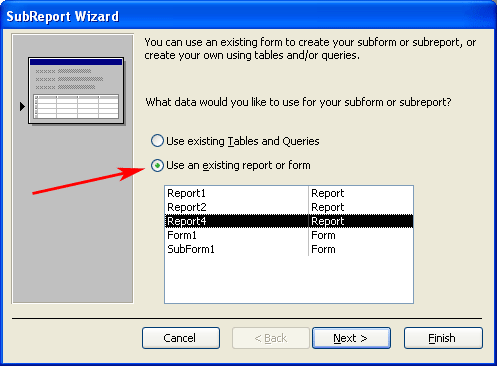
After selecting to use my "Report4" I select to choose the fields that will link the two reports records together in a hierarchal order. Then click Next.
Fig. 3

Choose to keep the name for your SubReport or rename it if you want and click Finish.
Fig. 4

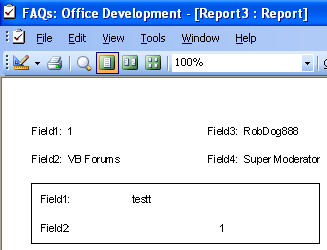
Now you will see your SubReport on your main report as shown in Fig. 5. Make any necessay modifications and Preview the report.
Fig. 5

Preview of finished report displaying a nested SubReport with its own set of related records.
Fig. 6
Last edited by RobDog888; Jul 10th, 2006 at 12:58 PM.
VB/Office Guru™ (AKA: Gangsta Yoda™  ®) ®)
I dont answer coding questions via PM. Please post a thread in the appropriate forum. 
Microsoft MVP 2006-2011
Office Development FAQ (C#, VB.NET, VB 6, VBA)
Senior Jedi Software Engineer MCP (VB 6 & .NET), BSEE, CET
If a post has helped you then Please Rate it! 
• Reps & Rating Posts • VS.NET on Vista • Multiple .NET Framework Versions • Office Primary Interop Assemblies • VB/Office Guru™ Word SpellChecker™.NET • VB/Office Guru™ Word SpellChecker™ VB6 • VB.NET Attributes Ex. • Outlook Global Address List • API Viewer utility • .NET API Viewer Utility •
System: Intel i7 6850K, Geforce GTX1060, Samsung M.2 1 TB & SATA 500 GB, 32 GBs DDR4 3300 Quad Channel RAM, 2 Viewsonic 24" LCDs, Windows 10, Office 2016, VS 2019, VB6 SP6
 Posting Permissions
- You may not post new threads
- You may not post replies
- You may not post attachments
- You may not edit your posts
-
Forum Rules
|
Click Here to Expand Forum to Full Width
|



 Reply With Quote