|

-
Oct 17th, 2005, 11:22 AM
#1
Thread Starter
Fanatic Member


 Tutorial: SQL Server recursion - Parent child relations Tutorial: SQL Server recursion - Parent child relations
Update on April 2. 2008: This tutorial was written for SQL Server 2000. Recursive queries can be done much easier in SQL Server 2005 using recursive Common Table Expression.
I'm sure that many of the experienced database developers in here already know about this technique, but for the rest of you I though it would be nice to have a tutorial on how you can query multi-level parent-child data, both one to many and many to many relationsships.
Examples of a one to many multi-level structure are for example organisations structures or a threaded discussion forum (like VBForums).
A many to many structure can be a Bill of Material (BOM). A BOM can have many items and an item can be part of many BOMs.
The problem with these kind of relations is how write a query that will search and return the whole tree for a given record, e.g. the whole subtree (or x levels) of a BOM or all replies to a post in a discussion forum.
I will start with an example where we look at an employee structure. An employee has one manager, and a manager can have many employees. We create a table Employee with Employee_Id, First_Name, Last_Name, and Manager_Id.
Code:
CREATE TABLE Employee (
	Employee_Id int IDENTITY (1, 1) NOT NULL PRIMARY KEY CLUSTERED,
	First_Name varchar(50) NOT NULL,
	Last_Name varchar(50) NOT NULL,
	Manager_Id int NULL constraint [FK_Manager_Employee] FOREIGN KEY
		(Manager_Id) REFERENCES Employee(Employee_Id)
) ON [PRIMARY]
GO
-- We also create an index on Manager_Id to speed things up a little bit.
CREATE NONCLUSTERED INDEX IX_Manager ON Employee
	(
	Manager_Id
	) ON [PRIMARY]
GO
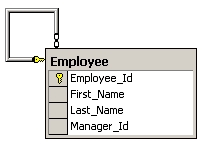
To make it even more understandable we will populate the table with "employees" from VBForums database section, and I hope nobody gets offended by this chart.
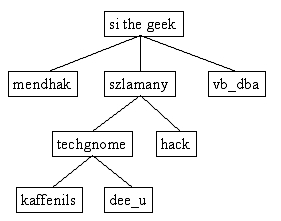
The following TSQL will insert this structure into the Employee table:
Code:
insert into Employee(First_Name, Last_Name, Manager_Id) values('si_the_geek','NA',NULL)
insert into Employee(First_Name, Last_Name, Manager_Id) values('mendhak','NA',1)
insert into Employee(First_Name, Last_Name, Manager_Id) values('szlamany','NA',1)
insert into Employee(First_Name, Last_Name, Manager_Id) values('vb_dba','NA',1)
insert into Employee(First_Name, Last_Name, Manager_Id) values('techgnome','NA',3)
insert into Employee(First_Name, Last_Name, Manager_Id) values('hack','NA',3)
insert into Employee(First_Name, Last_Name, Manager_Id) values('kaffenils','NA',5)
insert into Employee(First_Name, Last_Name, Manager_Id) values('dee-u','NA',5)
We have now the created the Employee table and populated it with test data. As you can see, the Employee structure consists of four levels.
The next step is to create a function or stored procedure that can take an Employee_Id as parameter and list all sub-levels in the employee hierarcy. This means that if we execute the query with Employee_Id=1 (si_the_geek), we will get all the records in the table returned.
The script that does the magic is here. Comments in the script explains how it works.
Code:
declare @tree table(TreeId int identity primary key,
Employee_Id int not null,
lvl int, ParentTreeId int,
Path varchar(2000),
Employee_Id_Path varchar(2000))

declare @rowcount int, @lvl int, @delcount int

set nocount on

set @lvl=0

-- Here we insert the top level that will be used to extract all sub leves from.
insert into @tree(Employee_Id,lvl) values (1,@lvl)

-- Get numbers of rows affected by the initial insert
set @rowcount=@@ROWCOUNT

-- Update the first level's Path and Employee_Id_Path. Employee_Id_Path will be used to prevent the recursion from
-- going into an endless loop if for example si_the_geek is defined as both parent and child to mendhak.
update @tree set Path=str(TreeId,10,0) + '.', Employee_Id_Path=cast(Employee_Id as varchar(10)) + '\'

while @rowcount>0
begin
	-- Increase level by one.
	set @lvl=@lvl+1

	-- This line inserts all records from the Employee table that has the previous level's
	-- employee_Id as Manager_Id. In other words, it inserts all manager's staff from the previous
	-- execution of the loop.
	insert into @tree(Employee_Id, lvl, ParentTreeId)
		select e.Employee_Id, @lvl, t.TreeId
		from Employee e inner join @tree t on e.Manager_Id=t.Employee_Id and t.lvl=@lvl-1

	-- Get number of rows affected by the previous insert. If no records were affected by the last
	-- statement, then we know that we have reached the bottom of the hierarcy.
	set @rowcount=@@ROWCOUNT

	-- The following SQL updates the newly inserted records' Path with the
	-- the new TreeId + previous levels TreeId. The path is used later to sort
	-- the result in a treeview look-a-like way. We also update Employee_Id_Path
	-- with the Employee_Id and previous level's Employee_Id_Path. The Employee_Id_Path
	-- is used to detect endless loops and therefore we only update Employee_Id_Path
	-- where parent Employee_Id_Path does not contain current Employee_Id. This is
	-- perhaps a little bit difficult to understand the first time you read the code.
	update t1 set t1.Path=t2.Path + str(t1.TreeId,10,0)+'.',
		t1.Employee_Id_Path=t2.Employee_Id_Path + cast(t1.Employee_Id as varchar(10))+'\'
		from @tree t1 inner join @tree t2 on t1.ParentTreeId=t2.TreeId
		where t1.lvl=@lvl and t2.Employee_Id_Path not like '%' + cast(t1.Employee_Id as varchar(10)) + '\%'

	-- This statement deletes andy records where Employee_Id_Path is NULL. In other
	-- words: We delete records that will cause an endless loop.
	delete from @tree where Employee_Id_Path is null

	-- We then get the number of records deleted...
	set @delcount=@@ROWCOUNT

	-- ... and substract this number from the records appended. If @rowcount=0
	-- then the WHILE loop will exit.
	set @rowcount=@rowcount-@delcount
end

-- Now we can choose to display the results in what way we want to. Path can, as we said before,
-- be used to sort the result in a treeview way.
select replicate(' | ',lvl)+cast(t.Employee_Id as varchar(10)) as tree_level,e.First_Name,lvl
from @tree t inner join Employee e on t.Employee_Id=e.Employee_Id order by Path


GO
You can use this script in a stored procedure or a UDF. Using the script in a UDF will also give you the possibility to use the result as a recordset in other SELECT statements. Read here to see how the UDF header must be defined to act as a recordset.
Execute the script in QA and you will get the following result. As you can see, this is a treeview representation of the hierarcy displayed in the picture above.

This example demonstrates the basic principle, but you can make it much more advanced if you like to. We have used it to return a distinct list of all items in a BOM and the quantity of each item.
Enjoy, and feel free to add questions or comments.
Last edited by kaffenils; Apr 2nd, 2008 at 07:45 AM.
 Posting Permissions
- You may not post new threads
- You may not post replies
- You may not post attachments
- You may not edit your posts
-
Forum Rules
|
Click Here to Expand Forum to Full Width
|



 Reply With Quote